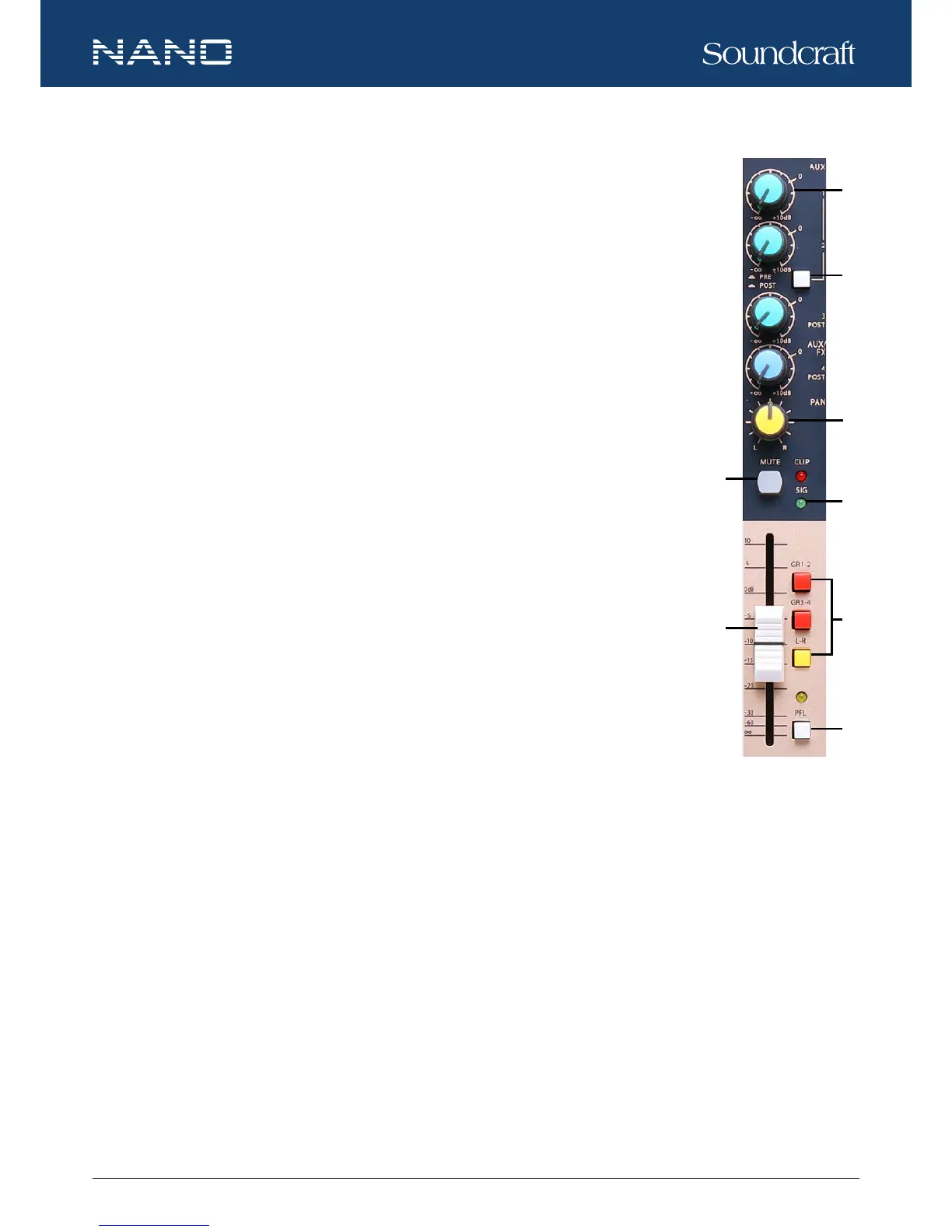
13. AUX SEND CONTROLS
These four controls are used to adjust the level of the respective signal sent to AUX bus and the
adjustable range is from -∞ to +10dB.
14. PRE / POST SWITCH
Use the button to switch AUX 1 and AUX 2 to PRE/POST fader. This is helpful when AUX 1 and/or
AUX 2 are used for monitoring or effect & sound processor input. AUX 3 and AUX 4 are congured as
POST fader.
15. PAN / BAL CONTROL
The PAN control moves a mono signal source from left to right. The BAL control moves the whole
stereo image from left to right.
16. MUTE
Each channel is equipped with a MUTE button. When the button is pressed down, it equals to turning
the fader down, and can mute the corresponding channel output except for the PRE AUX sends,
channel INSERT send and PFL. The MUTE LED will illuminate when the MUTE button is engaged.
17. SIG / CLIP
The SIG LED illuminates when there is signal present in the channel. The CLIP LED will indicate
when the signal is about to clip or distort.
18. CHANNEL LEVEL FADER
The 60mm fader allows precise balancing of the various channel signals being mixed to the main
output. The adjustable range is from -∞ to +10dB.
19. GR 1-2 / GR 3-4 / L-R
Each channel provides three push-buttons: GR 1-2, GR 3-4 and L-R, which can be considered as signal assignment switches. For
instance, press the GR 1-2 down and the channel signal will be assigned to GROUP 1-2. You can depend on the PAN control to
adjust the amount of channel signal sent to the GROUP 1 versus GROUP 2. When the PAN control is turned to completely left,
then the signal will be controlled by GROUP 1 only and vice versa. Likewise, pressing the GR 3-4 or L-R will assign the channel
signal to GROUP 3-4 or MAIN MIX L-R, and will also be affected by the PAN switch.
20. PFL
Each channel is equipped with a PFL switch. When pressed down, the channel signal will be routed to CTRL ROOM / PHONES
outputs and the PFL LED will illuminate.
Controls and Features






 To Next Page