Operation
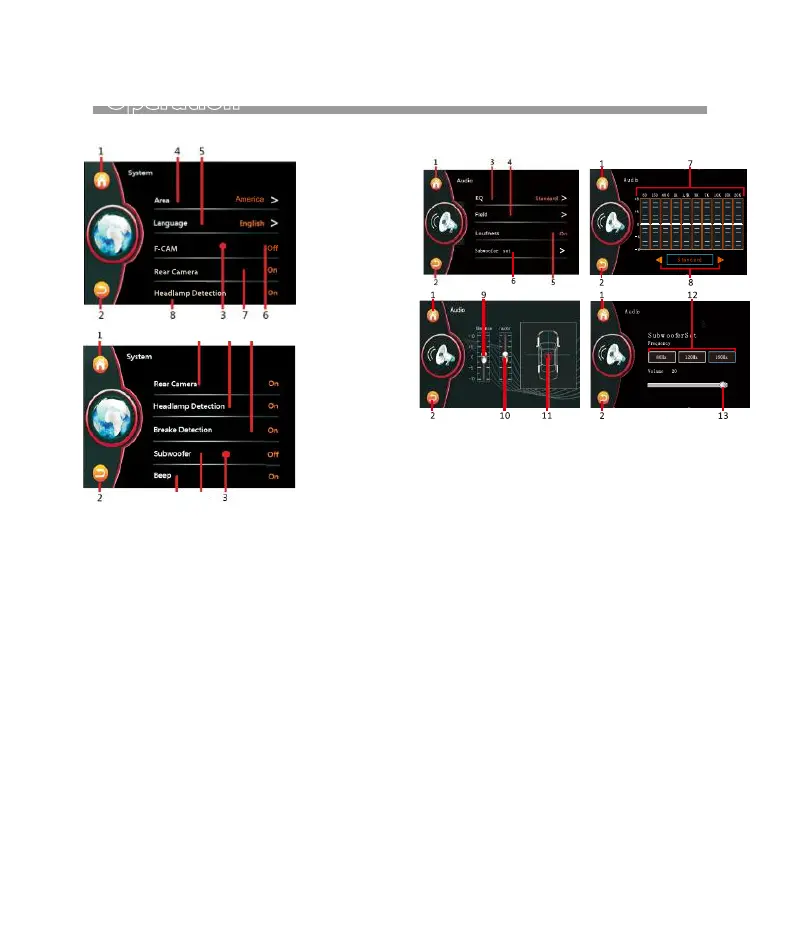
SYSTEM SETUP AUDIO SETUP
1. Touch to shift to MAIN MENU for operation
mode selection.
2. Touch to back to previous setting menu.
3. Hold & slide to show hidden setting items.
4. Touch to select the radio frequency that suits the
area located.
5. Touch to select the desired language.
6. Touch to shift Front Camera is On or Off.
7. Touch to shift Rear Camera is On or Off.
8. Touch to shift shift Headlamp is On or Off.
ON: When the headlamp of the car is turned on,
Brightness of screen will shift to the default
setting by user. User can also adjust the
brightness of screen at this mode.
OFF:When the headlamp of the car is turned on,
Brightness of screen will not be affacted.
9. Touch to shift to Brake Detection is On or Off.
10. Touch to shift to Subwoofer is On or Off.
11. Touch to shift to Beepis On or Off.
1. Touch to shift to MAIN MENU for operation
mode selection.
2. Touch to back to previous setting menu.
3. Touch to access to EQ MENU.
4. Touch to access to FIELD MENU for sound output
setting.
5. Touch to shift LOUNDNESS is On or Off.
6. Touch to access to Subwoofer for subwoofer
setting.
7. At custom control mode, hold and slide the cursor
set to desired equalizer level.
8. Touch repeatedly to select the desired preset
equalizer mode .
9. Hold and slide the cursor to set to desired Balance
level (Left and right speakers).
10. Hold and slide the cursor eo set to desired Fader
level (front and rear speakers).
11. Hold and slide to adjust the desired output level
between left & right speaker as well ad front &
rear speaker.
12. Choose the different subwoofer frequency:
80Hz > 120Hz > 160Hz.
13. Hold and slide to adjust output level.
7
11
8 9
10
11


 To Next Page