Operation
1. Touch to shift to MAIN MENU for operation
mode selection.
2. Touch to back to previous setting menu.
3. Touch to activate CALENDAR FORMAT
MENU for date/ month/year format setting.
4. Touch to activate CLOCK FORMAT MENU
for 12H / 24H format setting.
5. Touch to activate SETTING MENU for
calendar & time setting.
6. Touch to select calendar display format.
7. Touch to select clock display format.
8. Touch repeatedly to set for calendar &
clock.
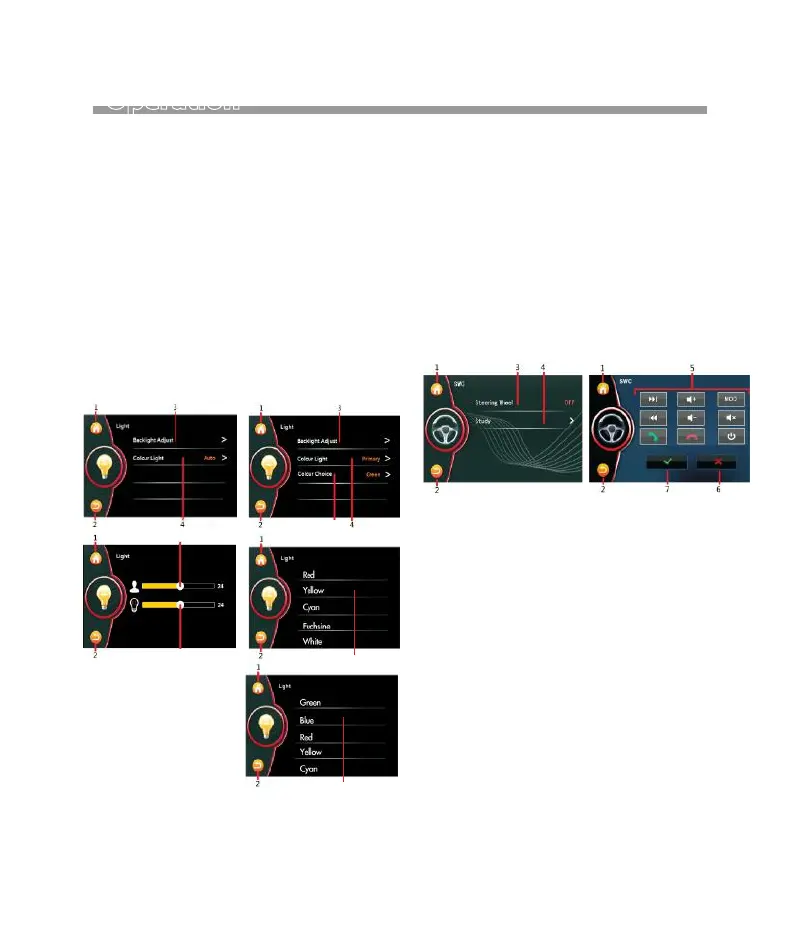
1. Touch to shift to MAIN MENU for operation
mode selection.
2. Touch to back to previous setting menu.
3. Touch to turn on or off SWC (when the steering
wheel control wires - gray & green as well as the
ground wire connected).
4. Touch to activate SWC STUDY MENU for
steering wheel control learning & setting as
below:
- touch any control key “5” on screen.
- press and hold the respective control of the
steering wheel of car.
- the unit starts learning and once completed,
indicator appears on screen.
- follow the above stepes to set all other controls.
- press “6” to cancel the setting.
5. Show the items avaliable for setting.
6. Touch to cancel settings.
7. When study & setting completed, touch to
confirm the setting.
1. Touch to shift to MAIN MENU for operation
mode selection.
2. Touch to back to previous setting menu.
3. Touch to activate Backlight Adjust Menu
for operation.
4. Touch to select illumination mode:
AUTO or PRIMARY.
5. Touch to select backlight color.
6. Hold & slide to set brightness of screen when
brightness of screen is set an USER Mode.
7. Hold & slide to set rightness of screen when
brightness of screen is set an USER SETTING
MODE under headlamp detection at ON mode
(refer to MAIN MENU OPERATION).
8. In Primary mode-Color Choice, you can choose
desired backlight color: Green>Blue>Red
>Yellow>Cyan>Fuchsine>White
ILLUMINATION BACKLIGHT
STEERING WHEEL CONTROL
AUTO PRIMARY
8
8
5
6
7
14


 To Next Page