Operation
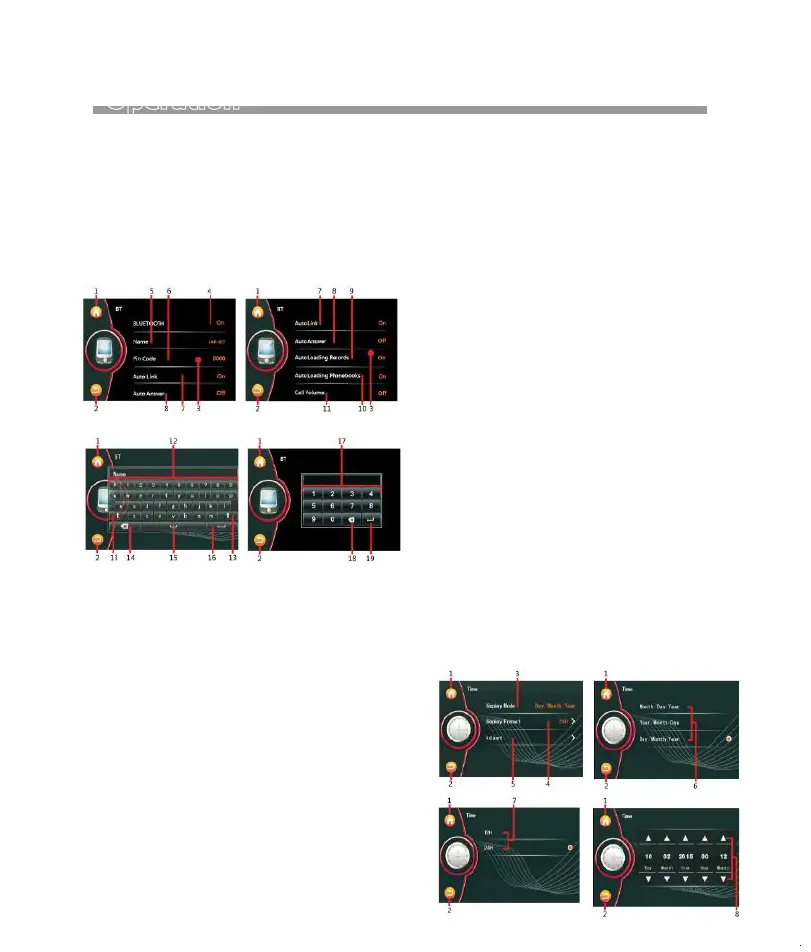
Bluetooth SETUP
CALENDAR & CLOCL SETUP
CALENDAR
Keyboard Pin Code
1. Touch to shift to MAIN MENU for operation
mode selection.
2. Touch to back to previous setting menu.
3. Hold & slide to show hidden setting items.
4. Touch to switch the Bluetooth is On / Off.
5. Touch to activate KEYBOARD MENU for
renaming the device. (Default name is
“CAR-KIT”).
6. Touch to activate PIN CODE MENU for
changing the pin code of the device.
(Default code is “0000” or “8888”).
7. Touch to turn on or off of Auto Link
with mobile phone.
(Note: When auto connect is turn on, the
unit will connect to the linked-up mobile
phone after ignition of the car)
8. Touch to turn on or off of auto answer
when an incoming call received.
9. Touch to turn on or off of automatic
loading record of incoming calls /
dial out/missing calls of the mobile
phone to the car unit.
(Note: Loading of record will start auto-
matically when the unit linked-up mobile
phone and shift to BT RECORD MENU at
first time. )
10. Touch to turn on or off of auto loading
phonebook once the unit linked-up with
the mobile phone.
11. Touch to turn on or off the default volume
level during Bluetooth conversation.
ON Mode: Volume level at Bluetooth con-
versation is shifted to the default volume
level.
OFF Mode: Volume level at Bluetooth con-
versation is same as current volume level.
(Note: Volume level can be adjusted at any
time during Bluetooth conversation ).
12. Touch to input the new name of device.
13. Touch to shift between caital letter or
small letter.
14. Touch to erase the digit or letter input by
error.
15. Touch for spacing.
16. Touch to confirm.
17. Touch to input the new pin code of the
device.
18. Touch to confirm.
1. During DVD plauback, new setting on “Audio
Language”, “Subtitle Language”,”Menu Language”,
can not be activated. It is recommended to make
relative setting before inserting a DVD for playback.
2.Default password is “0000” or “8888”.
Note:
TIME
13


 To Next Page