
 Need help?
Do you have a question about the Soundstream VRCPAA-106F and is the answer not in the manual?
Lists and illustrates all accessories provided for unit installation and operation.
Step-by-step instructions for installing the head unit into a vehicle dashboard.
Explains the function and connection of the parking wire for safety features.
Details on connecting the reversing line to the car's taillight for rear camera input.
Provides a diagram for correctly connecting speakers to the unit.
Detailed pinout specifications for ISO A, ISO B, and the 8-pin connector.
Identifies and describes all buttons and ports on the front panel of the unit.
How to access the setup menu and its main categories.
Configuration options for Language, Date & Time, Key Beep, SWC, Factory Reset, and About.
Guide to setting up and customizing steering wheel controls.
Instructions on how to reset the unit to its default factory settings.
Adjustments for lighting detect, dimming levels, illumination, and wallpaper.
Manages Bluetooth connection, pairing, device name, and clearing records.
Steps to initiate and complete the pairing process with Bluetooth devices.
Configuration for rear camera view, parking assist guide, and guide adjustment.
How to connect and use Apple CarPlay with compatible iPhones.
Guide to using Android Auto for navigation, calls, and music with Android devices.
Steps for connecting and operating Android Auto via USB and Bluetooth.
Guide to connecting USB devices and playing audio, video, and picture files.
Instructions for playing music wirelessly via Bluetooth.
Steps to connect or reconnect the unit to a Bluetooth-enabled device.
Procedure to pair the unit with a mobile phone or Bluetooth device.
Enables making and receiving calls wirelessly via Bluetooth (HFP).
Step-by-step guide to making a call using the keypad or contacts.
Details power supply, output, impedance, frequency response, and dimensions.
Interface for setting rear camera view and parking assist guide adjustments.
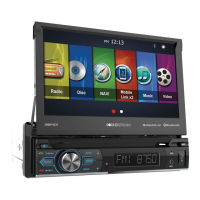
This document describes the Soundstream VRCPAA-106F AV Center, a 2-DIN DVD Head Unit with a 10.6-inch monitor and touchscreen. It supports various media formats and connectivity options, designed for in-car entertainment and navigation.
The VRCPAA-106F is a versatile car audio system offering a wide range of functions. It serves as a central hub for media playback, communication, and navigation in a vehicle. Key functions include:
 General
| Brand | Soundstream |
|---|---|
| Model | VRCPAA-106F |
| Category | Car Video System |
| Language | English |












 To Next Page