This document describes the Soundstream VRCPAA-7DRM, a 2-DIN AV Center head unit designed for in-car entertainment and connectivity.
Function Description:
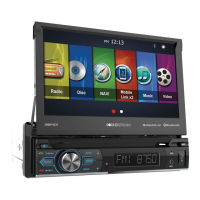
The VRCPAA-7DRM is a versatile car audio system offering a wide range of functions. Its core features include a 2-DIN chassis with a 7-inch touch screen monitor, providing an intuitive interface for various operations. It supports playback of MP3/MP4 files, as well as USB and SD media. The unit includes an AM/FM radio tuner for broadcast reception.
A key highlight of this head unit is its support for Apple CarPlay™ and Android Auto™, allowing seamless integration with smartphones for navigation, communication, and entertainment. Bluetooth connectivity is also integrated, enabling hands-free calling and audio streaming.
The main menu provides quick access to all primary functions, including Apple CarPlay, Android Auto, Radio, Bluetooth, USB, and SD. Icons for functions that are not ready or properly connected are displayed in gray. A hidden soft button bar at the bottom of the screen offers additional controls for setup, AUX IN, dimming, Bluetooth pairing, front camera access, equalizer settings, and TFT display on/off.
Important Technical Specifications:
- Display: 7-inch TFT LCD touch screen with a resolution of 1024x600 pixels.
- Power Supply: DC10~16Volts, Negative Ground.
- Current Drain: 15A (Max.).
- Max Power Output: 4x75W/channel.
- RMS Power Output: 4x25W/channel.
- Speaker Impedance: 4~8ohms per channel.
- Frequency Response: 20Hz~20KHz.
- Operating Temperature: -20~+60℃.
- Dimensions: 178mm(W)x135mm(D)x100mm(H).
- FM Radio Frequency Range (USA): 87.5~107.9MHz.
- FM Radio Frequency Range (Europe): 87.5~108MHz.
- FM Radio Usable Sensitivity (S/N=30dB): <15dB.
- FM Radio S/N Ratio: ≥55dB.
- FM Radio Stereo Separation: ≥30dB.
- AM Radio Frequency Range (USA): 530~1710KHz.
- AM Radio Frequency Range (Europe): 522~1620KHz.
- AM Radio Usable Sensitivity (S/N=20dB): <40dB.
- AM Radio S/N Ratio: ≥45dB.
- Line-Out/Subwoofer Output Maximum Output Level (10K ohms load): ≥4Vrms.
- Subwoofer Time Align: 0~18ms.
- Fuse: Max 15 Ampere.
- Voltage: 12V(DC); Negative Ground.
- Built-in Microphone: Yes.
- External MIC jack: Yes.
- Amplifier: 300 Watt 4CH.
Usage Features:
- Front Panel Controls: The front panel includes an IR sensor for remote control, a built-in microphone, a Micro SD slot for playback, and a rotary control for power on/off and volume adjustment. A Siri button activates voice control when Apple CarPlay or Android Auto is available. Mute and track navigation buttons are also present. A USB port allows for digital playback and connection to Apple CarPlay or Android Auto. An AUX in jack provides sound output from external devices. A reset button restores factory settings.
- Remote Control: A comprehensive remote control is provided for various functions, including volume adjustment, menu navigation, track selection, radio tuning, EQ settings, and direct access to modes like CarPlay/Android Auto, Radio, Bluetooth, and USB.
- Settings Menu: The settings menu is divided into System Settings, Display Settings, Audio & EQ Settings, Bluetooth Settings, and Rear Camera Settings.
- System Settings: Allows users to set language, date & time, key beep on/off, perform a factory reset, and view unit information (MCU, SOC, Hardware versions).
- Display Settings: Configures lighting detect (on/off), daylight dimming level (8-15), night dimming level (0-8), illumination, and wallpaper. The illumination setting includes an "Led Auto" option for automatic color change or manual selection of white, red, yellow, blue, green, purple, or light green.
- Audio & EQ Settings: Features Balance/Fader adjustment, Subwoofer Output (on/off), Subwoofer Filter (50Hz/80Hz/120Hz/160Hz), Subwoofer Level (-10 to +10), a 10-band equalizer with preset options (off, Soft Rock, Pop, Electric, Jazz, EQ Custom), and LOUD (on/off).
- Bluetooth Settings: Manages Bluetooth connection (on/off), pairing mode, device name, and clearing of device records.
- Rear Camera Setting: Configures Rear View Camera (Normal/Reverse) and Parking Assist Guide (on/off), with an adjustment interface for the parking assist lines.
- Radio Mode: Features AM/FM tuning, prescan search, auto scan, LOCAL/DX switching, and preset station storage (six presets per band).
- USB/SD Playback: Supports audio, video, and picture files. Users can browse folders, skip tracks, fast forward/rewind, play/pause, repeat (all, one, directory), and shuffle.
- Bluetooth Audio: Allows streaming music from a connected Bluetooth device with track navigation, repeat, and shuffle functions.
- Bluetooth Phone: Enables hands-free calling with a keypad for dialing, call history, contact list access, auto answer settings, and microphone gain adjustment.
- AV IN: Supports audio/video input via RCA cables, allowing external devices to display content on the head unit.
- Camera Input: Features an RCA socket for a rear camera video signal, with automatic display when reverse gear is engaged.
Maintenance Features:
- Installation: The manual provides detailed instructions for installation, including mounting brackets, wiring connections, and trim ring placement. It emphasizes disconnecting the vehicle battery before installation and consulting a dealer for complex installations.
- Parking Wire: The parking wire must be connected to the brake signal for safety, allowing video programs to be viewed only when the car is braking.
- Reversing Line: Instructions are provided for connecting the reversing line to the taillight for automatic rear camera display when the reverse gear is engaged.
- Steering Wheel Control (SWC): To use the steering wheel control feature, a universal remote adapter (not supplied) matched to the car is required.
- Factory Reset: A dedicated function in the settings menu allows users to reset the unit to its default factory settings.
- Firmware Updates: The "About" section in System Settings displays MCU, SOC, and Hardware versions, and includes an "Update" button, suggesting the possibility of firmware updates.
- Warranty: The product comes with a limited 90-day consumer warranty. If purchased and installed by a Soundstream authorized dealer, the warranty extends to one year. The warranty covers defects in workmanship and material under normal use but is voided by accident, unreasonable use, improper service, or modifications. It does not cover labor costs for removal and reinstallation. Proof of installation by an authorized dealer is required for the one-year warranty to be valid.

 Need help?
 General











 To Next Page