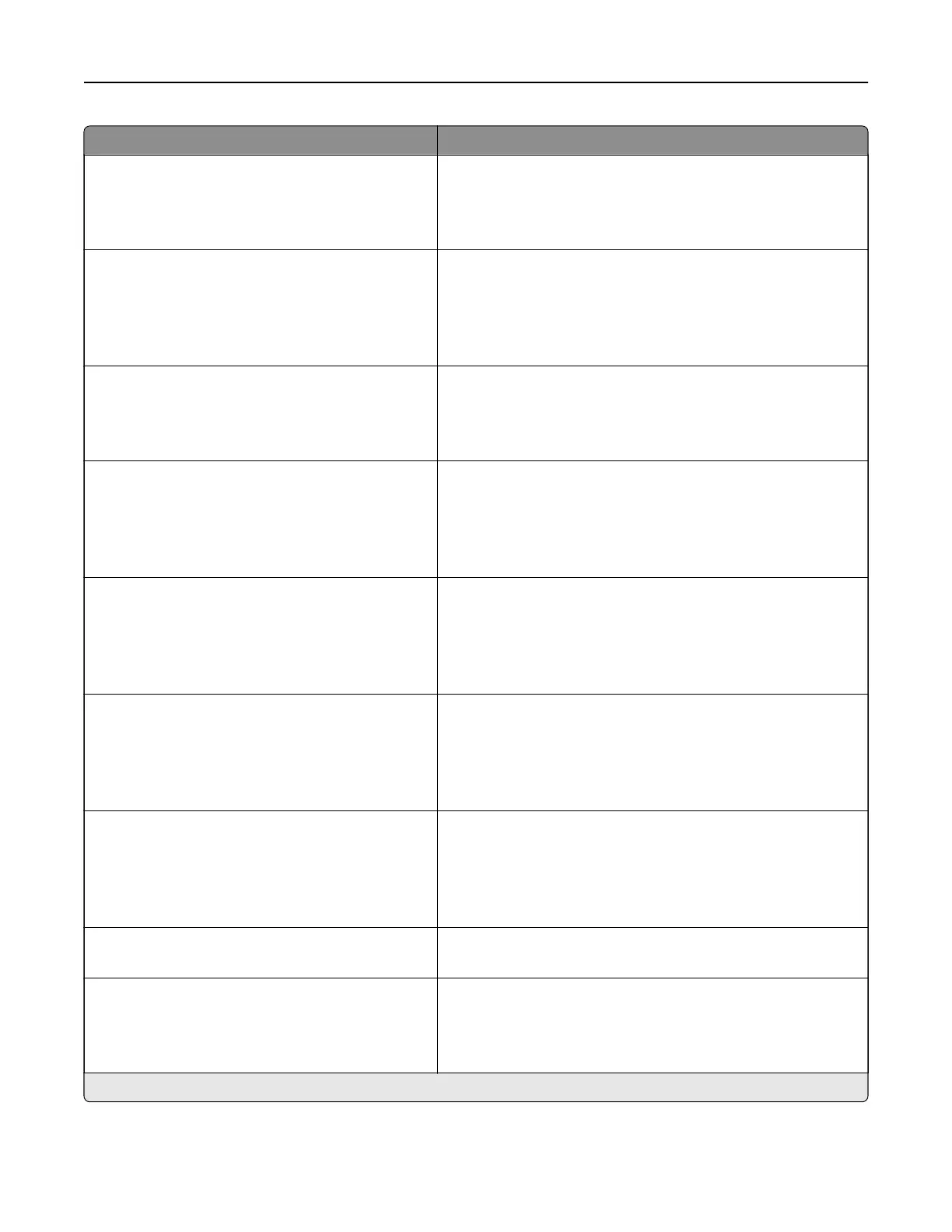
Menu item Description
Tray Configuration
Tray Linking
Automatic*
O
Set the printer to link the trays that have the same paper type
and paper size settings.
Tray Configuration
Show Tray Insert Message
O
Only for unknown sizes*
Always
Set the printer to show the Tray Insert message.
Tray Configuration
A5 Loading
Short Edge
Long Edge*
Specify the page orientation when loading for A5 paper size.
Tray Configuration
Paper Prompts
Auto*
Multipurpose Feeder
Manual Paper
Set the paper source that the user fills when a prompt to load
paper appears.
Note: For Multipurpose Feeder to appear, set
Configure
MP
to Cassette from the Paper menu.
Tray Configuration
Envelope Prompts
Auto*
Multipurpose Feeder
Manual Envelope
Set the paper source that the user fills when a prompt to load
envelope appears.
Note: For Multipurpose Feeder to appear, set Configure MP
to Cassette from the Paper menu.
Tray Configuration
Action for Prompts
Prompt user*
Continue
Use current
Set the printer to resolve paper- or envelope-related change
prompts.
Reports
Menu Settings Page
Event Log
Event Log Summary
HealthCheck Statistics
Print reports about printer menu settings, printer events, and
event logs.
Supply Usage And Counters
Clear Supply Usage History
Clear the supply page counter or view the total printed pages.
Printer Emulations
PPDS Emulation
O*
On
Set the printer to recognize and use the PPDS data stream.
Note: An asterisk (*) next to a value indicates the factory default setting.
Understanding the printer menus 52



 To Next Page