5
Operation
MODE Button
To select Hz/% Duty Cycle, Ω/Diode Test/Continuity/Capacitance, AC/DC Voltage,
AC/DC Current
When the meter is first turned on, it goes into the Autoranging mode. This
automatically selects the best range for the measurements being made and is
generally the best mode for most applications. For measurement situations
requiring that a range be manually selected, perform the following:
1. Press the RANGE button. The “AUTO” display indicator will turn off.
2. Press the RANGE button to step through the available ranges until you select
the range you want.
3. Press and hold the RANGE button for 2 seconds to exit the Manual Ranging
mode and return to Autoranging.
The relative function allows you to make continuous measurements relative to
a stored reference value. A reference voltage, current, etc. can be stored and
measurements made in comparison to that value. The displayed value is the
difference between the reference value and the measured value. (Relative does
not work on Frequency or Duty Cycle).
1. Perform any measurement as described in the operating instructions.
2. Press the REL button to store the reading on the LCD display. The "REL"
indicator will appear on the LCD display.
HOLD Button
To freeze the reading on the LCD display, momentarily press the HOLD
button. The HOLD indicator will appear on the LCD display. Momentarily press
the HOLD button again to return to normal operation.
Backlight Button
The backlight illuminates the display when the ambient light is too low to permit
viewing of the displayed readings. To turn on the backlight, press the HOLD
button for > 1 second. The HOLD feature will activate when the backlight is
turned on. Momentarily, press the HOLD to exit HOLD. To turn the backlight
off, press the HOLD button for > 1 second. The HOLD feature will activate
when the backlight is turned off. Momentarily, press the HOLD to exit HOLD.
REL Button
NOTE: The RANGE button does not operate in Capacitance, Frequency or Duty
Cycle functions.
RANGE Button
6
Operation
REL Button cont.
3. The display will now indicate the difference between the stored value and
the measured value.
4. Press the REL button to return to normal operation.
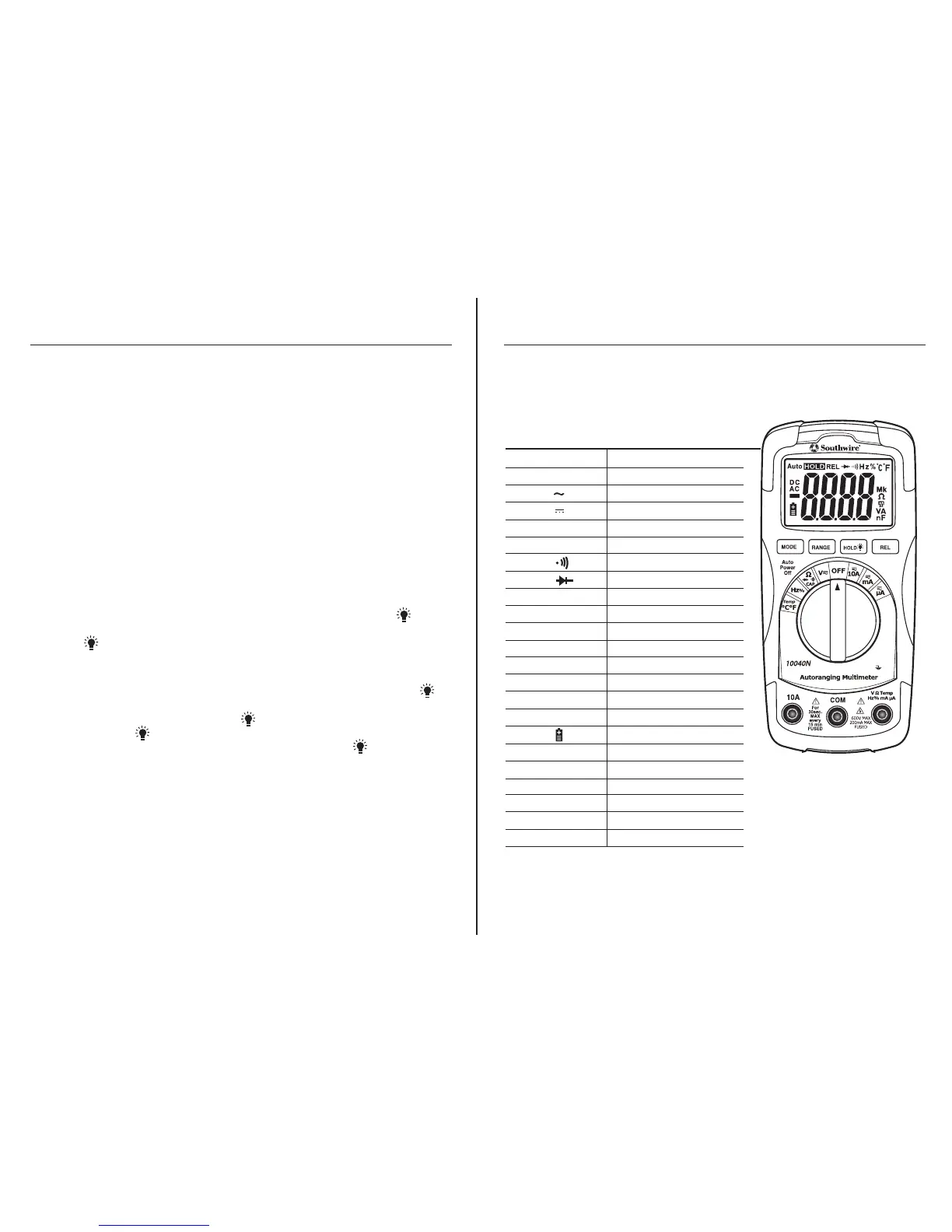
V Volts
A Amps
Alternating Current
Direct Current
- Display minus sign
Ω Ohms
Continuity
Diode test
F Farad (capacitance)
Hz Hertz (frequency)
% Percent (duty cycle)
ºF Degrees Fahrenheit
ºC Degrees Centigrade
AUTO Autoranging
HOLD Display Hold
REL Relative
Low battery
n nano (10
-9
)
µ micro (10
-6
)
m milli (10
-3
)
k kilo (10
3
)
M mega (10
6
)
OL Overload
Symbols and Annunciators
CAT III 600V



 To Next Page