9
Operation
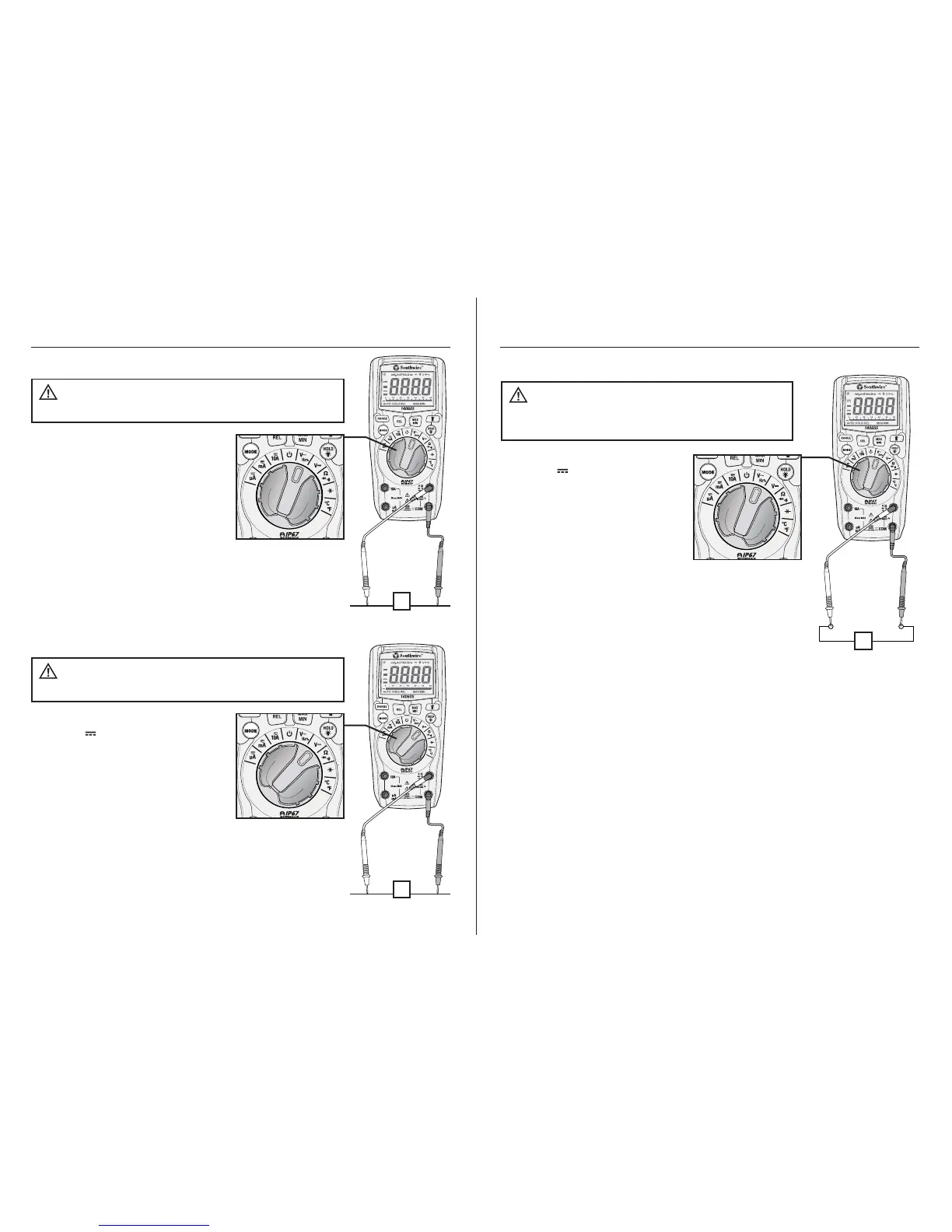
1. Set the rotary function
switch to the V~HZ% position.
2. Insert the black test lead into
the COM input jack and the red
test lead into the V input jack.
3. Touch the test lead probes to
the circuit under test.
4. Read the voltage on the
LCD display.
AC Voltage Measurements
Observe all safety precautions
when working on live voltages.
WARNING:
V
1. Set the rotary function switch
to the V position.
2. Insert the black test lead into
the COM input jack and the red
test lead into the V input jack.
3. Touch the test lead probes to
the circuit under test. Touch the
red test lead to the positive side
of the circuit and the black test
lead to the negative side of the circuit.
4. Read the voltage on the LCD display.
DC Voltage Measurements
Observe all safety precautions
when working on live voltages.
WARNING:
V
-+
10
Operation cont.
Hz
1. Set the rotary function switch
to the V HZ % position.
2. Press the MODE button to
select frequency or % duty
cycle. The “Hz” or “%” symbol
will appear on the display.
3. Insert the black test lead into
the COM input jack and the red
test lead into the V input jack.
4. Touch the test lead probes to
the circuit under test.
5. Read the frequency or % duty
cycle on the LCD display.
Frequency and % Duty Cycle Measurements
Observe all safety precautions
when working on live voltages. Do not measure
frequency or % duty cycle on circuits that exceed 600V.
WARNING:



 To Next Page