17
8.3. HANDLEBAR REMOTES
B
A
C
8.3
Fig. 8.3
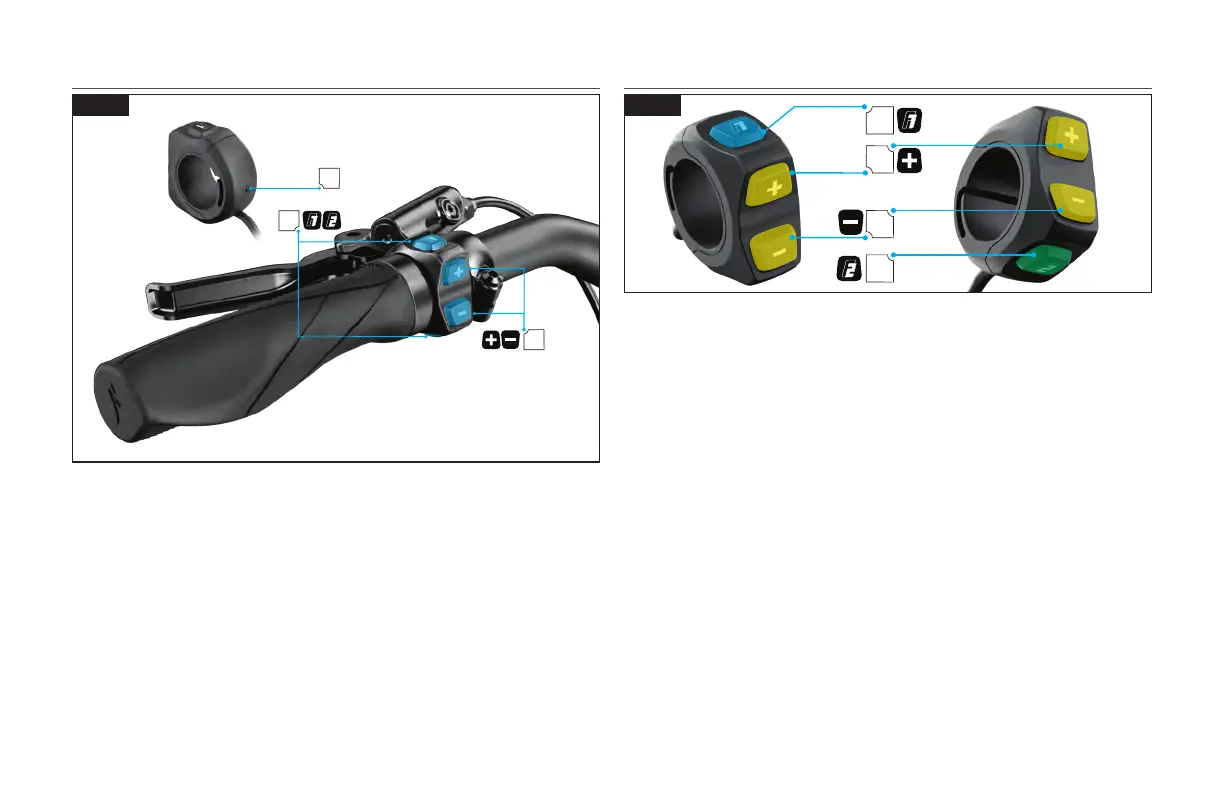
The handlebar remote is included on all Como models. It controls the level of motor support
and controls the functions and scrolling of the MasterMind TCD-w.
A: (+) (-) Support adjustment buttons. Navigating and setting up the MasterMind TCD-w.
Pressing and holding the (+) button activates the walk-assist mode.
B: Function buttons F1 and F2 (scrolling and setting up of the MasterMind TCD-w)
C: Compression screw (2 mm hex key 0.8 Nm / 7 in-lbf).
8.4. REMOTE FUNCTIONS
A
B
D
C
8.4
Fig. 8.4
A - F1 BUTTON:
• Toggles pages on the MasterMind TCD-w to show different fields such as odometer, speed,
and distance.
• Settings & menu navigating.
• Long press turns the lights on and off.
B - F2 BUTTON:
• ENVIOLO AUTOMATiQ HUB: Long press toggles between standard modes and Micro Tune.
• ENVIOLO AUTOMATiQ HUB: Short press toggles the enviolo cadence adjustment and
Assist / Micro Tune modes.
• STANDARD HUB: Long press toggles standard modes and Micro Tune mode.
• Settings & menu navigating.
C - (+) BUTTON:
• Short press increases the amount of support.
• Pressing and holding activates the walk-assist mode.
• ENVIOLO AUTOMATiQ PEDAL PACE: When activated, a short press increases the target
pedal pace on the enviolo hub.
D - (-) BUTTON:
• Short press decreases the amount of support.
• Long press resets the trip.
• ENVIOLO AUTOMATiQ PEDAL PACE: When activated, a short press decreases the target
pedal pace on the enviolo hub.
C&D - (-) (+) DUAL BUTTON PRESS:
• A long dual press opens the settings menu on the MasterMind TCD-w.



 To Next Page