23
SOUND ALERTS
The MasterMind TCD-w emits an alarm tone for various alerts.
The alarm tone for an approaching vehicle differs from the tone when the vehicle has passed.
The device will sound an alert as soon as another vehicle is detected.
INFO: Activating or disabling tones can be done in the MasterMind TCD-w
Settings.
INFO: The Garmin Radar is compatible with all Como models and can be
fitted to any model. Installation of the Garmin Radar on non-equipped
bicycles requires specific parts and physical system integration and should
be performed by an Authorized Specialized Retailer.
8.12. ERROR MESSAGES
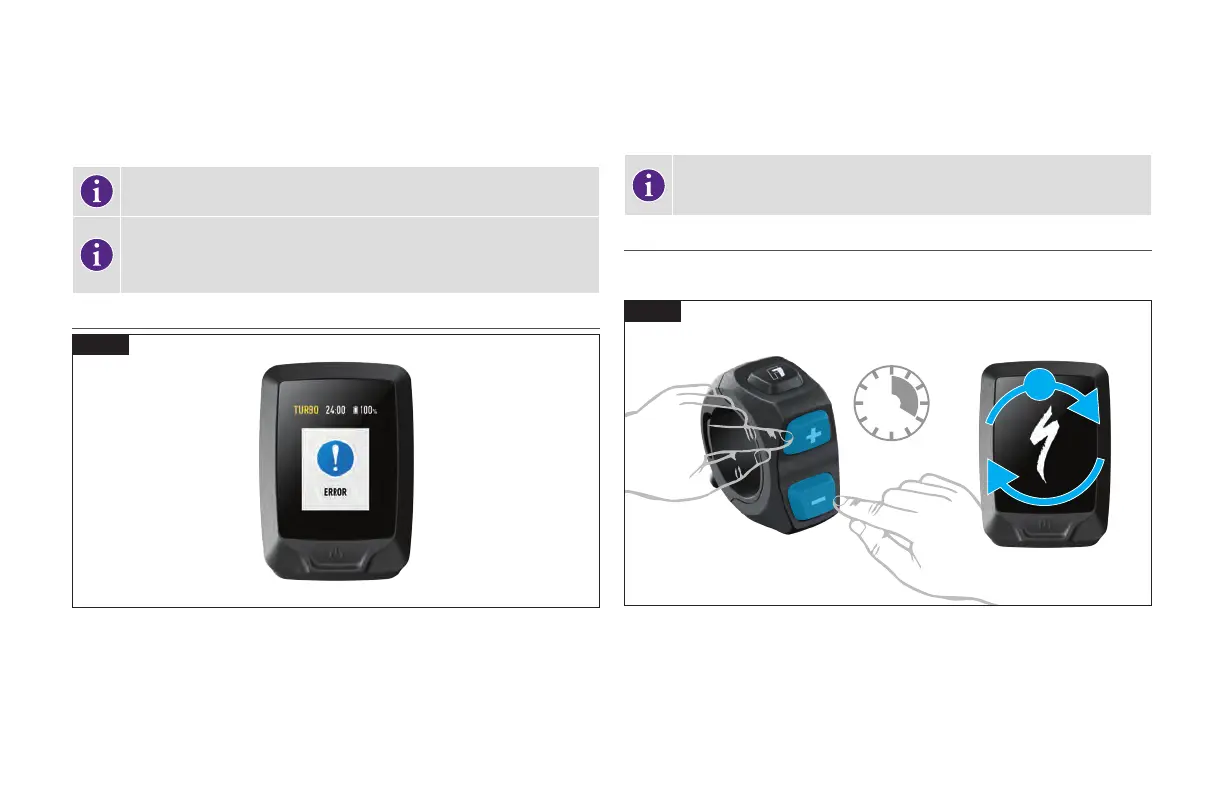
8.15
Fig. 8.15
MasterMind TCD-w has a built-in diagnostic system to automatically check and identify the
functionality of the system. If the system detects an error, it shows on the display. In some
cases, the error message can be dismissed by pushing any button on the remote.
Depending on the type of error message, the system may be switched off automatically. In
any case, the bicycle can be ridden without motor support with the system turned off. If you
receive such an error, please restart the system. If the error message continues to be shown,
please contact your Authorized Specialized Retailer for further instructions.
INFO: Mission Control supports the rider with User Actions for errors and
diagnostic reports which can be shared with Retailers who can give further
advice based on the bike serial number.
8.13. PERFORMING A FACTORY RESET ON THE MASTERMIND TCD-w
When a new or used bicycle is sold, the new user should perform a factory reset of the
MasterMind TCD-w display, to reset the peak power and support mode settings.
45
SEC
+
x2
8.16
Fig. 8.16
Dual press and hold the (+) (-)and buttons for 45 seconds. During this process, the
MasterMind TCD-w will reboot twice.
Release the buttons when the MasterMind TCD-w reboots for the second time.



 To Next Page