28
ENITESPTCNTCNSJP KR
D
B
C
A
10.1
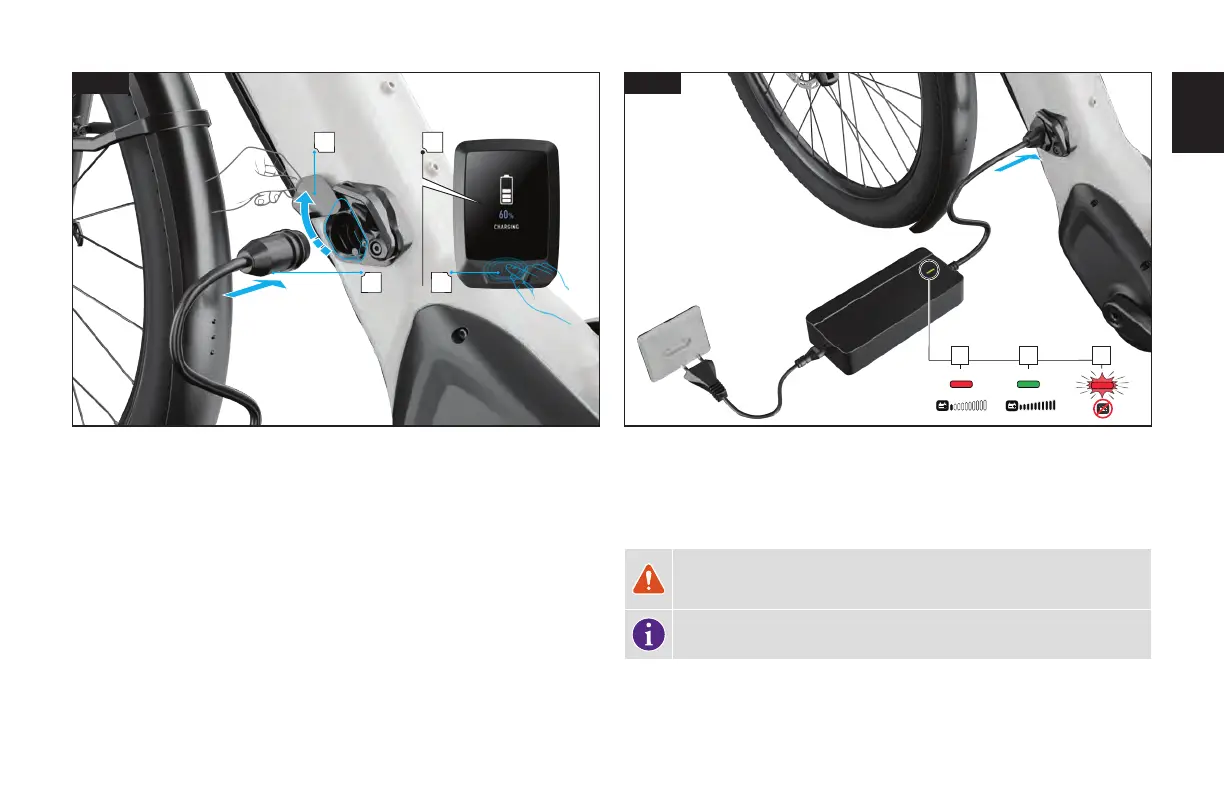
Fig. 10.1
Plug the charger’s plug into an outlet, using the appropriate plug for the country’s
standards. Do not plug the charger into an extension cord.
Power off the bicycle on the MasterMind TCD-w (A).
Open the magnetic charge port cover on the side of the battery located on the downtube (B).
Insert the charger plug into the socket. The magnet connector will help the plug locate into
the socket (C).
1 2 3
10.2
Fig. 10.2
Once the battery is charging, you should see visual cues on the MasterMind TCD-w (Fig.
10.1 D) indicating the charging status.
During the charging process, the diode on the charger will glow solid red (1). When the
battery is fully charged, the diode on the charger will turn solid green (2).
WARNING! If the diode on the charger flashes red (3), a charging error has
occurred. Immediately remove the charger from the charging socket and
outlet and contact your Authorized Specialized Retailer.
INFO: After charging begins, the lights automatically power off to conserve
energy.



 To Next Page