30
ENITESPTCNTCNSJP KR
10.5. REMOVING & INSTALLING THE BATTERY
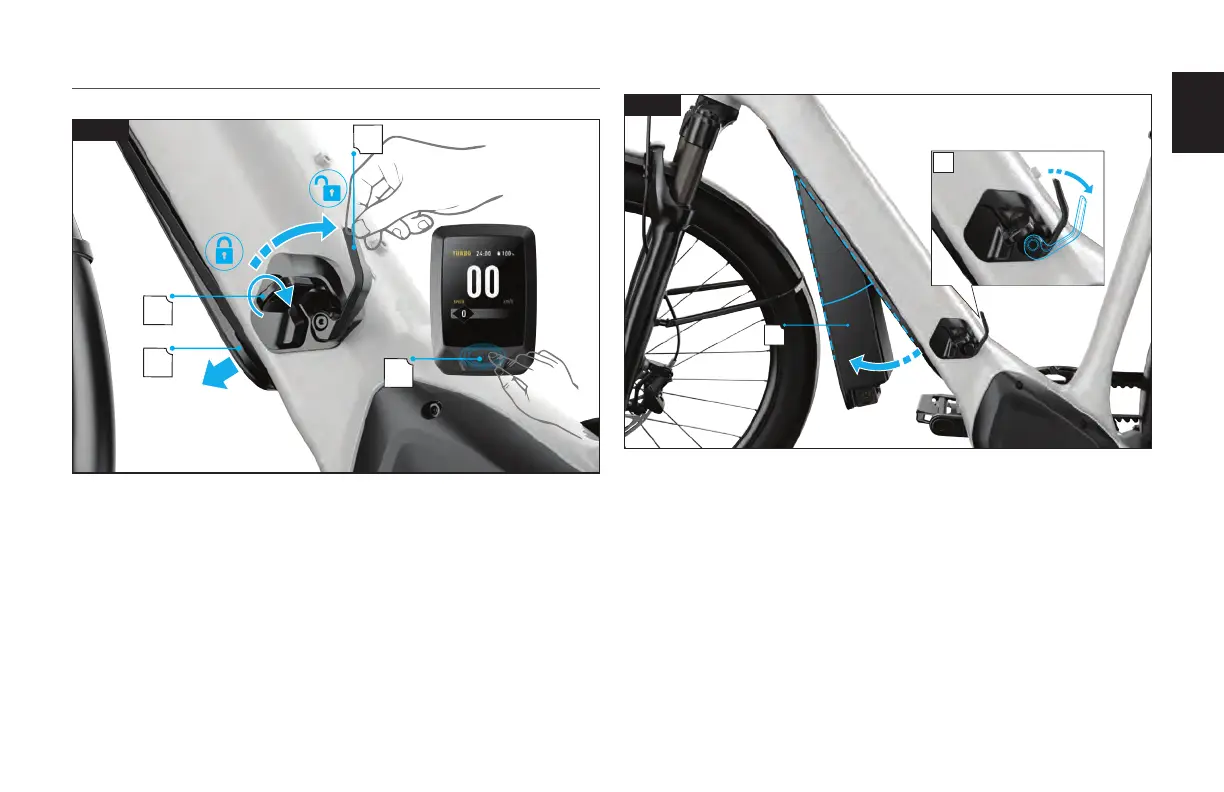
UNLOCK AND OPEN THE BATTERY LATCH
A
B
D
C
10.5
Fig. 10.5
Power off the bicycle on the MasterMind TCD-w (A).
Use the supplied key to unlock the battery latch (B).
Rotate the latch lever clockwise (C) to release the battery (D).
REMOVE THE BATTERY
A
B
10.6
Fig. 10.6
Supporting the battery with one hand, rotate the latch lever clockwise to fully release the
battery (A).
Rotate the battery down and align the battery roughly 20 degrees with the downtube (B).







 To Next Page