Speco HS Rev 1.0 Copyright I-View Now, LLC 2014 3
Introduction
The Speco HS supports up to 16 analog and IP cameras and can easily accommodate monitoring a building, wide area or
location, where multiple cameras and alarm inputs need to be integrated and reported upstream for central monitoring
by a monitoring station like I-View. I-View’s Video Verification adds value by enabling the customer to quickly focus on
important events and review the conditions surrounding them both before and after.
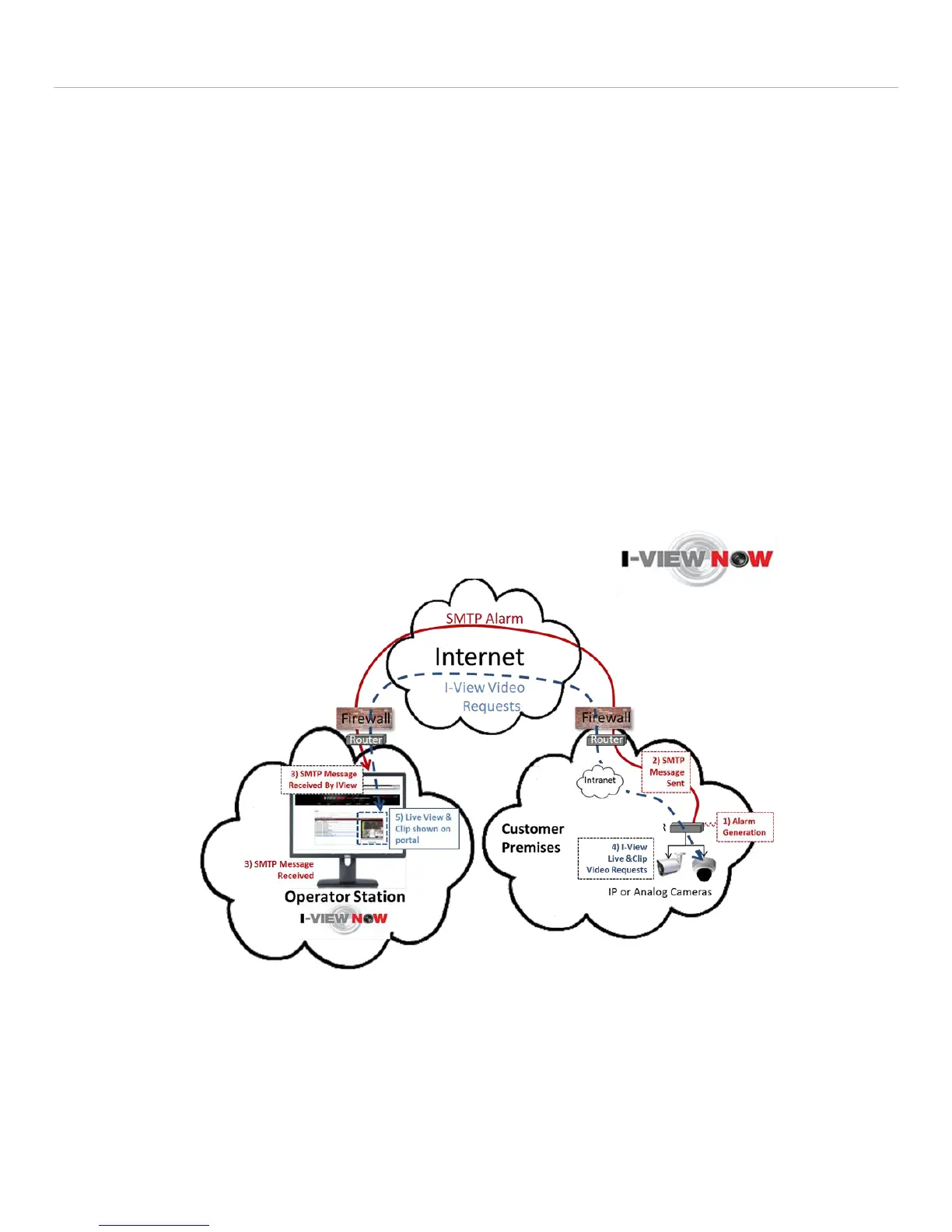
Once the DVR has been set up it is ready to be tested with I-View. The following illustration shows the path of two
message flows comprising a typical “Video Verification” scenario:
1-3 - An onsite alarm ‘event’ causes an SMTP message to be sent to the I-View Now system. The alarm event is
usually the result of a simple contact closure wired into the back panel of the DVR.
4, 5 - The resulting message path I-View initiates upon receipt of the SMTP message to retrieve the ‘pre’ and
‘post’ alarm video associated with the alarm event. The number of pre and post seconds can vary but it’s usually
not less than 3 and normally about 10 on either side of the alarm condition that initiates the sequence.
The user can view one or more consecutive alarm event ‘clips’ as they arrive from the I-View Now portal via a cell phone,
or a PC or tablet device’s browser. With each clip is the ability to see one or more “Live Views” for various cameras
associated with the DVR that generated the SMTP alarm.
Figure 1
Speco HS Alarm Message to



 To Next Page