Speco HS Rev 1.0 Copyright I-View Now, LLC 2014 14
Setting the Time
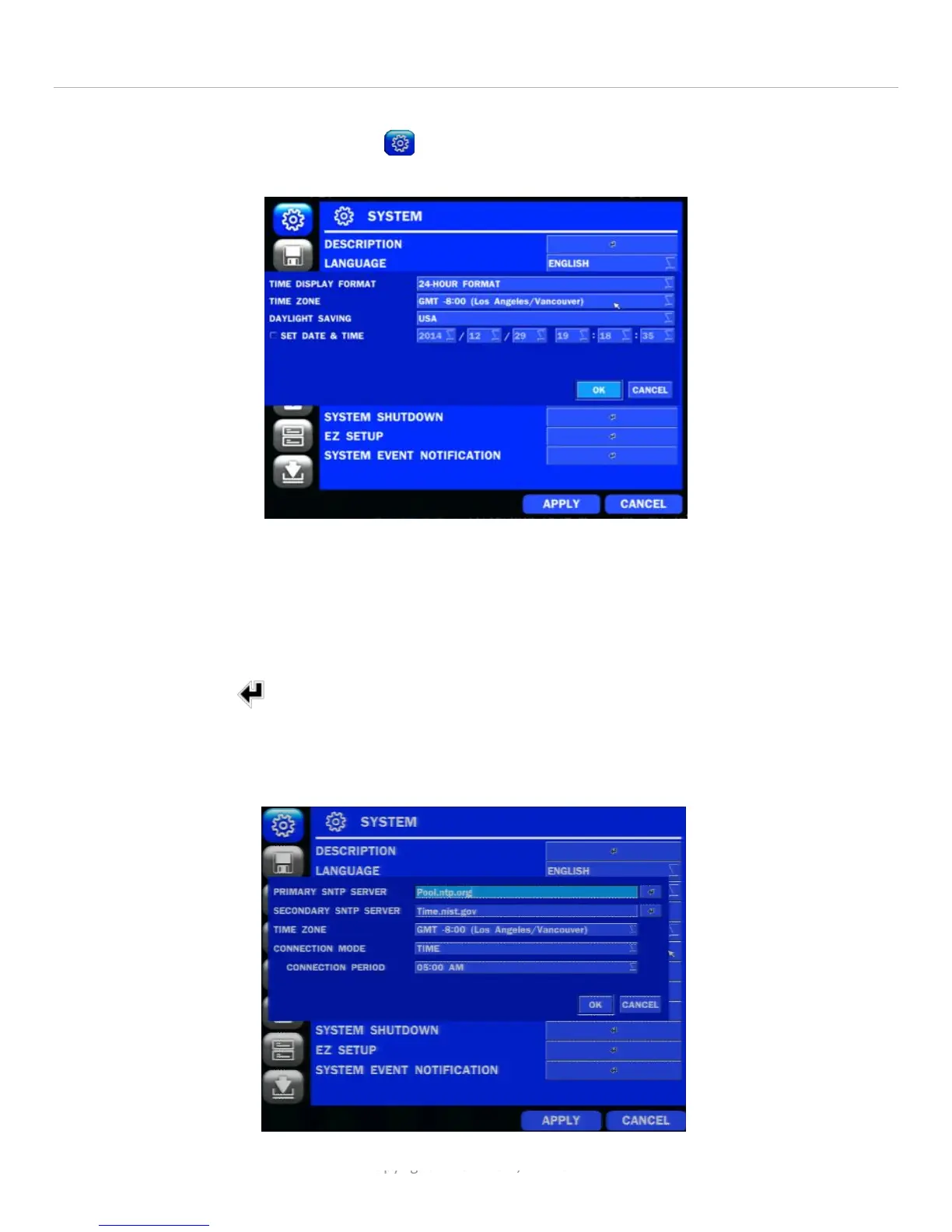
Make sure care is taken to set up the time on the Speco DS/NS appropriately. This is accomplished via the main System
menu which can be accessed by clicking on the icon and then clicking on DATE & TIME SETUP. The screen that is
shown looks as follows:
Figure 11
Take care to set the time zone and determine if day light savings is in effect for part of the year where the DVR resides.
If so, set it to the appropriate value, e.g. USA. Some adjustments can be made in retrieving clips depending on how
these parameters are set when retrieving the clips.
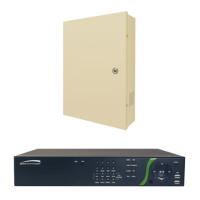
In addition, the system should be set to synchronize with the Internet time site so events will closely correlate with
other events. Click on the and set the PRIMARY SNTP SERVER to Pool.ntp.org, the
SECONDARY to Time.nist.gov and set the appropriate time zone, e.g. GMT -8:00 (Los Angeles/Vancouver) if the DVR is on
the West coast. There is also a connection verification time which is usually set to some early time in the morning such
as 3:00 am or during periods of little activity.


 To Next Page