13
4 Camera Management
4.1 Add/Edit Camera
4.1.1 Add Camera
The network of the NVR should be set before adding IP camera (see 11.1.1 TCP/IP Configuration for details).
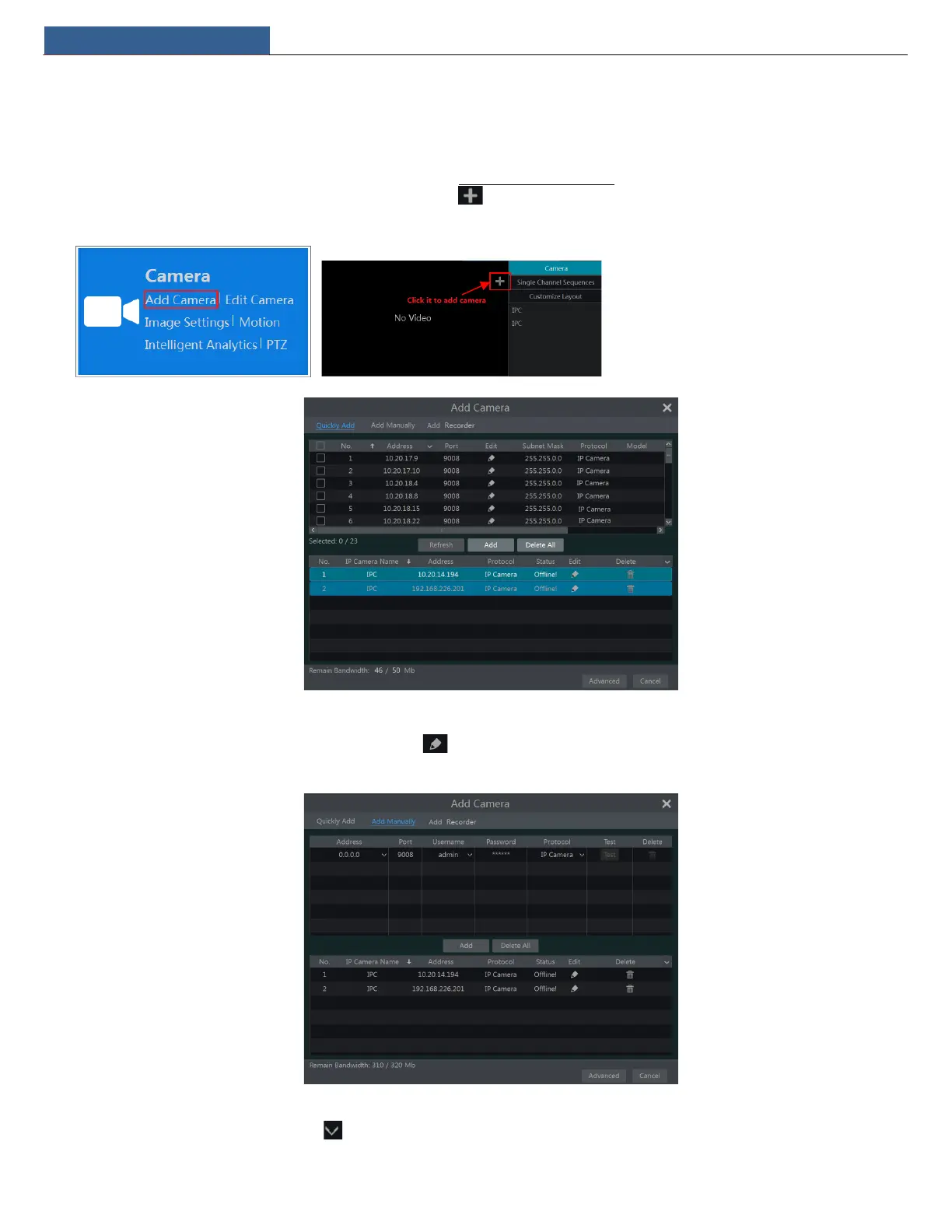
Refer to the pictures below. Click Add Camera in the setup panel or in the top right corner of the preview window to pop up the “Add Camera”
window as shown below. You can quickly add or add the IP camera manually.
Quickly Add
Check the cameras and then click “Add” to add cameras. Click to edit the camera’s IP address, username and password and so on. Click “Default
Password” to set the default username and password of each camera.
Add Manually
Enter the IP address or domain name (click in the IP address column to pop up the domain name input window, enter the domain name of the
IPC in the window and then click “OK” button), port, username and password of the camera and then select the protocol. Click “Test” to test the


 To Next Page