Remove the Shipping Bracket Ensure ESD Protection
December 2022 Shipping Bracket Installation & Removal — Spectra Stack Library
13
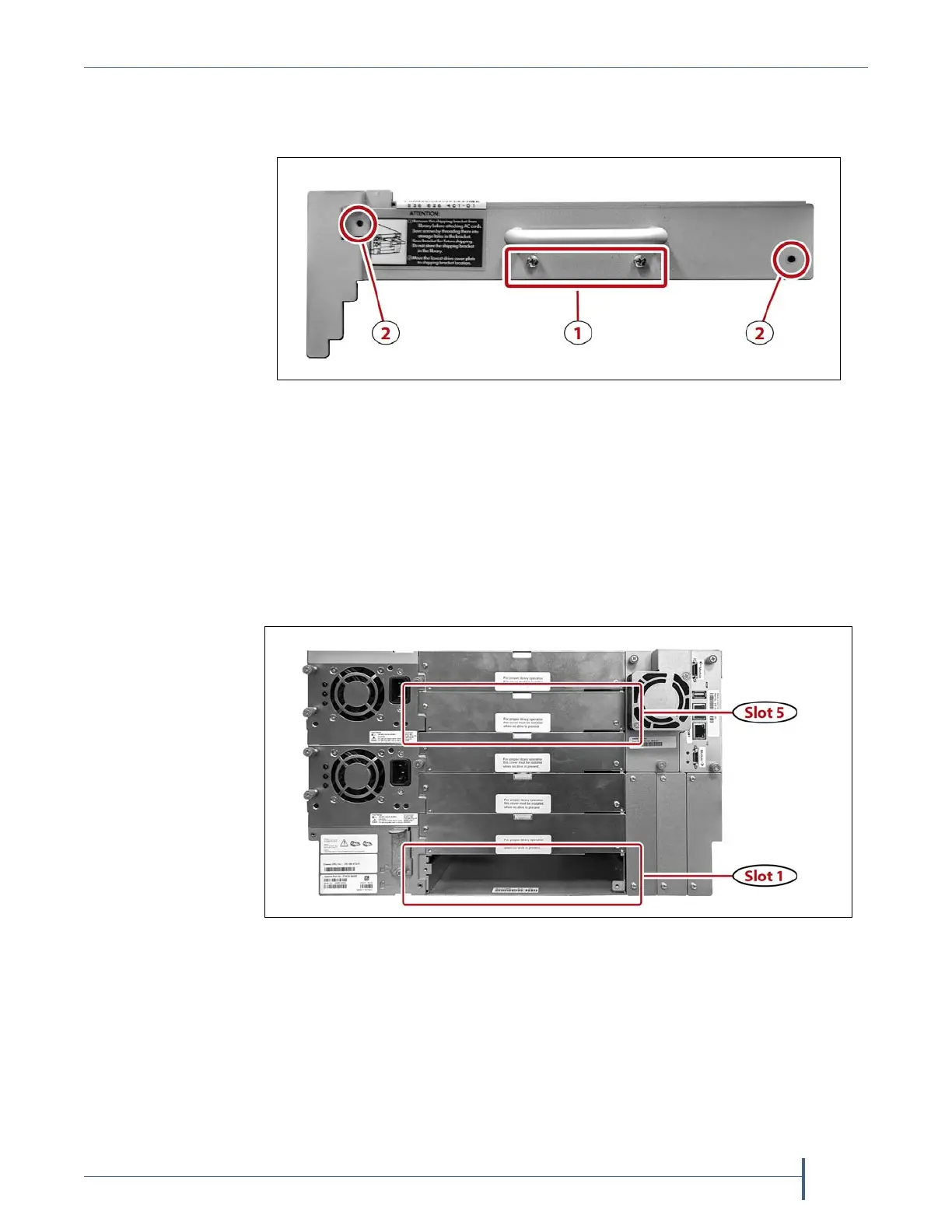
4. Usinga#1Phillipsscrewdriver,removethetwoscrewsthatsecurethe
shippingbrackettothechassis(2)andinstallthescrewsunderthe
handleoftheroboticshippingbracket(1).
5. Usingyourfinger,holdtheroboticelevatorinplace(seeFigure6on
page8)whileyoupulltheshippingbracketoutofthechassis.
6. Releasetheelevatorandallowittoslowlydescendtothebottomofthe
chassis.
7. Storethebracketandscrewsforuseifyouneedtomovethelibrary
afterinstallation.
8. Usinga#1Phillipsscrewdriver,removethetwoscrewsthatsecurethe
slot1drivebaycover.
9. Move
thedrivebaycovertotheslot5positioninthelibrary.
10. Usinga#1Phillipsscrewdriver,installthetwoscrewsyouremovedin
Step8tosecurethecovertothechassis.
Figure 14 The robotics shipping bracket rear panel.
Figure 15 The rear of the Spectra Stack chassis.



 To Next Page