Spectracom Corporation PathAlign-R
2200 / 2240 / 2241 PathAlign-R Manual
Switch is set to an appropriate frequency).
Toggling the [AUDIO] switch selects either the internal variable
alignment tone or
transmitted voice from the headset or
speaker.
AUDIO volume is a knob that adjusts the volume heard in
either the hidden front panel speaker (located behind the
circular front panel graphic),
or the headset’s earpiece. The
speaker is only ac
tive when there is no headset plugged into
the ’Headset’ jack.
The setting of the [MASTER/SLAVE] switch affects the
transmitted frequency of the 2240. The transmitted frequency
will be 20 MHz above the set frequency (set by the
thumbwheel sw
itches) when the [MASTER/SLAVE] switch is
set to ’MASTER’; 19 MHz below the set frequency when the
[MASTER/SLAVE] switch is set to ’SLAVE’. This 39 MHz offset
makes possible full-
duplex voice transmission and
measurement between the two 2240s.
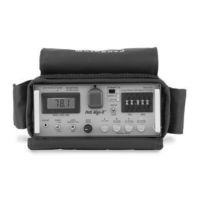
3.2.2 Front Panel Path Loss Display
The 4-digit display shows the received measured path loss in dB.
The PathAlign-R has a 4-digit, 0.5 inch high numerical in-line
backlit LCD display with decimal point. The display shows 4
digits of received Pat
h Loss measurement information. Path
Loss is displayed in dB with 0.1 dB of resolution. The high
contrast LCD provides good readability in bright ambient light
and the back-
lit LCD panel provides good contrast in low light.
All dB indications are negative (loss).
3.2.3 LED / LCD Indicators and Annunciators
This section identifies the PathAlign-R front panel indicators and annunciators.
(Band 1)
Red LED. Illuminates when Band 1 is active (thumbwheel
switch has selected a frequency that
is within the Band’s
range).
(Band 2)
Red LED. Illuminates when Band 2 is active (thumbwheel
switch has selected a frequency that is within the Band’s
range).
7.5-10 & 11-12 GHz
(Band 3)
Red LED. Illuminates when Band 3 is active (thumbwheel
switch has selected a frequency that is within the Band’s


 To Next Page