Meteor LED Operation
BEE25 features various Meteor LED effects and status indicators.
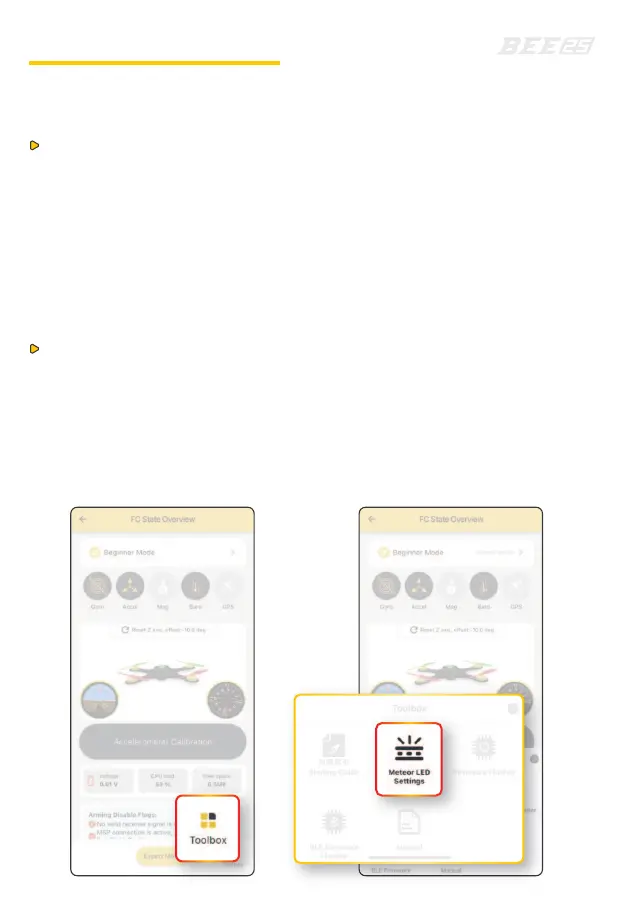
Customize your lighting effects through the SpeedyBee APP.
Operation Steps:
1.Use the SpeedyBee app to connect to BEE25.
2.In the app interface, select "Meteor LED Settings" in the bottom right
corner of the "Toolbox" to start customizing.
Operation Method:
1.On/Off Control: Adjust the channel corresponding to the "LED LOW"
mode to a high position to turn off the Meteor LED, and vice versa
to turn it on.
2.Effect Switching: Quickly toggle the channel corresponding to the
"LED LOW" mode once to switch the Meteor LED effects.
Additionally, the Meteor LED on the BEE25 can also be controlled
using remote controller.
(enable the LED LOW channel in the mode, which is already on by
default as channel 4 in the factory firmware).



 To Next Page