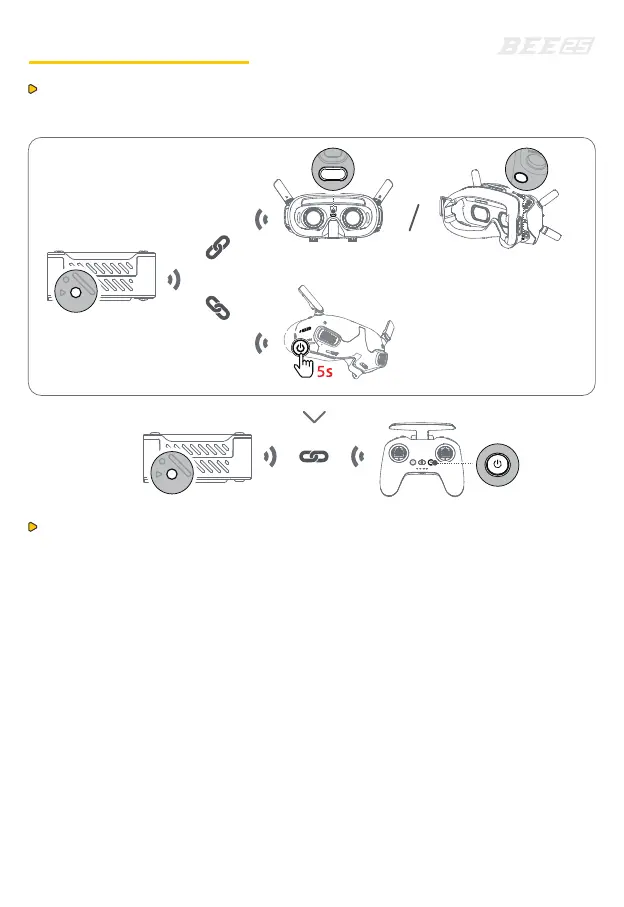
Goggles Integra
Goggles 2Goggles V2
The Air Unit needs to bind with the goggles first,
and then with the remote controller.
1. Power the Air Unit, turn on the goggles and the remote controller.
2. Press the binding button on the Air Unit and the goggles respectively.
(For integrated goggles, hold the power button for 5 seconds to enter the
binding state.) The binding status indicator on the Air Unit will flash red,
and the goggles will emit a "beep-beep..." sound.
3. Ensure the Air Unit and goggles are within 0.5 m of each other. Once binding
is successful, the Air Unit's binding status indicator will turn solid green,
the goggles' beeping will stop, and the VTX will be displayed.
4. Press the binding button on the Air Unit, then press and hold the power
button on the remote controller. The Air Unit's binding status indicator will
flash red, and the remote controller will emit a "beep-beep..." sound,
with the power indicator flashing cyclically.
5. Ensure the Air Unit and the remote controller are within 0.5 m of each
other. Once binding is successful, the Air Unit's indicator will turn solid
green, and the remote controller will stop beeping.
O3 Air Unit Binding
Before binding, make sure the firmware of the Air Unit, goggles,
and remote controller are updated.


 To Next Page