EasyManua.ls Logo

Sphere Astrolink - User Manual

Sphere Astrolink
27 pages
Print Icon
To Next Page IconTo Next Page
Loading...
User Manual
Ver 1.2
Astrolink
Fully Automatic Satellite Dish
Designed in Australia
for Australian conditions
www.coastrv.com.au
More information https://www.caravansplus.com.au
Question and Answer IconNeed help?

Do you have a question about the Sphere Astrolink and is the answer not in the manual?

Summary

General Information

Introduction

Overview of the Sphere Astrolink satellite system and its operation.

Proper Use and Operation

Guidelines for correct and safe usage, maintenance, and warranty information.

Safety Notes

Important safety precautions to follow during installation and operation of the system.

Product Contents

Components Bundle

Lists and illustrates all the parts included in the Sphere Astrolink package.

Name of Parts

Identifies and labels the main components of the Sphere Astrolink system.

Dish Assembly Guide

System Connection Diagram

System Operation

Getting Ready to Use

Instructions for initial setup, controller settings, and LED indicators before operation.

Searching for Satellite

Procedure for selecting and locking onto a satellite signal using the controller.

Returning to Home Position and Powering Off

Steps to return the unit to its home position and power it down safely.

Advanced Features

Error Message Guide

Explains LED indicators and error codes displayed by the system.

Factory Reset Procedure

Procedure to reset the Sphere Astrolink to its default factory settings.

Software Upgrade Process

Guide on how to update the system's software via USB.

Advanced Settings

Details on how to adjust advanced settings for specific receivers.

Troubleshooting Common Issues

Unit Not Functioning on Power On

Troubleshooting steps for when the unit does not power on or function.

Failed Satellite Lock

Solutions for issues related to the antenna failing to lock onto a satellite signal.

Mechanical Problems

Guidance for resolving physical or mechanical issues with the antenna movement.

Terrestrial Antenna Recommendation

Recommendation to retain terrestrial antenna for areas with satellite signal obstruction.

Technical Specifications

Dimensions

Provides the physical dimensions of the Sphere Astrolink 85cm unit.

Detailed Specifications

Lists detailed technical specifications of the Sphere Astrolink 85cm.

Caravan and Motorhome Installation

Required Installation Space

Specifies the necessary clearance and space around the antenna for installation.

Installation Equipment

Lists all the tools and equipment required for the installation process.

Installation Procedure

Step-by-step instructions for mounting the antenna on a vehicle roof.

Battery Power Connection

Details how to connect the Sphere Astrolink to the vehicle's power supply.

Optional Accessories

Information on optional accessories like multiswitches and down converters.

Overview

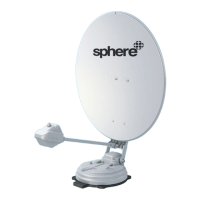
The Sphere Astrolink is a fully automatic satellite dish system designed for fixed installation on vehicles, such as caravans and motorhomes, with a maximum speed of 130 km/h. It is engineered to automatically aim its antenna at geostationary television satellites, providing satellite TV reception. The system operates on a standard vehicle electrical system with a rated voltage of 12 Volts, though a separate DC to DC downconverter is required for 24V DC systems.

Function Description:

The Sphere Astrolink is an intelligent satellite TV reception antenna system that automatically aligns itself towards a preset satellite when located within the footprint of the selected satellite. The system's controller allows users to select a satellite using arrow buttons and confirm with an "OK" button. A "Lock LED" flashes during the search and becomes solid once the satellite is found. If the wrong satellite is selected, users can navigate to the correct one and confirm.

Before driving, the antenna must be returned to its HOME position by pressing the "HOME" button on the controller. The HOME position is when the antenna is completely folded down and facing backward. To fully turn off the unit, the "Power" button should be long-pressed when the unit is at HOME. Alternatively, for extended stays or to save power, the unit can be powered off by a short press of the "Power" button, allowing the signal to continue to the satellite TV receiver.

The system includes several LED indicators on the controller: "HOME LED," "Lock LED," and "GPS LED." When all cable connections are complete and the unit is powered on, all satellite LEDs will flash. The "HOME LED" and a selected satellite LED (defaulting to "VAST" or the last selected satellite) will become solid, indicating the antenna is ready. If the antenna is not at HOME, the "HOME LED" will flash while it moves to the HOME position. The "GPS LED" flashes while searching for the current location and becomes solid once confirmed. It is recommended to wait until both "HOME" and "GPS" LEDs are solid for faster and more precise satellite alignment. The Sphere Astrolink can still locate the satellite even without the GPS locked.
Important Technical Specifications:

  • Model: Sphere Astrolink 85cm
  • Dish Size (Offset dish): 86.0 (W) x 91.0 (L) cm
  • Dimension (L x W x H): 110.6 x 86.0 x 18.4 cm
  • Weight: 15.1 Kg
  • Work Condition: Stationary
  • Polarization: Linear (Horizontal / Vertical)
  • LNB Output: Dual Output
  • LNB Input Frequency: 11.7 ~ 12.75 GHz
  • LNB Output Frequency: 1000 - 2050 MHz
  • Angle Range: (EL) 0°~145° / (AZ) 390° / (SK) -60° ~ +60°
  • Satellite Searching Time: 80 seconds (Average)
  • Power Requirement: DC 12V
  • Power Consumption: 60W searching (4W standby)
  • Operating Temperature: -20°C ~ +60°C
  • Tuner: DVBS, DVBS2
  • GPS: 24 channels
  • Gear Drive: Heavy Duty Full Metal

Usage Features:

  • Automatic Satellite Alignment: The system automatically finds and locks onto preset satellites.
  • Controller Interface: A user-friendly controller with arrow buttons, "OK," "HOME," and "Mode" buttons for easy operation.
  • LED Indicators: Visual feedback on system status, including HOME, Lock, GPS, and satellite selection.
  • Home Position Function: Ensures the antenna is safely folded for travel.
  • Power Saving Mode: Allows the unit to be powered off while maintaining signal reception for extended stays.
  • Advanced Settings: Includes options to change the VAST STB Home Transponder (TP) for improved signal reception in low signal areas or bad weather. Specific instructions are provided for SatKing VAST Receivers and UEC DSD 4921 RV models.
  • Software Upgrade: The system supports software upgrades via a USB stick, ensuring the unit stays up-to-date.

Maintenance Features:

  • Factory Reset: A factory reset function is available to restore the unit to its default settings, which can be useful for troubleshooting.
  • Troubleshooting Guide: The manual provides a comprehensive troubleshooting section for common issues such as no function on power-on, failure to lock to a satellite, and mechanical problems. It advises checking cable connections, power input, battery polarities, LNB arm fitting, and trying different satellite parameters.
  • No Regular Maintenance Required: The product does not require regular maintenance, with all service to be carried out at approved service centers.
  • Warranty: The Sphere Astrolink comes with a 2-year warranty.
  • Installation Guidelines: Detailed instructions for assembly and installation, including mounting plate installation, fixing the antenna main unit, laying out junction boxes and cable holders, and battery connection. Emphasis is placed on using supplied cables and ensuring proper waterproofing during installation.
  • Safety Notes: Users are advised to read and follow operating instructions carefully, ensure correct installation with supplied cables, and inspect the antenna unit before driving to ensure it is properly folded. The manufacturer disclaims liability for damage due to unsuitable battery usage, incorrect installation, or wrong polarity.

Optional Accessories:

  • Sphere 2x4 Satellite TV Multiswitch: Increases LNB outputs to four, allowing simultaneous use of Foxtel IQ and VAST.
  • Sphere Mounting Kit: Available for transferring the Astrolink to another vehicle, including essential components like mounting plate, cables, and brackets.
  • Sphere 24V to 12V Down Converter: Required for operating the Astrolink on 24V vehicles.

Sphere Astrolink Specifications

General IconGeneral
BrandSphere
ModelAstrolink
CategoryAntenna
LanguageEnglish

Related product manuals