ENGLISH - 12
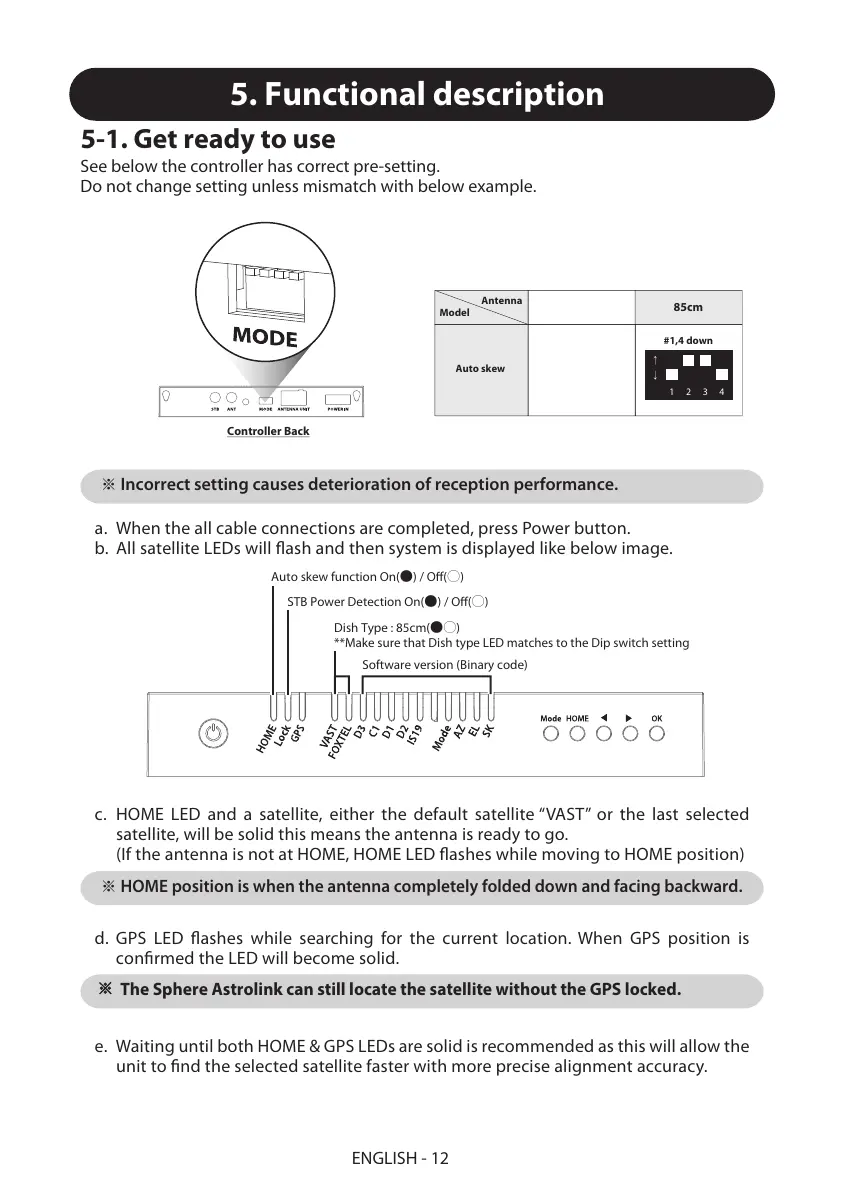
Incorrect setting causes deterioration of reception performance.
※
HOME position is when the antenna completely folded down and facing backward.
※
5. Functional description
5-1. Get ready to use
c. HOME LED and a satellite, either the default satellite “VAST” or the last selected
satellite, will be solid this means the antenna is ready to go.
(If the antenna is not at HOME, HOME LED flashes while moving to HOME position)
d. GPS LED flashes while searching for the current location. When GPS position is
confirmed the LED will become solid.
※
The Sphere Astrolink can still locate the satellite without the GPS locked.
e. Waiting until both HOME & GPS LEDs are solid is recommended as this will allow the
unit to find the selected satellite faster with more precise alignment accuracy.
a.
b.
When the all cable connections are completed, press Power button.
All satellite LEDs will flash and then system is displayed like below image.
See below the controller has correct pre-setting.
Do not change setting unless mismatch with below example.
Controller Back
Auto skew function On(●) / Off(○)
STB Power Detection On(●) / Off(○)
Dish Type : 85cm(●○)
**Make sure that Dish type LED matches to the Dip switch setting
Software version (Binary code)
Model
Antenna
85cm
Auto skew
#1,4 down
1
↓
↑
234
More information https://www.caravansplus.com.au


 To Next Page