32
To begin using SPOT TRACE, we recommend you spend a few minutes reading through this User
Guide, then visit FindMeSPOT.com to select a service plan and activate your SPOT device.
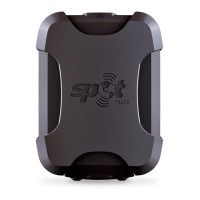
Mount the unit with logo pointed toward the sky. It can be mounted beneath fiberglass,
fabric, or glass, but metal obstructions should be avoided
Keep SPOT TRACE at least 12 inches away from GPS devices, as it can interfere with
the signal reception of your SPOT TRACE
Activate your SPOT TRACE before mounting or placing on an asset by visiting
FindMeSPOT.com/Activate
HERE ARE A FEW IMPORTANT THINGS
TO REMEMBER ABOUT YOUR SPOT TRACE
SECTION 1: WELCOME
Welcome to the SPOT Family! SPOT Trace provides satellite-
based messaging capabilities so you can track anything, anytime,
anywhere.
WHAT YOU NEED
• Personal contact information, including a valid email address for yourself and other people you
would like to receive notifications
• SPOT TRACE electronic serial number (ESN) and authorization code located at the bottom of
the Quick Start Guide and inside the SPOT Trace battery compartment (keep in a safe place as
a reference tool)
• Credit card information
ACCOUNT SETUP AND ACTIVATION
1. Go to FindMeSPOT.com/Activate.
2. Existing SPOT customers should login to their current SPOT account to add their new device.
3. New customers will need to select: Begin Activation, then Set Up New Account.
4. Follow the instructions provided within the activation portal. Do not skip forms or pages.
5. Choose the services you wish to add to your SPOT TRACE device and confirm your order. These
services include: Basic Service, Extreme Tracking, and Product Replacement.
6. Edit your device features, message alerts, and contact information for the necessary message
alerts. For more details on SPOT TRACE features, view page 7.
IMPORTANT NOTE: An update of SPOT TRACE is required after certain features are edited. SPOT
TRACE must be plugged into your computer with the included USB cable to successfully complete
an update.
Your SPOT TRACE requires an active SPOT subscription to communicate. To do this,
simply activate your device using the instructions outlined below.
SECTION 2: GETTING STARTED
These codes are located on the Quick Start Guide included in your SPOT TRACE box as well as
inside the battery compartment of your SPOT TRACE. You will need these codes when setting up
your account on FindMeSPOT.com/Activate.
ELECTRONIC SERIAL NUMBER (ESN) AND AUTHORIZATION CODE


 To Next Page