16 17
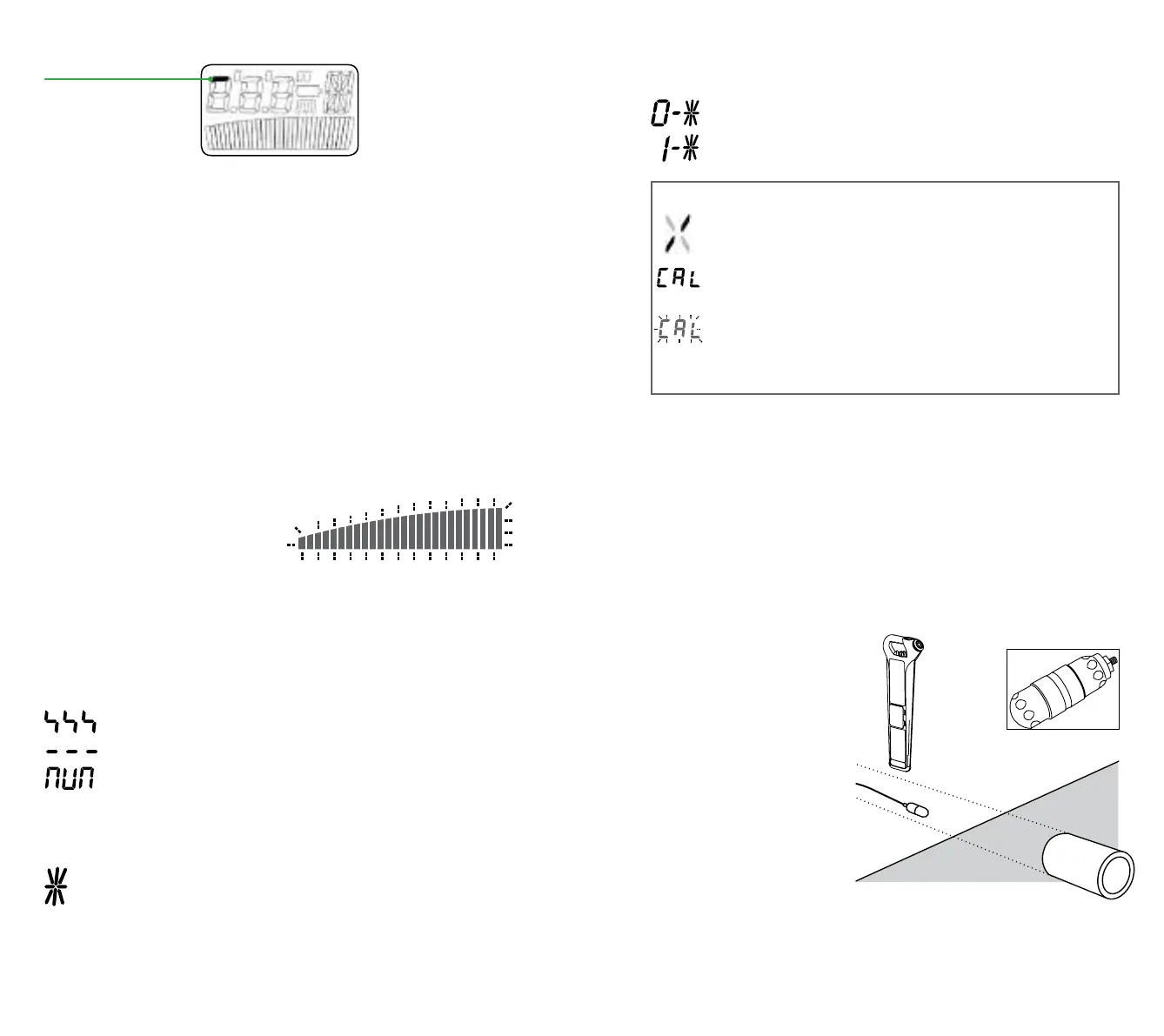
NOTE: When a valid depth measurement is displayed, the GPS
icon will momentarily disappear from the screen.
If a GPS lock is present when the trigger is released the gC.A.T
positional module will remain active for a predefined period of time
(GPS Remain On, 15 minutes by default) to enable an immediate GPS
lock next time the C.A.T is used.
If a GPS lock has not been acquired when the gC.A.T4’s trigger is
released, the positional module will first remain on for a predefined
period of time (GPS Lock Seek, 15 minutes by default) or until a lock is
acquired. When the lock is acquired, the gC.A.T4 will log the positional
data and maintain a GPS fix for the GPS Remain On period.
GPS Lock Seek and GPS Remain On time periods can be customized
using the C.A.T Manager software application.
Refer to the C.A.T Manager manual for further information
WARNINGS
Signal Overload
If the C.A.T4 is used in areas where very large power signals are
present, the signal bargraph will flash. In this condition the sensitivity
control and depth function will not operate and you are advised to try
lifting the C.A.T4 to bring it out of the overloaded condition or use the
C.A.T4 in a different location.
When taking depth readings
Conductor out of range.
Selected mode does not support depth estimations
Not possible to indicate depth eg, high levels of electrical
interference.
StrikeAlert
The optional StrikeAlert feature warns the operator of shallow
pipes and cables. To check if your C.A.T4 has StrikeAlert, look
for the StrikeAlert Activation sticker on the side of the C.A.T4.
When a shallow cable or pipe is detected in Power, Genny or Avoidance
Mode, StrikeAlert flashes an asterix and sounds a distinctive warbling
audio tone. StrikeAlert is not activated when tracing Radio signals.
The unit StrikeAlert status can be changed using C.A.T Manager, and is
momentarily displayed at start up:
Indicates that StrikeAlert is not active
Indicates that StrikeAlert is active
eC.A.T4 and gC.A.T4 models
Warns that a C.A.T is being used too far from the vertical or
moved too quickly for reliable cable or pipe location.
On startup, warns that the C.A.T is due for service in less
than 30 days, followed by number of days until service is due.
If C.A.T is CALSafe
™
enabled, the unit is past its calibration
due date. Return for immediate service.
All eC.A.T4 and gC.A.T4 models will log warnings when displayed.
Deactivating warnings
If required, for example if it is necessary to locate at an angle, the
StrikeAlert and SWING warnings can be temporarily disabled by
pressing and holding the depth button for the duration of the battery test
bleep at switch on. eC.A.T4 and gC.A.T4 models will log this action.
Optional Accessories
MOUSE SIGNAL TRANSMITTER – FOR NON METALLIC
UTILITIES
The Mouse is a small self-
contained watertight signal
transmitter (“Sonde”) which
can be located by the C.A.T4
in Genny mode or Avoidance
Mode.
Unscrew the housing
and insert batteries in the
orientation shown by the
diagram in the battery
compartment.
To check for correct
operation, place the Mouse on the ground, set the C.A.T4 to
Genny mode and, whilst holding the C.A.T4 in line with the Mouse,
check that the signal is being received.
Insert the Mouse into the duct or drain and adjust the C.A.T4
sensitivity to receive the signal.
GPS/GNSS icon



 To Next Page