EasyManua.ls Logo

SPX Pneumatic Products IBP500 - User Manual

SPX Pneumatic Products IBP500
52 pages
Print Icon
To Next Page IconTo Next Page
Loading...
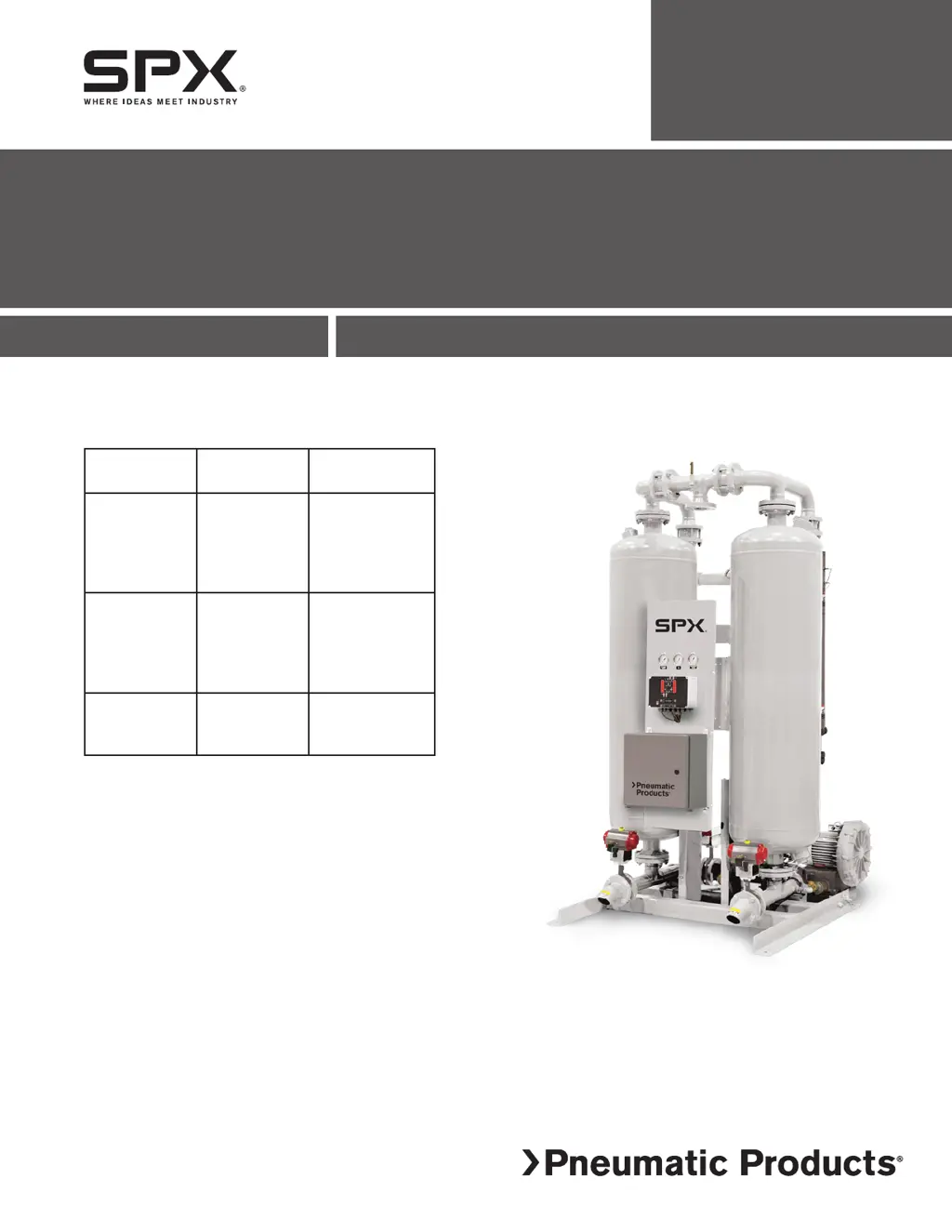
IBP Series
Blower Purge Desiccant Compressed Air Dryer
FORM NO.: 3158144 REVISION: 07/2014 READ AND UNDERSTAND THIS MANUAL PRIOR TO OPERATING OR SERVICING THIS PRODUCT.
INSTRUCTION MANUAL
MODELS
RATED
FLOW
MODEL
REFERENCE
IBP500
IBP600
IBP750
IBP900
IBP1050
500 SCFM
600 SCFM
750 SCFM
900 SCFM
1050 SCFM
500
600
750
900
1050
IBP1300
IBP1500
IBP1800
IBP2200
IBP2600
1300 SCFM
1500 SCFM
1800 SCFM
2200 SCFM
2600 SCFM
1300
1500
1800
2200
2600
IBP3200
IBP3600
IBP4300
3200 SCFM
3600 SCFM
4300 SCFM
3200
3600
4300

Questions and Answers

  • M
    Michael HartmanAug 19, 2025
    What to do if SPX Pneumatic Products IBP500 shows a High Humidity Alarm?
    • D
      dustinparkerAug 19, 2025
      To troubleshoot a High Humidity Alarm on the SPX Dehumidifier, consider these potential causes: * The desiccant bed may be overloaded. Check the inlet air flow rate, temperature, and pressure. If the flow and temperature are higher than the design specifications, or the pressure is lower, it can overload the dryer. * The dew point sensor or monitor could be damaged or defective. Inspect the sensor for any physical damage and verify the operation of the monitor/sensor. Replace if necessary. * There may be a loss of desiccant drying capacity. Check the filter elements and drains for contamination due to improperly filtered inlet air. Repair or replace as necessary. Also, consider if the desiccant's useful life has been exceeded.
  • B
    bkirbyAug 23, 2025
    Why does my SPX Pneumatic Products IBP500 show a Heater Over-Temperature Alarm?
    • S
      sean39Aug 23, 2025
      If your SPX Dehumidifier displays a Heater Over-Temperature Alarm, it could be due to: * Insufficient purge gas flow. Check for purge blockage or temperature sensor failure. * Temperature sensor failure. Repair or replace the sensor as required.
  • M
    mbrockAug 26, 2025
    Why does my SPX Pneumatic Products IBP500 show a Heater Low-Temperature Alarm?
    • C
      Cindy SextonAug 26, 2025
      If your SPX Dehumidifier displays a Heater Low-Temperature Alarm, it could be due to: * A heating malfunction caused by heater failure or heater contactor failure. Replace the heater or heater contactor. * Temperature sensor failure. Repair or replace the sensor as required.
  • K
    Kathryn PaceSep 4, 2025
    How to fix SPX Pneumatic Products IBP500 when indicator lights are not illuminated?
    • W
      Wendy LeeSep 4, 2025
      If the indicator lights on your SPX Dehumidifier are not illuminated, here are some potential causes and solutions: 1. No power to the unit: Check the voltage at the terminal board. 2. Loss of power supply to (or at) the dryer’s electrical disconnect switch or breaker: Check if the disconnect switch or breaker is closed. If a tripped breaker or blown fuse is found, investigate and fix the cause. 3. Blown fuse: Replace the fuse. 4. Board malfunction: Replace the board.
  • D
    davidruizSep 6, 2025
    What causes excessive pressure drop in SPX Pneumatic Products IBP500?
    • S
      Shawn McdanielSep 6, 2025
      If your SPX Dehumidifier is experiencing excessive pressure drop, it may be due to: 1. Dirty inlet/outlet screens on the desiccant towers. Clean the screens, following the desiccant removal instructions in the Maintenance section. 2. Excessive flow rate. Check the flow rate of the inlet air and reduce it to the design flow rate.
  • S
    Scott HarringtonSep 8, 2025
    What does it mean when SPX Dehumidifier displays Temperature Under-Range or Over-Range Alarm?
    • B
      Bradley HernandezSep 8, 2025
      If the SPX Dehumidifier displays a Temperature Under-Range or Temperature Over-Range Alarm for either the Left Tower or Right Tower, it could be due to: * Tower temperature sensor failure. Check the temperature circuit for continuity. Repair or replace as necessary.
  • S
    Steven ElliottSep 12, 2025
    What causes Blower Motor Overload Alarm on SPX Dehumidifier?
    • B
      bsilvaSep 12, 2025
      If your SPX Dehumidifier displays a Blower Motor Overload Alarm, it could be due to: * Restricted or blocked purge air flow. Check the intake filter on the blower and clean or replace the filter element. * Line failure. Check the voltages and currents in the motor circuit.
  • G
    gsawyerSep 13, 2025
    What does Energy Management Under-Range or Over-Range Alarm mean for SPX Pneumatic Products IBP500?
    • L
      lgraySep 13, 2025
      If the SPX Dehumidifier displays an Energy Management Under-Range Alarm or Energy Management Over-Range Alarm, it may be caused by: * Energy Management sensor failure. Check the circuit for continuity. Repair or replace as necessary.
  • C
    Carol TaylorSep 15, 2025
    What does Dew Point Under-Range or Over-Range Alarm mean on SPX Pneumatic Products IBP500 Dehumidifier?
    • A
      Amy HobbsSep 15, 2025
      If the SPX Dehumidifier shows a Dew Point Under-Range or Dew Point Over-Range Alarm during regeneration of either the Left Tower or Right Tower, it may be caused by: * Energy Management temperature sensor (RTD4) failure. Check the temperature circuit for continuity. Repair or replace as necessary.
  • A
    Angela ColeNov 20, 2025
    What to do if SPX Pneumatic Products IBP500 Dehumidifier shows Outlet Dew Point Alarm?
    • H
      Hannah MillerNov 20, 2025
      If the SPX Dehumidifier displays an Outlet Dew Point Alarm, consider the following potential causes: * The inlet air flow may be higher than the sizing condition. If so, reduce the inlet flow to the recommended level. * Liquids might be entering the dryer inlet. Check the inlet air line for liquids and inspect the prefilter and drain valve. Clean, repair, or replace the automatic drain valve as needed. * The inlet air temperature could be higher than the sizing condition. Inspect the compressor aftercooler and cooling system, and reduce the inlet air temperature to the appropriate level. * Desiccant dusting may be occurring. Check the air pressure, airflow, and airflow surges, and correct as necessary. It may also be necessary to replace the desiccant. * The desiccant may be con...

Summary

General Safety Information

Receiving, Storing, and Moving Procedures

Guidelines for handling, storing, and inspecting the dryer upon receipt.

General Safety Information

Essential safety rules and precautions for operating the dryer.

Installation Guidelines

Installation System Arrangement and Environment

Guidance on dryer location, clearances, and ambient air conditions.

Piping and Electrical Connections

Details on connecting the dryer to the compressed air system and power.

Initial Desiccant Charge Procedure

Steps for adding the desiccant to the dryer towers.

Instrumentation Overview

Operation Procedures

Start-up and Operational Checks

Procedures for initial start-up and checking unit operation.

Troubleshooting Guide

Warranty Information

SPX Pneumatic Products IBP500 Specifications

General IconGeneral
BrandSPX
ModelPneumatic Products IBP500
CategoryDehumidifier
LanguageEnglish

Related product manuals