Visit mySPYPOINT.com and create your free BRONZE account now!
Camera & photo management system
Take advantage of the automa-
tic organization of photos and
apply tags on photos to easily
nd them.
Access your photos from
anywhere in the world. With the
cloud system, don’t worry about
losing your data.
See your hunting partners’ pho-
tos by sharing your account with
your group.
Geotag capabilities
Track back your cameras, com-
pile location information and
weather data over the years and
plan your next hunting season
effectively.
Cloud system
Automatic photo
sorting
Account sharing
Allows to easily manage your photos and trail cameras online. A must
for enjoying your SPYPOINT trail camera to its fullest!
Quick start guide
Invisible LEDs
trail camera
Models:
IRON-9
IRON-10
C9 / B10 / G8
1-888-779-7646
support.spypoint.com
tech@spypoint.com
IRON
mySPYPOINT.com
Add your camera to your
free account now!
v1.7
In the box
Components
Note: Memory card and batteries are sold separately.
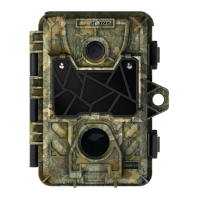
Photo lens
Invisible LEDs
Test light
BUSY LED
Detection lens
Cable lock hole
Battery case
Conguration screen
Switch panel
ON/OFF
Slot for installation strap
1
2
3
4
5
6
7
8
9
10
11
Tripod mount
Microphone
(if applicable)
12V jack
USB port
TV OUT
Distance dial
SD card slot
12
13
14
15
16
17
3. INSTALL THE CAMERA WITH THE SUPPLIED STRAP
1. CHOOSE A POWER SOURCE
We recommend the use of new alkaline batteries to ensure
maximum performance of the camera. Rechargeable AA batte-
ries are not recommended.
2. INSERT THE MEMORY CARD
Insert an SD/SDHC memory card (up to 32 GB
capacity) in the card slot. The card is inserted
correctly when a click is heard.
Before inserting or removing a memory
card, always turn off the camera to
prevent loss or damage of the photos already
recorded.
Getting started
Useful: Detach the desired section of this guide and
insert it into the sleeve provided on the back housing of
the camera.
6 alkaline AA batteries
Lithium battery pack
LIT-09/LIT-C-8
18
Installation
strap
USB
cable
Quick start
guide
Camera
11
1
2
5
6
7
8
9
10
12
1314
16
15
17
18
3
4
1. Insérez l’extrémité de la courroie dans la fente
qui se trouve au dos du mécanisme.
2. Insérez la courroie dans la fente sous le levier
et faites-la ressortir en arrière.
3. Créer une tension sur la courroie en la tirant vers
la droite, puis rabattez vers la gauche le levier pour
maintenir la position.
1. Insérez l’extrémité de la courroie dans la fente
qui se trouve au dos du mécanisme.
2. Insérez la courroie dans la fente sous le levier
et faites-la ressortir en arrière.
3. Créer une tension sur la courroie en la tirant vers
la droite, puis rabattez vers la gauche le levier pour
maintenir la position.
1. Insérez l’extrémité de la courroie dans la fente
qui se trouve au dos du mécanisme.
2. Insérez la courroie dans la fente sous le levier
et faites-la ressortir en arrière.
3. Créer une tension sur la courroie en la tirant vers
la droite, puis rabattez vers la gauche le levier pour
maintenir la position.
Audio-video
cable
Once installed, the inner part
of the camera can be removed
from the housing to easily
adjust the settings.
PRACTICAL TIP :
Recommended installation height:
about 3 feet above the ground.
Do not place the camera
facing the sun.
RECOMMENDATIONS:
3 ft
Power source Battery switch position
• 6 AA
• 12V
• 12V + 6 AA
ALK
• LIT-09*
• 12V + LIT-09*
• Solar panel + LIT-09*
LIT-09 or RECH
(depending on the camera)
* Rechargeable lithium battery pack, sold separately (LIT-09)
or with a charger (LIT-C-8).

 Need help?
 General












 To Next Page