EasyManua.ls Logo

Spypoint FLEX - User Manual

Spypoint FLEX
24 pages
Print Icon
To Next Page IconTo Next Page
Loading...
v.1.0
USER MANUAL

Other manuals for Spypoint FLEX

Questions and Answers

Summary

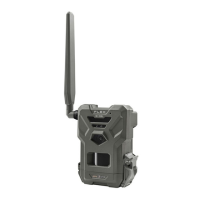
Introduction to SPYPOINT FLEX

FLEX Presentation

Introduces the SPYPOINT FLEX camera's design, antenna, interface, and connectivity.

Contact and Support Information

Provides contact information for technical support and website resources.

SPYPOINT Company Overview

Details SPYPOINT's mission and product focus on hunting and safety.

Join the SPYPOINT Community

Links to SPYPOINT's social media channels to join the community.

Camera Components

Camera Components Diagram

Identifies key external parts of the SPYPOINT FLEX camera via numbered labels.

Microphone Function

Records sound in video mode.

IR LED Illumination

Four powerful LEDs illuminate for night vision in photos and videos.

Light Sensor

Detects ambient light for automatic color/B&W photo adjustments.

Delay Light Indicator

Blinks during installation to signal when the user can walk away.

Photo Lens

The primary image sensor for capturing photographs.

Detection Lens

Enhances the motion sensor's detection area.

Battery Door

Access point for batteries, memory card, status light, and power switch.

microSD Card Slot

Slot for inserting a microSD card to save photos and videos.

Micro SIM Card Slots

Two slots for SIM cards required for cellular functionality.

Battery Tray

Holds 8 AA batteries (not included) for camera power.

Battery Level Indicator

Lights show the current battery charge level during startup.

Signal Level Indicator

Lights display cellular signal strength (1-5 bars) during startup.

Status Light

Indicates camera status like signal, recording, or firmware updates.

Format Button

Formats the microSD card during device startup.

Test Button

Triggers a photo transmission to the app for testing.

Off;On Switch

Controls the camera's power state.

Antenna

Captures cellular signals for data transmission.

12 V Jack

Port for connecting an external 12V power source.

Cable Lock Hole

For securing the camera with a padlock cable.

Locking Latch

Mechanism for securing and opening the camera door.

Slots for Installation Strap

Attachment points for the included camera installation strap.

Screw-Thread for Tripod Mount

Standard 1/4"-20 thread for mounting on tripods.

Camera Features

Cellular Transmission Capabilities

Details network connectivity, plan options, and remote configuration via app.

Photo Recording Settings

Covers resolution, file format, time-lapse modes, and capture settings.

Video Recording Settings

Specifies video resolution, file format, length, and capture modes.

Audio Recording Capability

Confirms audio recording capability (Yes).

External Memory Support

Specifies external memory support (microSD up to 512 GB).

Viewing Photos and Videos

Accessing photos/videos via SPYPOINT app or website.

Power Source Options

Lists available power options: AA batteries, lithium pack, 12V battery.

Detection System Specifications

Details movement detector type, angle, range, and trigger speed.

Illumination Options

Specifies LED type, night light range, and exposure adjustment.

Physical Dimensions

Provides camera dimensions in cm and inches.

Operating Recommendations

Lists recommended operating and storage temperatures.

Power Supply

Choosing a Power Source

Presents three options: AA batteries, 12V battery, or rechargeable battery pack.

Battery Pack Recommendation

Recommends the SPYPOINT #LIT-22 for longer battery life and cost savings.

Battery Best Practices

Tips for using batteries: new, no mixing, no rechargeable AA.

Installing AA Batteries

Step-by-step guide on inserting AA batteries correctly, including polarity.

Using an External 12 V Battery

Explains connecting an optional 12V battery and cable kit for power.

Managing Camera Power

How to check battery level via app or device lights.

Memory Card Management

Installing a Memory Card

Explains the necessity of a memory card and provides capacity estimates.

Memory Card Capacity Table

Shows approximate photos/videos storable on various microSD card sizes.

Continuous Mode Operation

Explains that the camera overwrites oldest files when the card is full.

Inserting the Memory Card

Step-by-step guide for inserting the microSD card correctly.

Removing the Memory Card

Instructions for safely removing the microSD card, advising to turn camera OFF first.

Formatting the Memory Card

Details the process of formatting the microSD card using the FORMAT button.

Preparation and Activation

Antenna Installation

Instructions for attaching the camera's antenna.

Camera Activation Requirement

States activation is required before use and mentions the activation code.

Finding the Activation Code

Locates the activation code inside the camera's battery compartment.

Camera Startup Sequence

Explains the startup light sequence and test button function during startup.

Activate via SPYPOINT App

Step-by-step guide to activate the camera using the SPYPOINT mobile application.

Activate via SPYPOINT Website

Step-by-step guide to activate the camera using the SPYPOINT website.

Photo Transmission Plans

Information on choosing a data plan for photo transmission.

Installation and Startup

Installing Your Camera

Guides on mounting the camera, selecting a tree, and optimal placement.

Verifications Before Starting

Lists important verifications before powering on the camera.

Camera Startup Indicators

Explains the LED status lights during the camera's startup process.

Operational Validation Test

Describes how to use the TEST button to verify camera functionality.

Test Button Functionality

Details the conditions under which the TEST button works and its expected output.

Camera Configuration

Manage Device Settings

Options to edit device name and restore factory settings via the app.

Image Capture Settings

Covers capture mode, motion delay, photo resolution, multi-shot, and sensitivity.

Cellular Configuration Options

Settings for daily sync time, sync frequency, cellular mode, and photo/video transmission.

Camera Commands

Allows requesting a firmware update for the device.

General Configuration Settings

Options for date format, time format, and battery type selection.

Camera Verification

Notifications System

Explains how the camera sends notifications to the SPYPOINT app for status updates.

Application Status Page Details

Describes indicators on the app/website: signal, battery, memory, comms, temp, GPS, model, version, SIM, activation code.

Status Light Explanation

Details the meaning of different LED colors and patterns for status indication.

Tools, Accessories, and Options

SPYPOINT Mobile App Features

Highlights app capabilities: managing cameras, viewing photos/videos, scouting.

Photo Transmission Plan Options

Information on choosing data plans, including a free option.

SPYPOINT Web App Usage

Instructions for managing cameras and media via the web app.

Transferring Files to Computer

File Transfer Process

Steps to turn off the camera, remove the card, and connect to a computer.

Transferring Files on a PC

Detailed instructions for copying files from the microSD card on a Windows PC.

Transferring Files on a Mac

Detailed instructions for copying files from the microSD card on a Mac.

Offered Accessories

12 V Battery, Charger & Housing Kit

Details the #KIT-12V for powering the camera with a 12V source.

Rechargeable Lithium Battery Pack

Describes the #LIT-22 rechargeable battery pack and its charging cable.

FLEX Camera Steel Security Box

Explains the #SB-500 security box for the FLEX camera.

Adjustable Mounting Arm

Details the #MA-500 adjustable mounting arm for cameras.

12 V Power Cable

Describes the #CB-12FT cable for connecting to a 12V camera battery.

Long Range Cellular Antenna

The #CA-01 antenna to boost cellular signal strength.

Cable Lock

The #CLM-6FT cable lock for securing cameras and boxes.

32 GB MicroSD Card

Package details for a 32 GB microSD card with adapter.

Troubleshooting Common Issues

Camera Not Turning On

Solutions for when the camera does not power on, checking batteries and switch.

Poor Camera Service or Signal

Solutions for weak signal, checking antenna and camera location.

Warranty and Repair Information

Limited Warranty Details

Details the 2-year warranty coverage and exclusions for SPYPOINT products.

Instructions for Repair Services

Outlines the process for obtaining repair services, including shipping.

Important Return Procedures

Crucial steps for returning products, requiring an RMA number and contact.

Repair Shipping Addresses

Provides shipping addresses for warranty returns in Canada and the United States.

Regulatory Information

FCC Regulation Compliance

Explains FCC Part 15 compliance and measures for interference reduction.

Product Disposal Guidelines

Information on proper disposal of the electronic device and its components.

Frequency Specifications

Frequency Range

Lists the cellular frequency bands supported by the device.

Maximum Transmission Power

Details the maximum transmission power levels for various cellular frequencies.

Spypoint FLEX Specifications

General IconGeneral
Photo Resolution33 MP
Video Resolution1080p
Number of LEDs4
GPSYes
Water ResistanceIP66
Trigger Speed0.3 s
Power Source8 AA batteries
Wireless ConnectivityLTE
Memory CardMicroSD card (up to 512 GB)
Battery LifeVaries with usage
Operating Temperature-20°C to 50°C

Related product manuals