14
POWERMETER PAIRING
PAIRING VIA ANT+
™
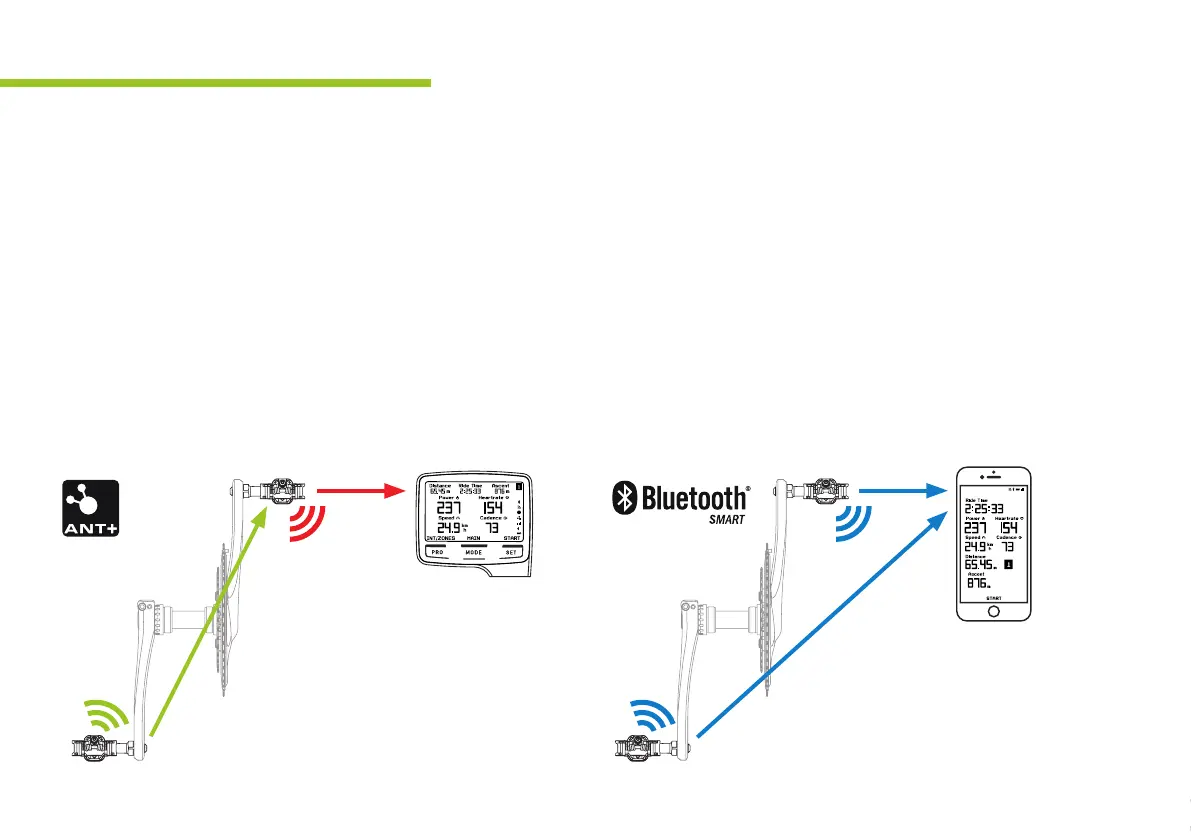
Make sure both pedals are turned on when pairing to your
device. Search in the device for sensor menu, add/pair
sensor and if necessary choose power sensor. Via ANT+
™
only the drive side serial will be shown and needs to get
paired. The non-drive pedal (Slave) and drive side pedal
(Master) work as a distributed system and send all data incl.
power balance, etc. via the Master to your bike computer.
PAIRING VIA BLUETOOTH
®
Make sure both pedals are turned on when pairing to your
device. Search in the device for sensor menu, add/pair
sensor and if necessary choose power sensor. When
adding sensors via Bluetooth
®
you need to add both
pedals separately. Make sure both drive and non-drive
pedals are added to get the correct measurements incl.
power balance.
X-Power pedal PowerMeter supports ANT+
™
and Bluetooth
®
connections. To show data on your device you need to
pair the X-Power pedal with your device. Depending on the device you might see one or more sensors. Select either
Bluetooth
®
or ANT+
™
to connect your bike computer.
PAIR RIGHT SIDE ONLY PAIR BOTH SIDES
SEPARATE WITH DEVICE
R
L
L
R + L


 To Next Page