19
Display range: 5,000–10,000 RPM
Display unit: 100 RPM
NOTE
The speed warning lamp
lights on when the current
speed has reached the
set value.
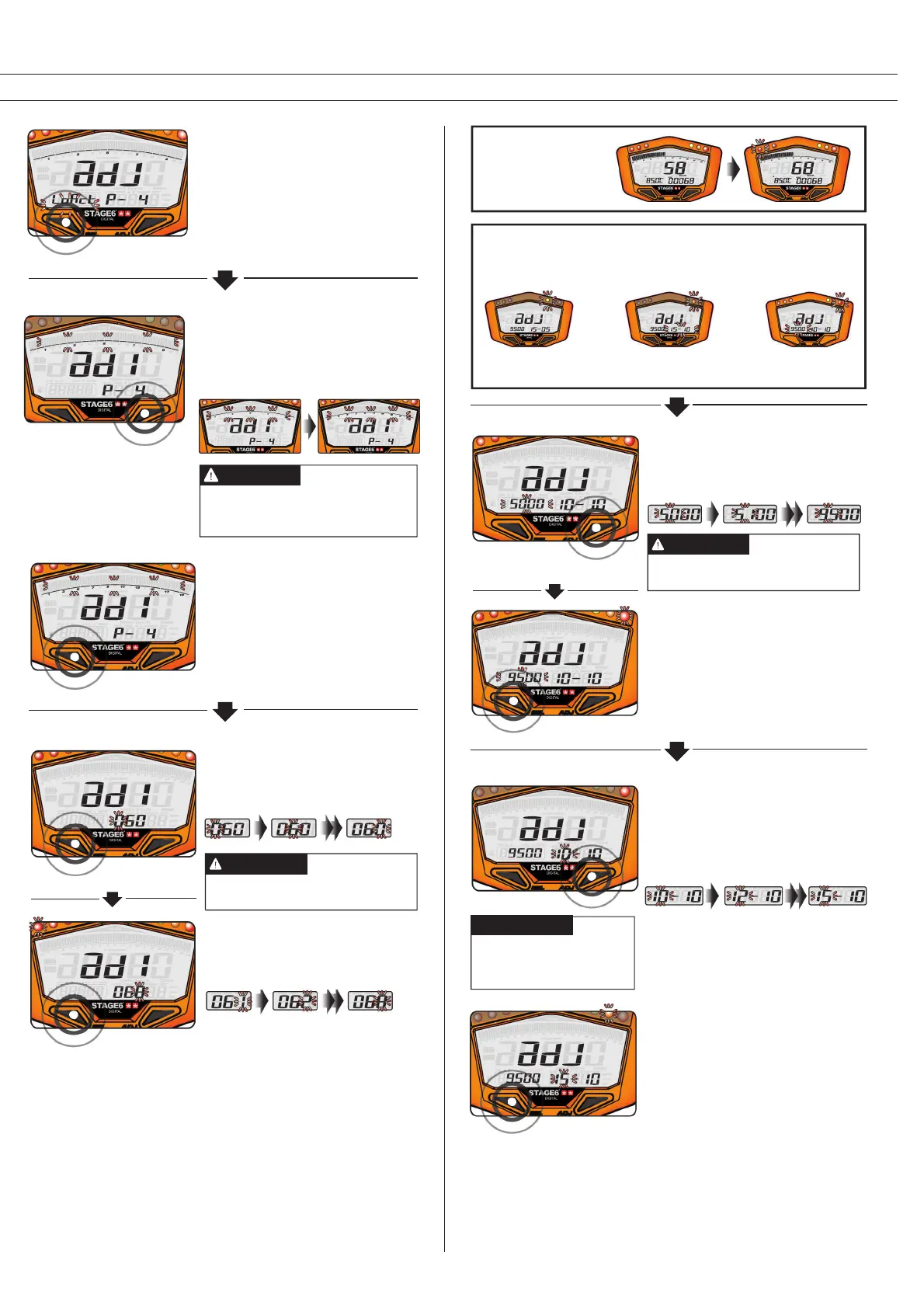
• E.g.: The shift light is to come on at
9,500 RPM.
• Press the Adjust Button to enter the
desired value.
• E.g.: The shift light setting has been
changed from 5,000 to 9,500 RPM.
• Press the Select Button to get to the
setting of pre-shift light B.
Shift Light
About the Shift Light Setting
First set the actual shift light, then pre-shift light B and then pre-
shift light A.
Pre-shift light A
(5) RPM
Pre-shift light B
(15) RPM
Shift light
9,500 RPM
Yellow Orange Red
The available tachometer ranges are:
0–10,000, 15,000 or 20,000 RPM.
NOTE
Bar Tachometer Range
• E.g.: The speed warning is to be
changed to 68 km/h.
• Press the Select Button to move
between digits.
Setting range: 30–360 km/h (19–225
MPH). Setting unit: 1 km/h (MPH)
NOTE
Speed Warning
• Press the Adjust Button to enter the
desired number.
• E.g.: The speed warning has been
changed from 60 km/h to 68 km/h.
• Press the Select Button to get to the
setting of the shift light.
• E.g.: The bar tachometer range is to
be set to 20,000 RPM.
• Press the Adjust Button to select the
respective range.
• E.g.: The range has been
changed from 0–10,000 RPM to
0–20,000 RPM.
• Press the Select Button to get to the
setting of the speed warning.
• E.g.: The setting has been changed
to “Lo” (negative impulse).
• Press the Select Button to get to the
setting of the RPM range.
Setting range: 5 (500RPM)
– 50 (5000 RPM);
Setting unit: 100 RPM
NOTE
Pre-Shift Light B
• E.g.: The pre shift light B is to come on
at 8,000 RPM, i.e. 1,500 RPM before
the actual shift light. The value that is
to be set is 15.
• Press the Adjust Button to enter the
desired value.
• E.g.: The setting value has been
changed to 15.
• Press the Select Button to get to the
setting of pre-shift light A.


 To Next Page
 Loading...