S6
INSTRUCTIONS
DIGITAL SPEEDOMETER MK2, UNIVERSAL
EN
20
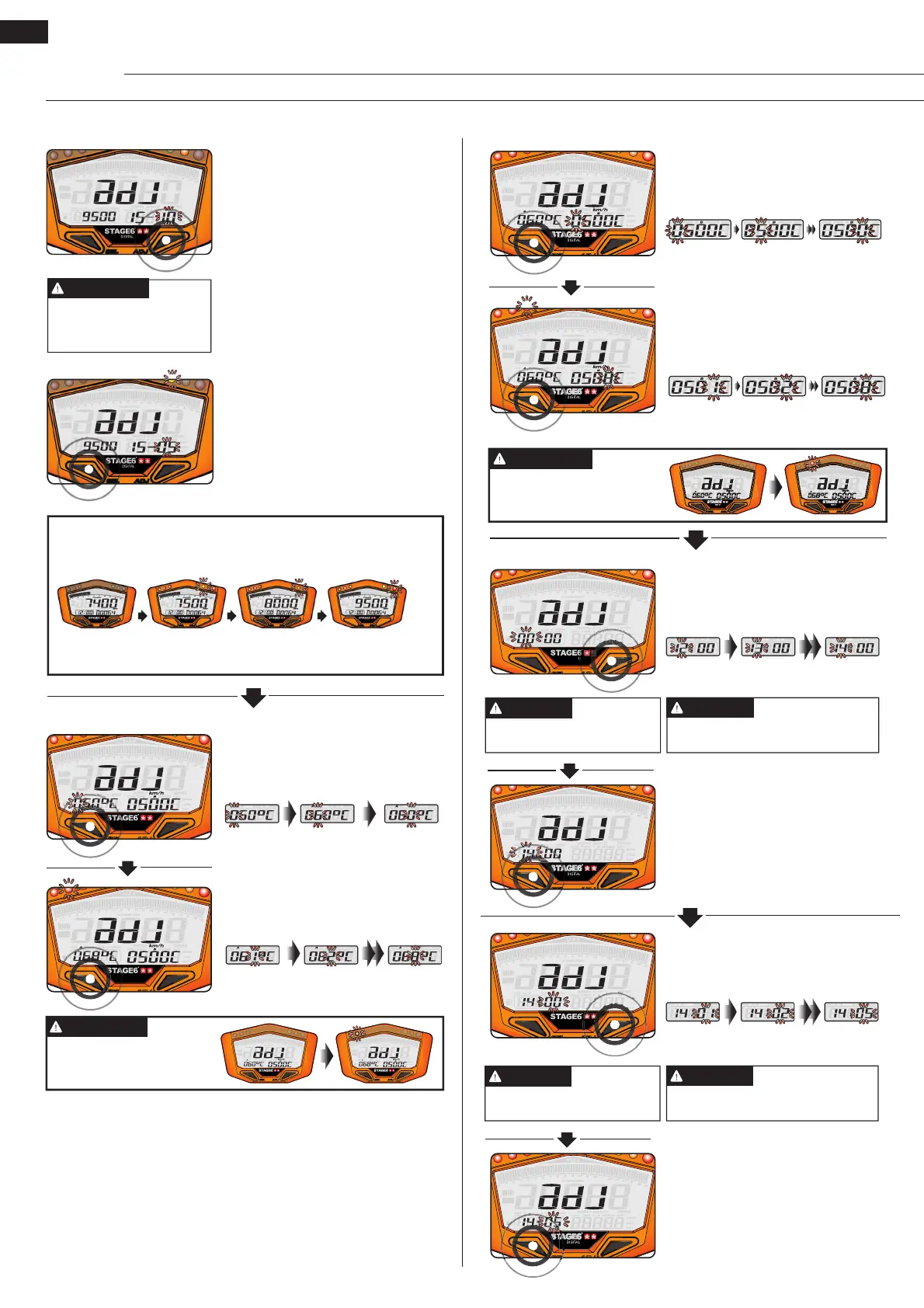
NOTE
Setting range: 0–59 minutes
Changing the time resets the
seconds.
NOTE
• E.g.: The hours have been
changed from 0 to 14.
• Press the Select Button to get to
the setting of the minutes.
• E.g.: The minutes are to be
changed to 05.
• Press the Adjust Button to enter
the respective value.
• E.g.: The minutes have been
changed from 00 to 05.
• Press the Select Button to get to
the setting of the fuel gauge resist-
ance.
Changing the time resets the
seconds.
NOTE
Setting range: 0–23 hours
NOTE
• E.g.: The hours are to be changed
to 14.
• Press the Adjust Button to enter
the respective value.
Clock
The red LED will come on accord-
ing to the setting for temperature
alarm B
.
NOTE
• Press the Adjust Button to enter the
respective value.
• E.g.: Temperature alarm B has been
changed from 500 to 508 °C.
• Press the Select Button to get to the
setting of the clock.
Temperature Alarm B
• E.g.: Temperature alarm B is to be
changed to 508 °C.
• Press the Select Button to move
between digits.
Temperature Alarm A
The red LED will come on
according to the setting for
temperature alarm A.
NOTE
• E.g.: Temperature alarm A is to be
changed to 68 °C.
• Press the Select Button to move be-
tween digits.
• Press the Adjust Button to enter the
desired value.
• E.g.: Temperature alarm A has been
changed from 60 to 68 °C.
• Press the Select Button to get to the
setting of temperature alarm B.
Display range: 5 (500
RPM) – 50 (5000 RPM);
Display unit: 100 RPM
NOTE
• E.g.: The pre shift light A is to come
on at 7,500 RPM, i.e. 500 RPM before
shift light B. The value that is to be
set is 5.
• Press the Adjust Button to enter the
respective value.
• E.g.: The setting value has been
changed to 5.
• Press the Select Button to get to the
setting of temperature alarm A.
Pre-Shift Light A
About the Shift Light
If the shift light and the two pre-shift lights are set as 9500–15–05,
the 3 lamps will come on as follows:
Pre-shift light A
7,500 RPM
Pre-shift light B
8,000 RPM
Shift light
9,500 RPM
Yellow Orange Red
T
-
A
T
-
B
S
P
E
E
D
DIGITAL
T
-
A
T
-
B
S
P
E
E
D
DIGITAL
T
-
T
-
B
S
P
E
E
DIGITAL
T
-
T
-
B
S
P
E
E
DIGITAL


 To Next Page
 Loading...