ASSEMBLY INSTRUCTIONS
10
STEP 6
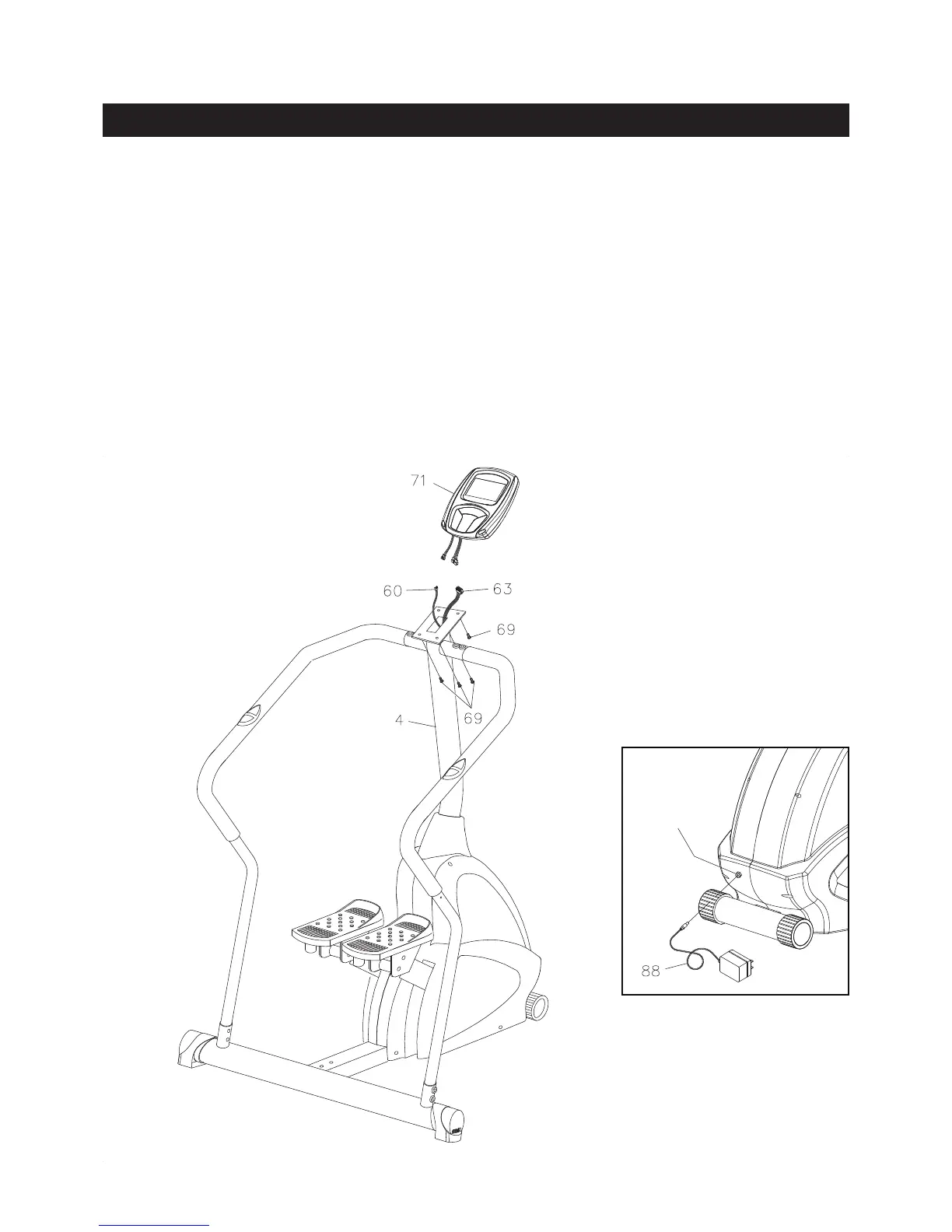
Plug the EXTENSION CONTROL WIRE(63) and PULSE CONNECTING WIRE(60) into the COMPUTER(71),
and push the excess wires back into the UPRIGHT(4). Attach the COMPUTER(71) to the plate on the
UPRIGHT(4) with ROUND HEAD SCREWS(M5x0.8x12mm)(69).
NOTE: Be careful not to damage the wires when attaching the COMPUTER(71) to the UPRIGHT(4).
STEP 7
Refer to illustration A. Plug the ADAPTER(88) into the SOCKET of the POWER WIRE(84) located on the
front of the unit. Plug the ADAPTER(88) into an electrical outlet.
Socket of
Power Wire(84)
A.



 To Next Page