“ “ symbol ash. If you do not place your hands correctly and 8 seconds passes
without a pulse input, the computer will turn off the pulse circuit. Place your hands
back on the Pulse Sensors correctly, the pulse readout will appear again.
PROGRAM DESCRIPTIONS
(M) MANUAL
MANUAL PROGRAM: Program “M” is a manual program allowing the
user to have full manual control of the workload. Use the UP button to
increase the load. Use the DOWN button to decrease the load.
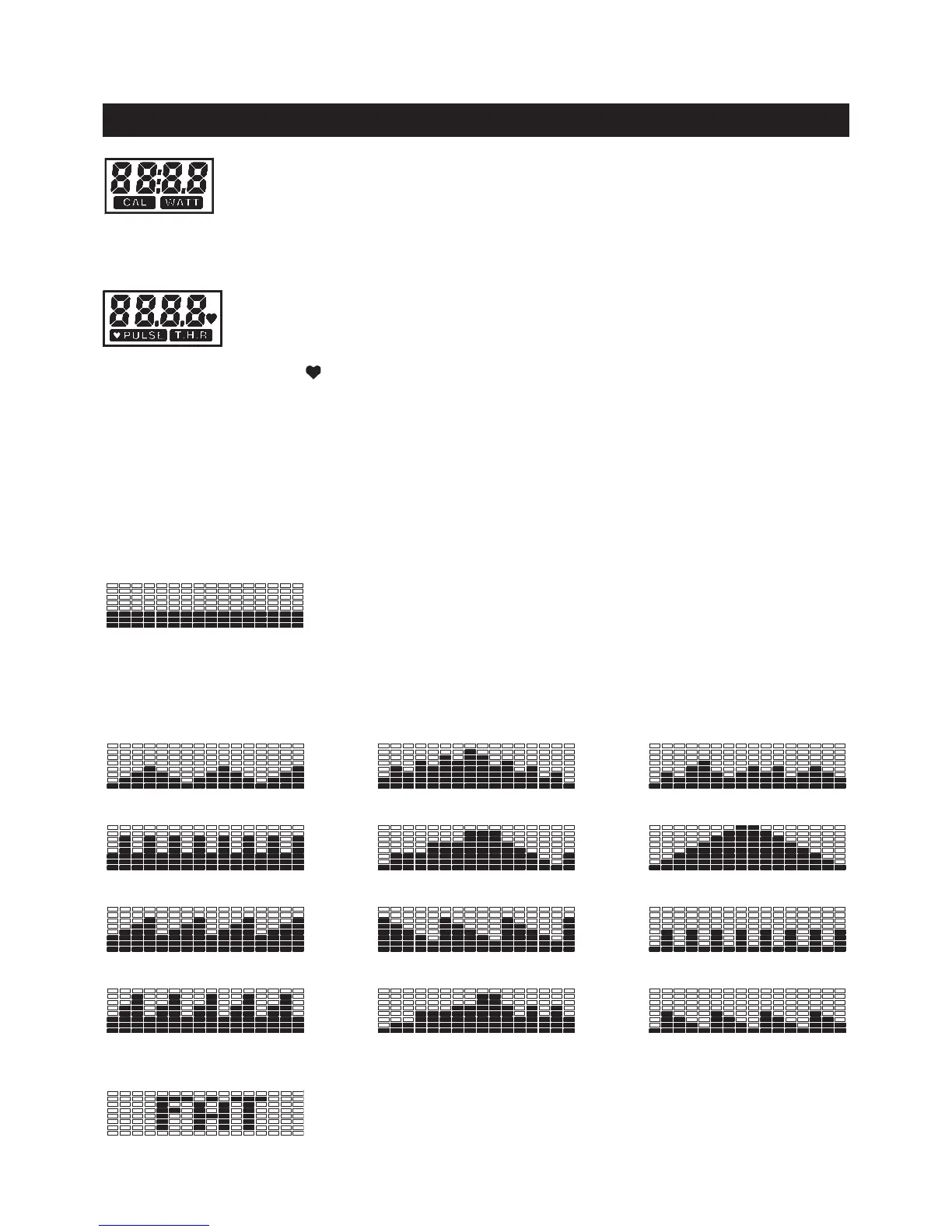
PRESET PROGRAMS: P1 to P12 are preset automatic programs. The proles are shown on the face
of the computer. Use the UP button to increase the load level of the program. Use the DOWN button to
decrease the load level of the program.
(P4) INTERVAL (P5) FITNESS TEST
(P7) ROLLING (P8) VALLEY
(P6) MOUNTAIN
(P9) INTERMITTENCE
COMPUTER INSTRUCTIONS
(P1) HILLS (P2) RAMPAGE (P3) RANDOM
(P10) BUMPINESS (P11) RAMP (P12) HILLOCK
Displays ashing “0:0” for presetting the calories consumption during setup, from 0 to
9990 cal, and counts down from the preset value.
If no value is preset, displays the calorie consumption, from zero to 9999 cal. Or displays
WATT, from 0 to 999.9 watt. Press MODE button to select the display of CAL or WATT.
NOTE: The calorie and watt readouts are an estimate for an average user. It should be
used only as a comparison between workouts on this unit.
(FAT) BODY FAT (P13)
BODY FAT MEASUREMENT: Program “FAT” is a special program
designed to measurement your body fat ratio. You must Input your gender,
age, height, and weight for correct readout.
This computer contains 20 different programs. You can preset the program time and the computer will divide
the time into 16 intervals. If you do not set the program time in advance, the computer will use 1 minute
for each interval of the program.



 To Next Page