2. Operation Procedure
10
ス
ト
ッ
パ
の
移
動
方
向
L
S
S
L
1
ス
ト
ッ
パ
Orange
Mark
Lamp
2-1 Operation Procedure
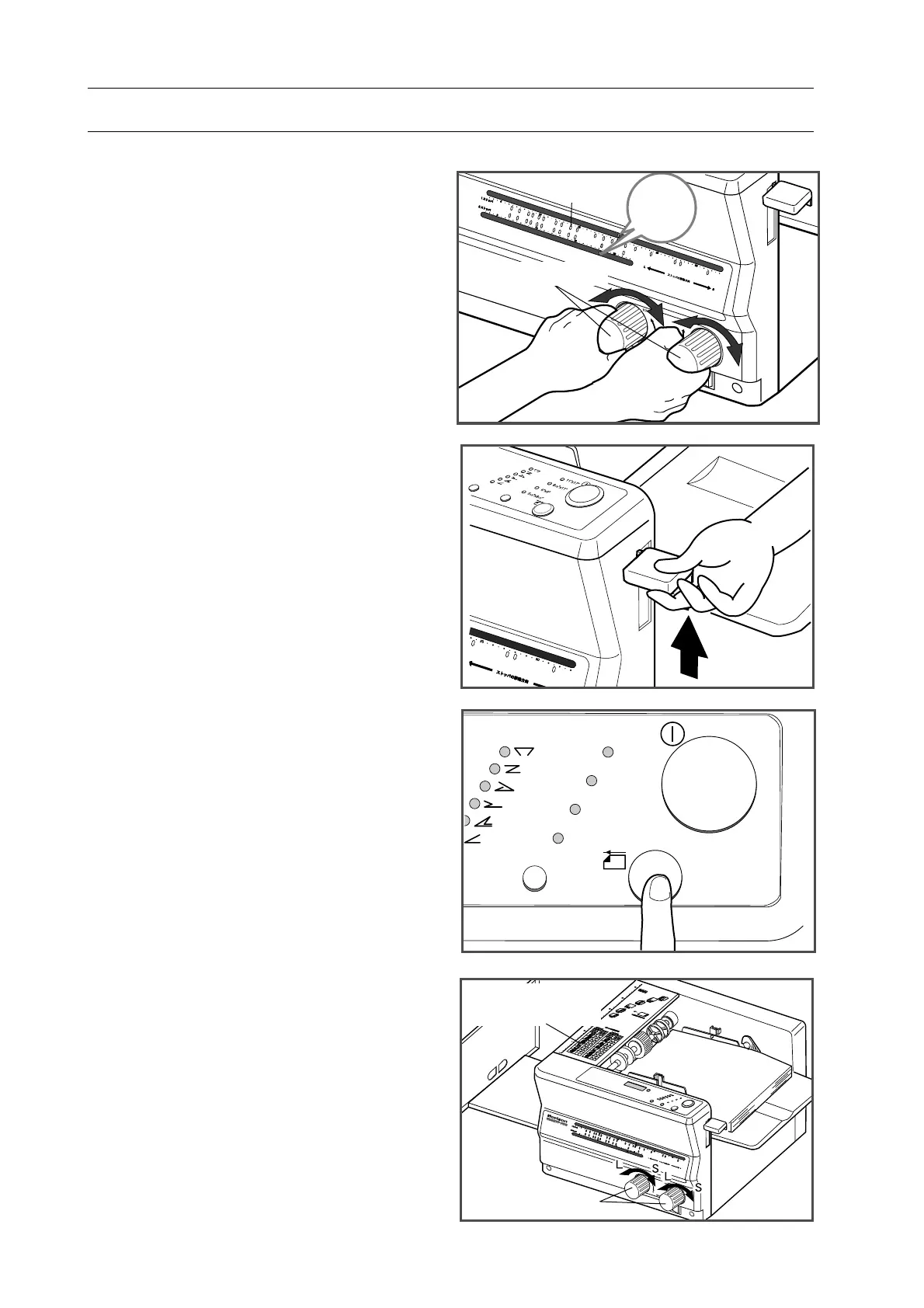
9. Turn stopper handle so that orange mark
aligns with the illuminated orange lamp.
10.
Raise feed tray lever.
11.
Press test button to fold one sheet in
order to check folding accuracy.
12. Check
folded sheet.
NOTE
- If sheet is folded uneven, correct it with
referring to "Adjustment Chart" on top
cover of PF-P310. Or refer to "2-4 When
Folding is not Even or Square" (page 19 to
20).
- Press test feed button and check folded
sheet after adjustment.
Stopper Handle
Stopper Handle
11"x17"
8
1/2
"x11"
6"x9"
5
1/2
"x8
1/2
"
Adjustment Chart


 To Next Page