(4)
スト
ッパ
の移
動方向
L
S
S
L
2
ス
トッパ
1
ス
トッ
パ
テ
ス
ト
ス
タ
ー
ト
/ス
ト
ッ
プ
折
形
紙
サ
イ
ズ
B
5
B
4
A
4
A
3
二
つ
四
つ
片
袖
観
音
内
三
つ
外
三
つ
ク
リ
ア
排
紙
状
態
で
表
わ
し
て
、
あ
り
ま
す
。
部
長
い
部
短
い
排
紙
状
態
で
表
わ
し
て
、
あ
り
ま
す
。
部
長
い
部
短
い
2
ス
ト
ッ
パ
1
ス
ト
ッ
パ
外
三
つ
折
L
S
外
三
つ
折
LS
二
つ
折
二
つ
折
LS
片
袖
折
SL
片
袖
折
L
S
内
三
つ
折
L
S
内
三
つ
折
SL
観
音
折
LS
観
音
折
S
L
ス
ト
ッ
パ
の
微
調
整
方
法
四
つ
折
S
L
四
つ
折
LS
0
1
0
1
5
2
0
2
5
3
0
5
二
つ
折
片
袖
折
内
三
つ
折
観
音
折
四
つ
折
紙
の
セ
ッ
ト
*
印
刷
面
は
ウ
ラ
向
き
で
す
。
外
三
つ
折
ス
ト
ッ
パ
の
移
動
方
向
L
S
1
ス
ト
ッ
パ
2
ス
ト
ッ
パ
1
0
1
5
2
0
2
5
3
0
5
1
0
1
5
2
0
5
PF-P310
P
E
P
E
R
F
O
L
D
E
R
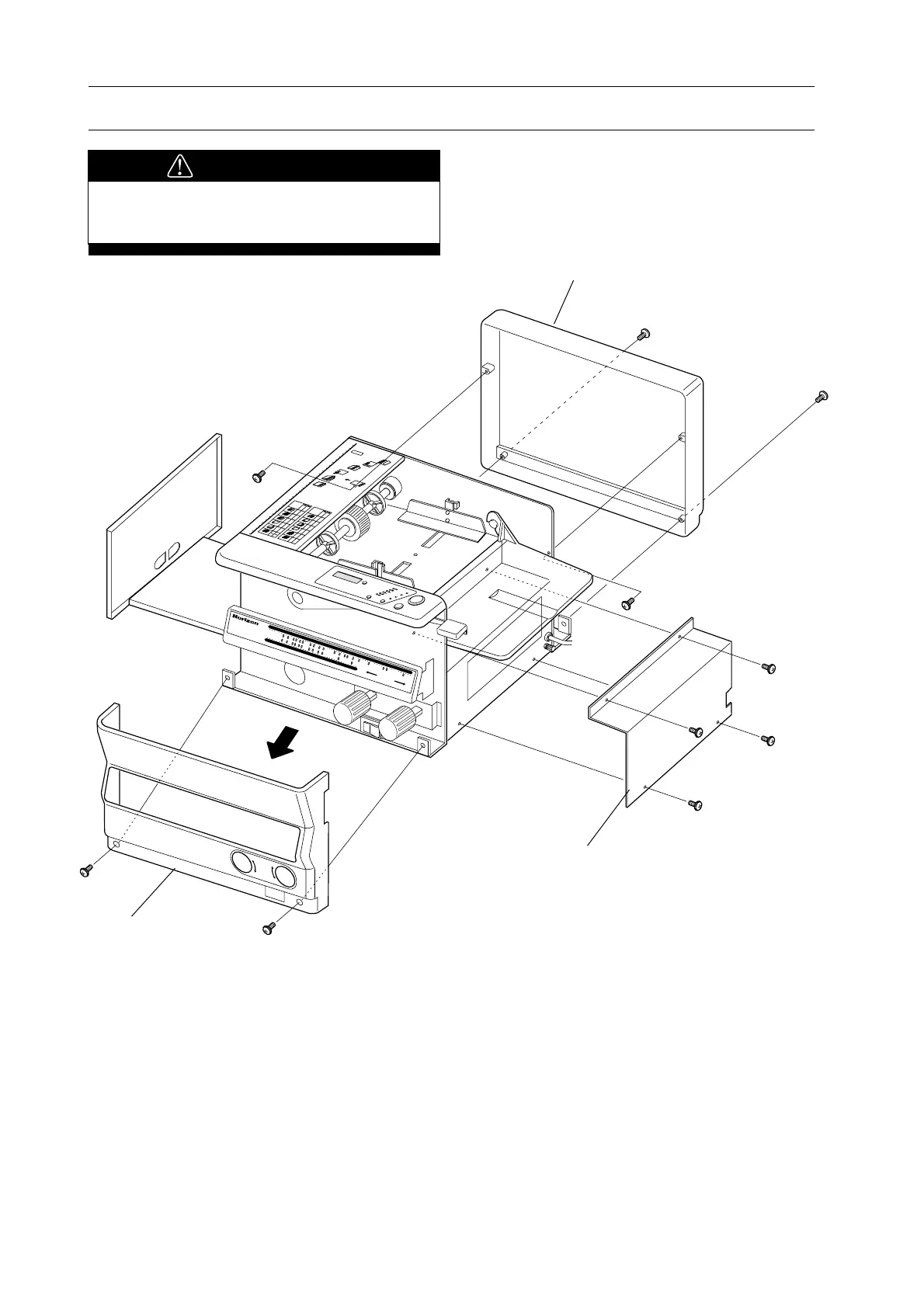
Front Cover
- Bind Screw M4 x 8 (2 pcs)
Front cover is installed with the top edge fitted
with operation panel. Remove front cover by
pulling front cover diagonally downward.
Side Cover
- Bind Screw M4 x 8 (4 pcs)
4. How to Remove Cover
Rear Cover
- Bind Screw M4 x 8 (2 pcs)
- Tapping Screw M4 x 10 (2 pcs)
Tool : Screwdriver
CAUTION
- Turn off main power and remove any
covers.



 To Next Page