16
Start / Stop
Test Feed
Sheet SizeFolding Pattern
8
1/2
"
X
11"
8
1/2
"
X
14"
5
1/2
"
X
8
1/2
"
11"
X
17"
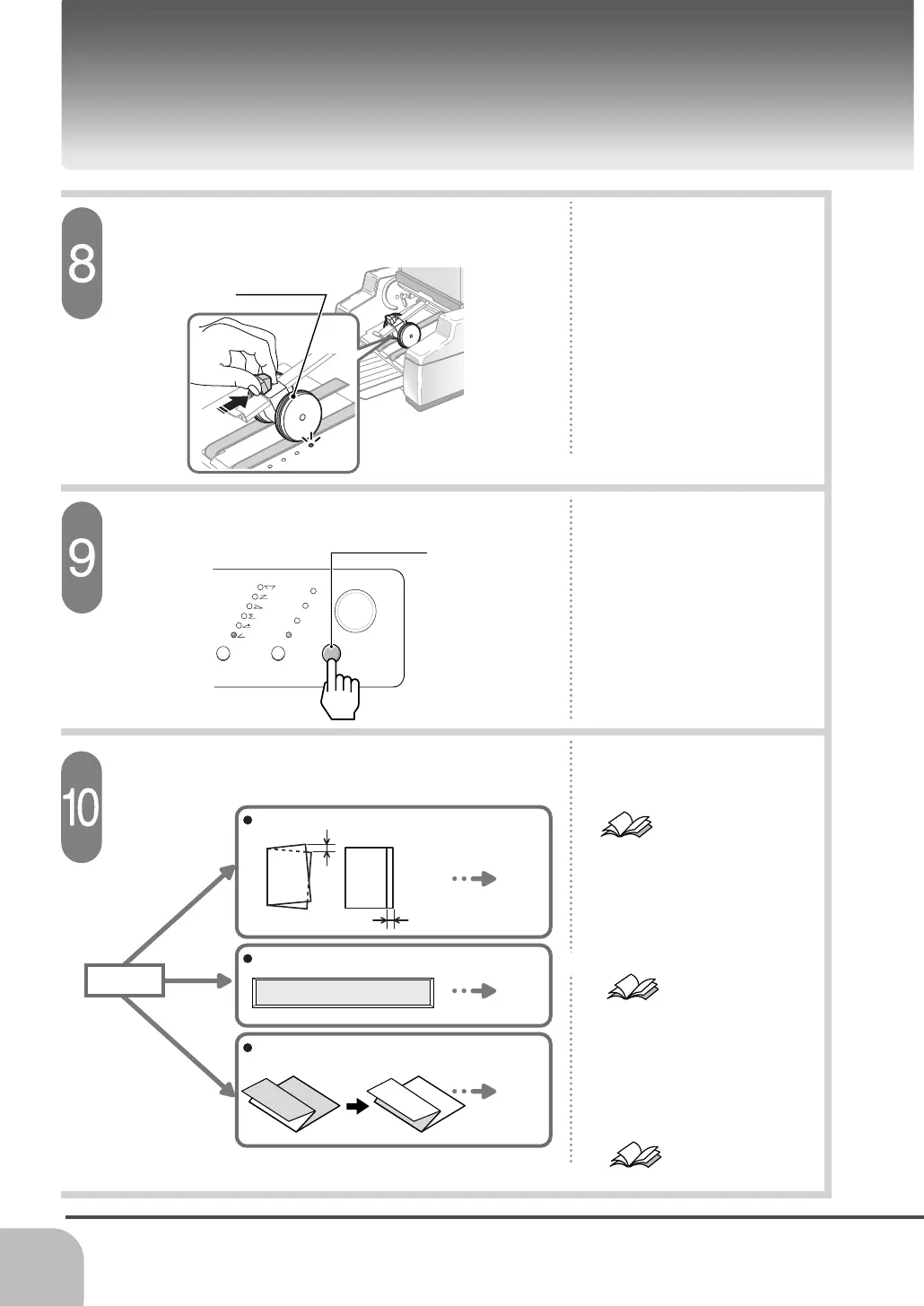
Test Button
Delivery Roller
- Press the test button, and the
table rises, and one sheet is
folded.
Refer to page 28
Set the delivery roller.
Press the test button.
- If there is a folding skew, refer to
[Troubleshooting] and perform
the adjustment.
- Set the delivery roller to the
position where light illuminates.
3 / 5 Feed error
ABC
ABC
P.28
P.32
P.14
Error Message
Up Side Down
Folding Skew, Folding Shift
Check the folded sheet.
- When the error message is
indicated on the display and the
machine stops, refer to [Error
Message Appears on the
Display] and remove the error.
Refer to page 32
- If the sheet is folded oppositely,
pile the sheet upside down.
Folding Standard Size Sheet
- If the sheet can not be fed
correctly, refer to [Troubleshoot-
ing].
Refer to page 39
Check


 To Next Page