18
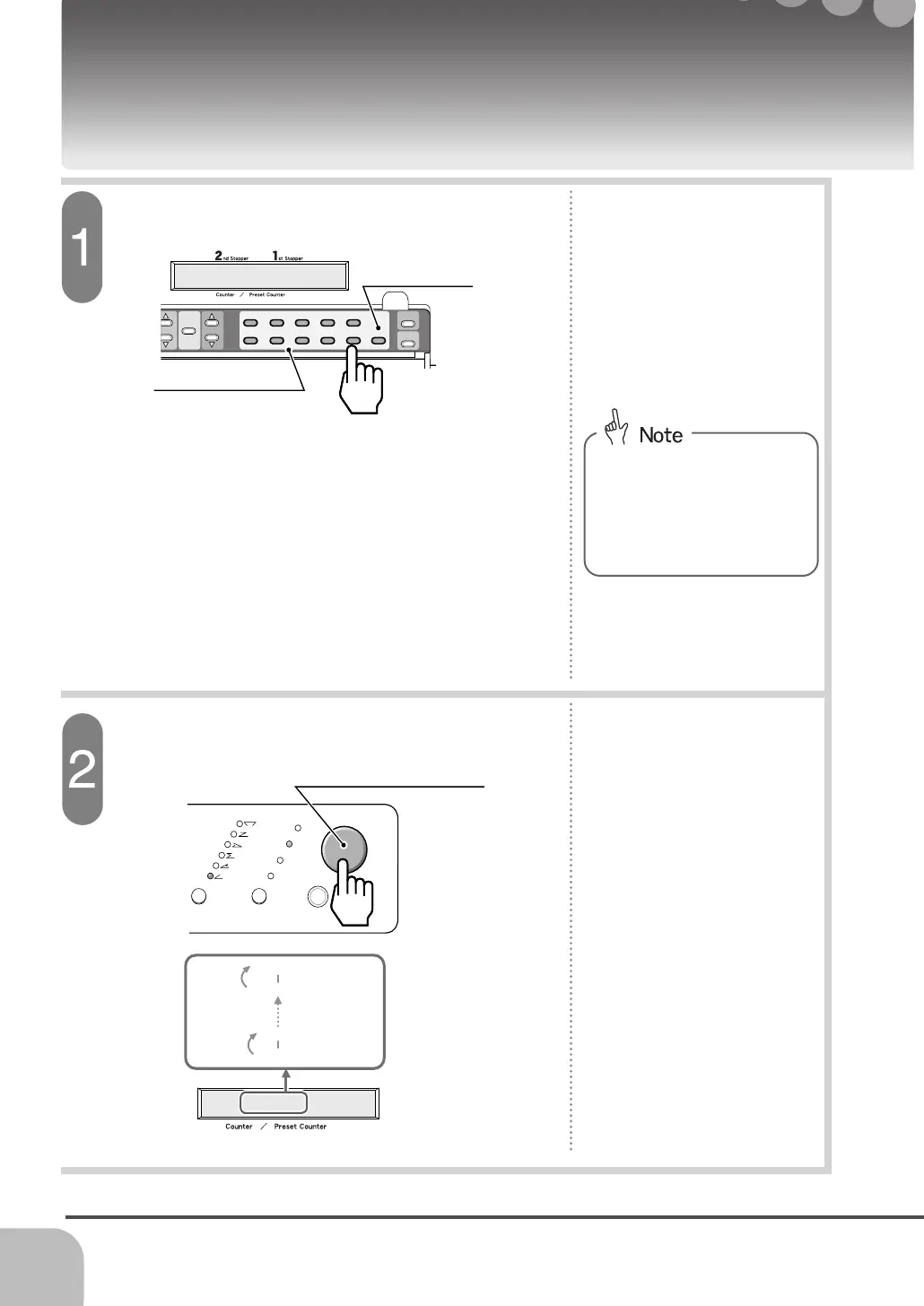
Input the number to fold.
Set the Number to Fold (Pre-set Function)
Clear Button
Input the needed number to fold beforehand, and the machine stops automatically when pre-set number
of sheets are completed. Use for the off-set.
1
2
3
4
5
6
7
89
0
C
2
nd
topper
1
st
Stopper
Memory
Mode
Stopper
Position
Display
0 / 50
0 / 50
50 / 50
49 / 50
1 / 50
0 / 50
Start / Stop
Test Feed
Sheet SizeFolding Pattern
8
1/2
"
X
11"
8
1/2
"
X
14"
5
1/2
"
X
8
1/2
"
11"
X
17"
Start/Stop Button
Numeric Keypad
- When folding operation starts,
the counter counts up one by
one. The machine stops
automatically when the pre-set
number of sheets are com-
pleted.
- Open the extension panel and
check that the display shows the
counter. Input the number to fold
using the numeric keypad.
- Illustration shows 50 sheets as an
example.
Start folding using the start/stop button.
- Maximum input number is 9999.
- When wrong number is input or
the display does not show the
counter 0/0, press the clear
button and input the correct
number to fold again.


 To Next Page