22
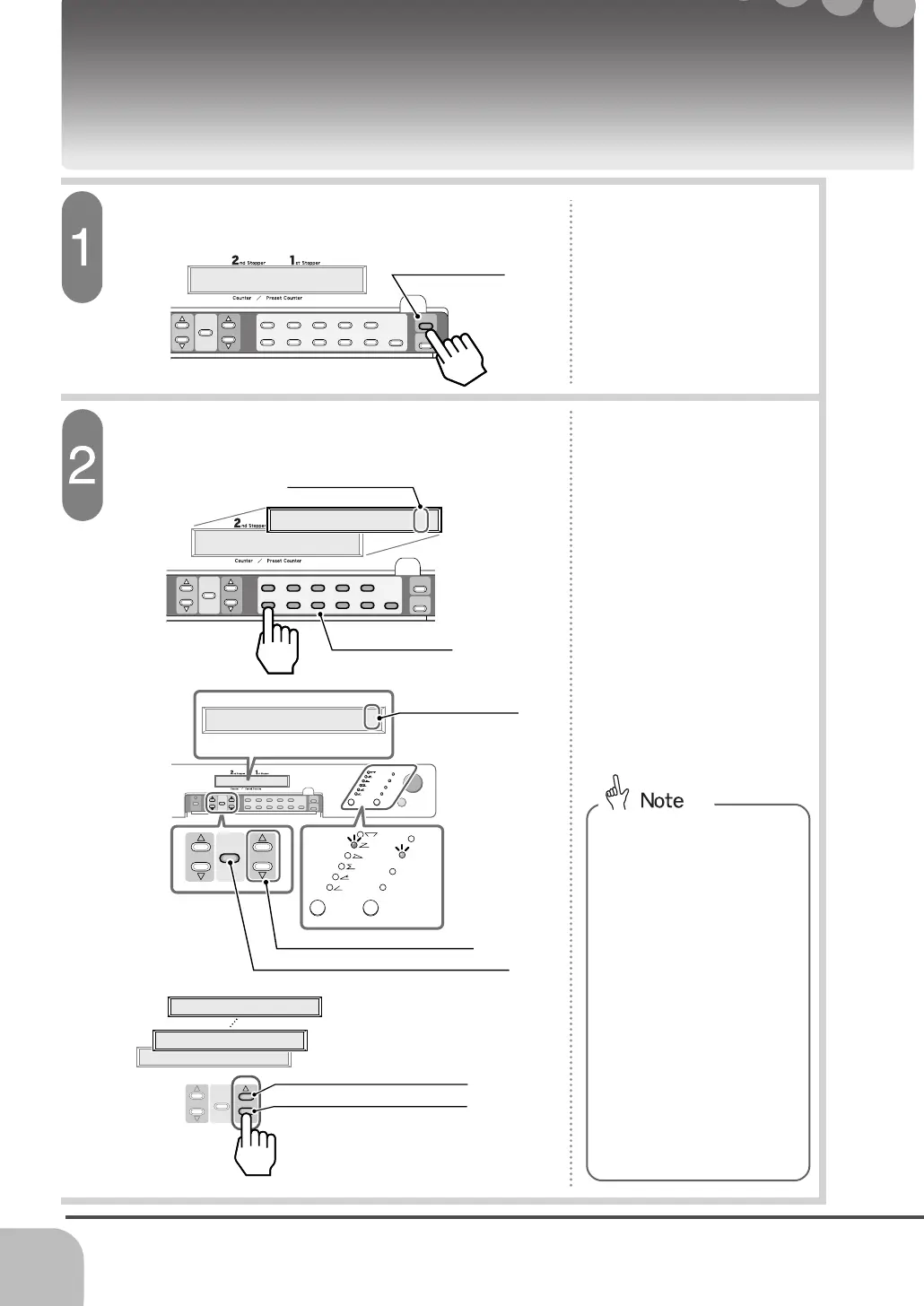
Open the extension panel and press the memory
button (Orange).
Input the memory number to be loaded using
numeric keypad (Gray).
1
2
3
4
5
6
7
89
0
C
Feed Gap
2
nd
Stopper
1
st
Stopper
Memory
Mode
Stopper
Position
Display
Start / Stop
Test Feed
Sheet SizeFolding Pattern
8
1/2
"
X
11"
8
1/2
"
X
14"
5
1/2
"
X
8
1/2
"
11"
X
17"
3.898 7.795 Memory 6
Sheet Size
Folding Pattern
8
1/2
"
X
11"
8
1/2
"
X
14"
5
1/2
"
X
8
1/2
"
11"
X
17"
2
nd
Stopper
1
st
Stopper
Stopper
Position
Display
Loading the Memorized Job Setting from the Memory
Memory Button
- To check the job setting in
the selected memory number,
press the stopper position
displaying button.
- The stopper position and the
memory number are
indicated on the display.
And, the memorized fold
pattern and the sheet size
lamp will illuminate.
- If no job setting is
memorized, 0 will be indicated
at the stopper position.
- When the memorized job
setting is displayed, the other
memorized job settings can
be seen by pressing the 1st
stopper moving button.
This section explains how to read out the memory.
1
2
3
4
5
6
7
8 9
0
C
2nd
Stopper
1st
Stopper
Memory
Mode
Stopper
Position
Display
M1 Loaded select No.
1
2
3
4
5
6
7
89
0
C
2
nd
Stopper
1
st
Stopper
Memory
Mode
Stopper
Position
Display
M1 Loaded select No.
Press MODE To Load M7
Numeric Keypad
Memory Number
Memory Number - Check that the input memory
number is indicated on the
display.
Stopper Position Displaying Button
Stopper 1 Moving Button
Memory number goes down
- The display shows [M Loaded
Select No.].
Memory number goes up
1.969 5.867 Memory 1
2.898 5.827 Memory 2
0.000 0.000 Memory 7
2
nd
Stopper
1
st
Stopper
Stopper
Position
Display


 To Next Page