LOADING
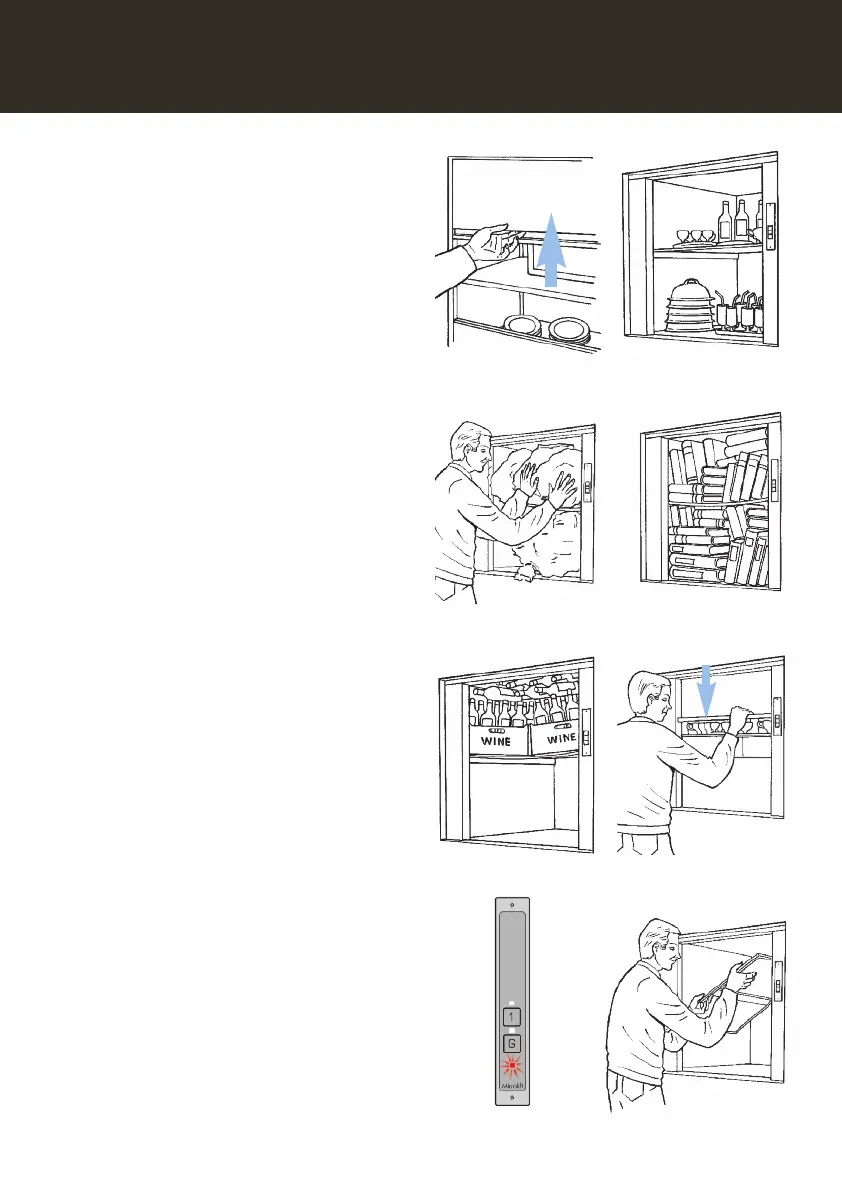
Open the outer landing shutter door by lifting
up the handle (Fig. 13).
The
red LED will illuminate to indicate to other
users that the Microlift is in use.
Then open the inner car shutter door (if fitted)
and load the Microlift.
When loading your Microlift you should
ensure that:
• the load is secure and that items cannot
move or topple (Fig. 14).
• the load does not overhang the edge of the
lift car (Fig. 15).
• the load does not exceed the carrying
capacity of the Microlift - if in doubt, make
another trip! (Fig. 16).
• the shelf is not overloaded (maximum shelf
load is 50kg) (Fig. 17).
• when loading is complete, gently close the
inner car shutter door (where fitted) and then
close the landing shutter door (Fig. 18).
• the
red LED will go out when the lift is ready
to be sent to the desired floor.
Note: The white LED remains illuminated until
the Microlift moves away from your floor
(Fig. 19).
For bulky objects the shelf can be removed as
follows:-
• lift up one side of the shelf whilst supporting
the other side with your other hand (Fig. 20).
• with the shelf at about 45 degrees, move the
lower side away from the side wall of the car.
• the shelf can then be withdrawn from the lift
car, or laid flat on the lift car floor if desired.
Note: If your Microlift is fitted with a heated
shelf/shelves option, then these shelves
cannot be removed.
O
O
O
MICROLIFT OPERATION
Fig. 13 Fig. 14
Fig. 15 Fig. 16
Fig. 17 Fig. 18
O
Fig. 19 Fig. 20
9



 To Next Page