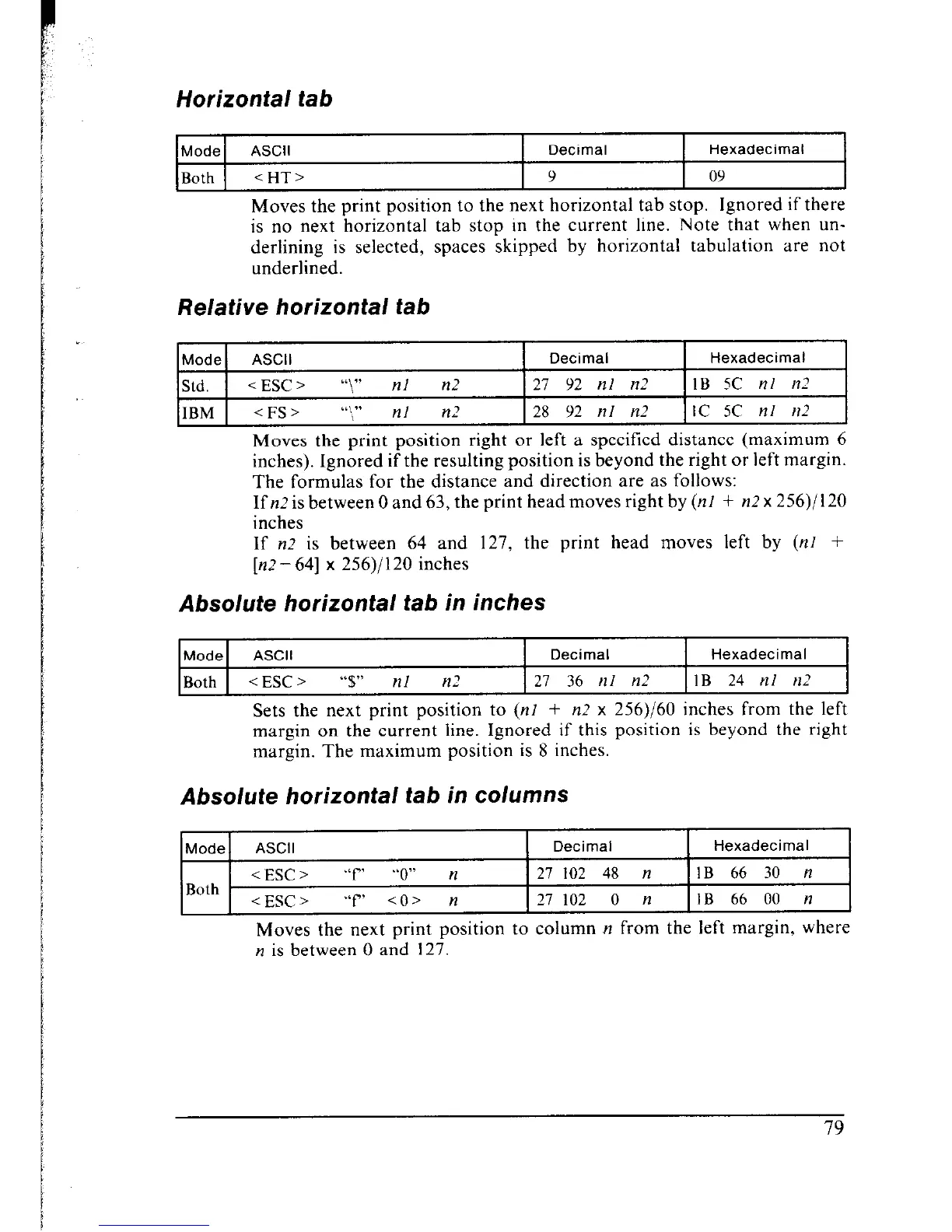
Horizontai tab
1
Mode ASCII Decimal
Hexadecimal
Both <HT> 9 09
Moves the print position to the next horizontal tab stop. Ignored if there
is no next horizontal tab stop in the current line. Note that when un-
derlining is selected, spaces skipped by horizontal tabulation are not
underlined.
Relative horizontal tab
Mode
ASCII
Decimal Hexadecimal
Std.
i ESC > “\” nl n2 21 92 ill I12 IB 5C nl n-7
IBM
< FS > “‘sI” nl n2
28 92 nl n2
IC 5C nl rt2
Moves the print position right or left a specified distance (maximum 6
inches). Ignored if the resulting position is beyond the right or left margin.
The formulas for the distance and direction are as follows:
If n2 is between 0 and 63, the print head moves right by (nl + n2 x 256)/l 20
inches
If n.? is between 64 and 127, the print head moves left by (nl +
[n.?-641 x 256)/120 inches
Absolute horizontal tab in inches
Mode ASCII Decimal Hexadecimal
Both <ESC>
“$” nl n2 27 36 nl n2 IB 24 nl nZ
Sets the next print position to (nl + n2 x 256)/60 inches from the left
margin on the current line. Ignored if this position is beyond the right
margin. The maximum position is 8 inches.
Absolute horizontal tab in columns
Mode ASCII
Decimal
Hexadecimal
<ESC> “f
“0” n 27
102 48 n IB
66 30 n
Both
<ESC> “f’
CO> n 27
102 0 n IB
66 00 n
Moves the next print position to column n from the left margin, where
n is between 0 and 127.











 To Next Page