StarLine E9 v2
20
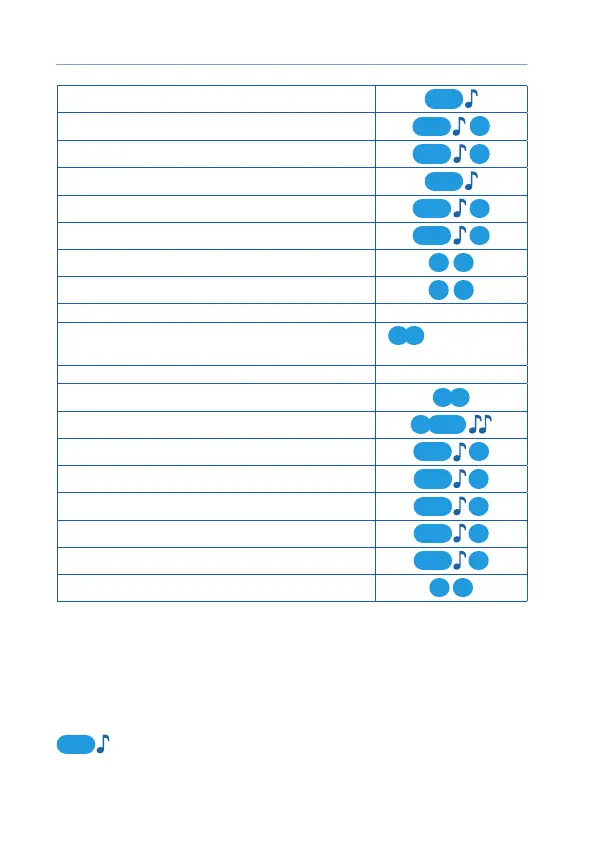
Stop engine
2
Start parking heater
1
2
Stop parking heater
22
Find car on parking
3
Switch shock sensor On / Off
21
Switch motion / tilt sensor On / Off
31
Enable Panic
1 1
Unlock trunk
2 2
Enable automatic engine start configuration menu
Enable / disable Service mode
1 3
or configuration
menu
Enable / disable Hands free mode configuration menu
Enable / disable buttons lock
2 3
Enable / disable auto buttons lock
1
4
Enable vibration only
33
Enable sound profile 2
13
Enable sound profile 1
23
Enable sound profile 0
33
Enable sound profile --
43
Activate Flexible Logic program
3 3
Modes menu
Some options and operation modes are controlled in Modes menu:
Hands Free mode, Service mode, Autostart settings.
Modes menu is entered and exited with 4 button long push level 1:
4
. Modes menu is automatically exited when no any buttons
pushed 15 sec.



 To Next Page