3 Operation
3.1 Preparation for measurement
3.1.1 Insert the probe plug into the socket for the probe on the main
unit,
3.1.2
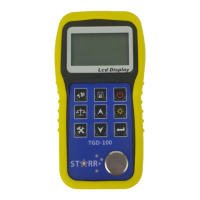
Press to turn on the instrument.
3.1.3 LCD will Display software editions information about the
instrument. And then display
Latest sound velocity.
3.2 Adjusting sound velocity
If the current display is thickness, by pressing , you can come into
speed-of-sound state, and it will display content in current sound velocity
memory unit. The sound velocity memory unit will change once every time
when you press the VEL key, it can display 5 sound velocities alternatively. If
you hope to change the contents in the current sound velocity unit, you can
adjust that with or till reach the desired value, and then the value be
saved to memory.


 To Next Page