18
To view manuals, videos, drivers, downloads, technical drawings, and more visit www.startech.com/support
5. Thread the appropriately sized M-Type Screws (e.g. M5 x
14 mm Screws) through the Rectangular Washers, TV
Mounting Brackets, (Optional) Spacers, and into the TV.
Note: Each Rectangular Washer features two holes. Select
the hole that ts the M-Type Screws.
6. Tighten the M-Type Screws, using a Phillips Head
Screwdriver, until each Screw sits ush with the surface of
the TV Mounting Brackets.
Warning! Do not overtighten the M-Type Screws. If any
unexpected resistance is encountered while fastening these
Screws, immediately stop and attempt to use a
dierent length of M-Type Screw.
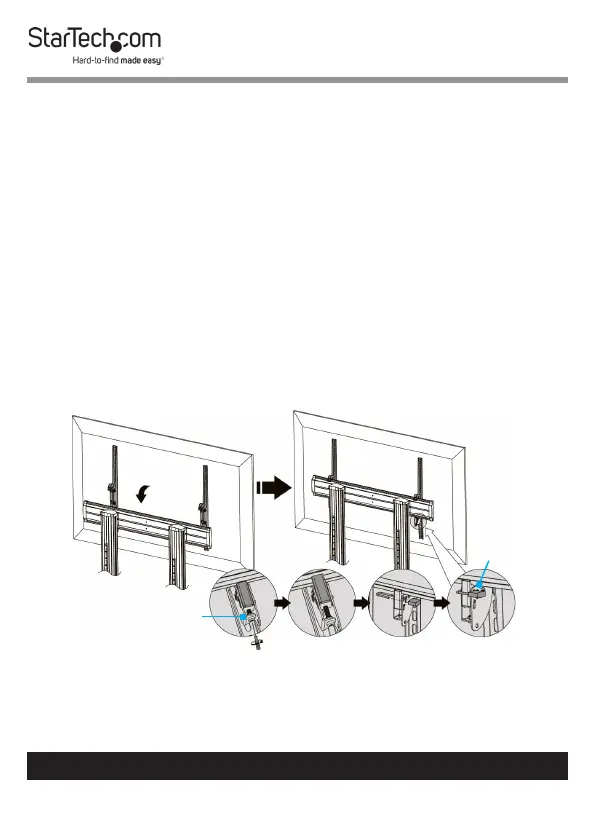
Hang the TV onto the Universal Plate
1. Loosen the 2 Screws, located at the bottom of the TV
Mounting Brackets, using a Phillips Head Screwdriver.
(Figure 11)
Figure 11
Screw
Padlock



 To Next Page