20
To view manuals, videos, drivers, downloads, technical drawings, and more visit www.startech.com/support
4. Insert two M4 x 6 mm Round Head Screws through
the back of the Camera Shelf and into the back of the
Connecting Plate.
5. Tighten the two M4 x 6 mm Round Head Screws, using a
Phillips Head Screwdriver.
Attach the Camera Shelf Assembly
1. Determine the desired mounting height of the Camera
Shelf above the TV.
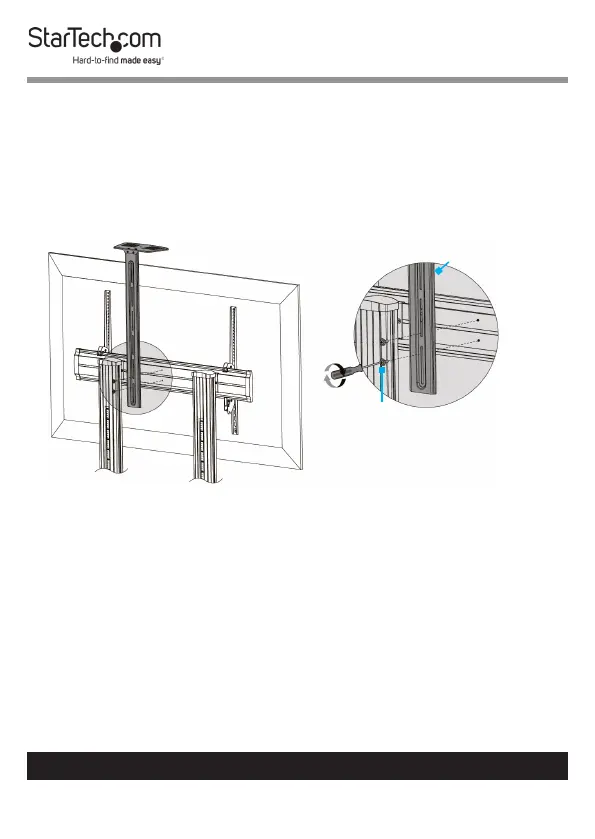
2. Hold the Camera Shelf Assembly up against the back of the
Universal Plate at the desired mounting height, aligning the
slots in the Connecting Plate with the two holes in the back
of the Universal Plate. (Figure 13)
3. Insert two M6 x 25 mm Screws through the Connecting
Plate and into the Universal Plate.
4. Tighten the two M6 x 25 mm Screws, using a Phillips Head
Screwdriver.
Figure 13
M6 x
25 mm
Screws
Connecting
Plate



 To Next Page