15
RECORDINGTOCASSETTE
A.RECORDINGFROMCASSETTETOCASSETTE(DECK2TODECK1)
Thisunitenablesyoutoduplicateapre‐recordedtapetoanothertape.ThiscanonlybeperformedfromDeck2(playback)
toDeck1(recording).
DUBBING(RECORDINGTOTAPE)ATNORMALSPEED
1. SelectTAPEfunction.
2. Insertapre‐recordedcassettetapeintoDeck2andablankcassettetapeintoDeck1.
3. PRESSthe“PAUSE”keyandthenPRESSthe“RECORD”and“PLAY”keytogetheratDeck1.
4. PRESSthe“PLAY
”keytostartplaybackatDeck2andthenPRESSthe“PAUSE”keyatDeck1tostartdubbing.
5. PRESSthe“PAUSE”keyatDeck1andthenthe“ST OP”keyatDeck2whenfinishedrecording.
B.RECORDINGFROMRADIOTOCASS ETTE
1. SelectFMorDABfunction.
2. Tunetothedesiredstationandinsertablankaudiocassettetape(preferablyabrandedC60)inDeck1.
3. Pressthe“RECORD”&“PLAY“keystogethertostartrecording.
4. Pressthe“PAUSE”keyandthenthe“STOP/EJECT”keywhenfinishedrecording.
NOTE:DuringrecordingofsomeAM(=MW)radiostations,someinterferenceinreceptionmaybeexperienced.Thisis
normalandnotamalfunctionofthesystem.
C.RECORDINGFROMTURNTABLETOCASSETTE
1. SelectPHONOfunction.
2. InsertablankcassettetapeinDeck1.
3. Pressthe“PAUSE”keyfirstandthenthe“RECORD”&“PLAY“ keystogether–thecassette.Recordingfunctionisnow
instandby.
4. Startpla y ingtherecordtoberecordedandthenPress
thecassette“PAUSEKEY”tostartrecording.
5. Tostoprecording,Pressthe“PAUSE”keyandthenthe“STOP/EJECT”keyatthecassettetapedeckfirst,thenreturn
thetonearmbacktothearmrest.
D.RECORDINGFROMCDITOCASSETTE
1. SelectCDIfunction.
2. InsertablankcassettetapeinDeck1.
3. Press the “ PAUSE ” key first and then the “ RECORD ” & “ PLAY ” keys together at cassette Deck 1 controls.The
recordingfunctionisnowinstandby.
4. Startplayback(6)of
theCDmode,andthenPressthe“PAUSEKEY”atDeck1tostartrecording.
5. Tostoprecording,Pressthe“ST OP”button(5)inCDmodefirst,thenPressthe“PAUSE”keyatDeck1andthenthe
cassette“STOP/EJECT”key.
E.RECORDINGFROMUSBTOCASSETTE
1. SelectUSBfunction.
2. InsertablankcassettetapeinDeck1.
3. Press the “ PAUSE ” key first and then the “ RECORD ” & “ PLAY ” keys together at cassette Deck 1 controls.The
recordingfunctionisnowinstandby.
4. Startplayback(22)ofthe
USBmode,andthenPressthe“PAUSEKEY”atDeck1tostartrecording.
5. Tostoprecording,Pressthe“STOP”button(19)inUSBmodefirst,thenPressthe“PAUSE”keyatDeck1andthen
thecassette“STOP/EJECT”key.
CASSETTECARE
Twocommoncausesoftroubleexperiencedwhenusingcassettesare:
- Tapejamming,leadingtounevenspeedduringplayback.
- Tapeentangling,whenthetapewrapsitselfaroundvitalpartsofthemechanism.
Toavoidtheseproblemsoccurring,takethefollowingprecautions:
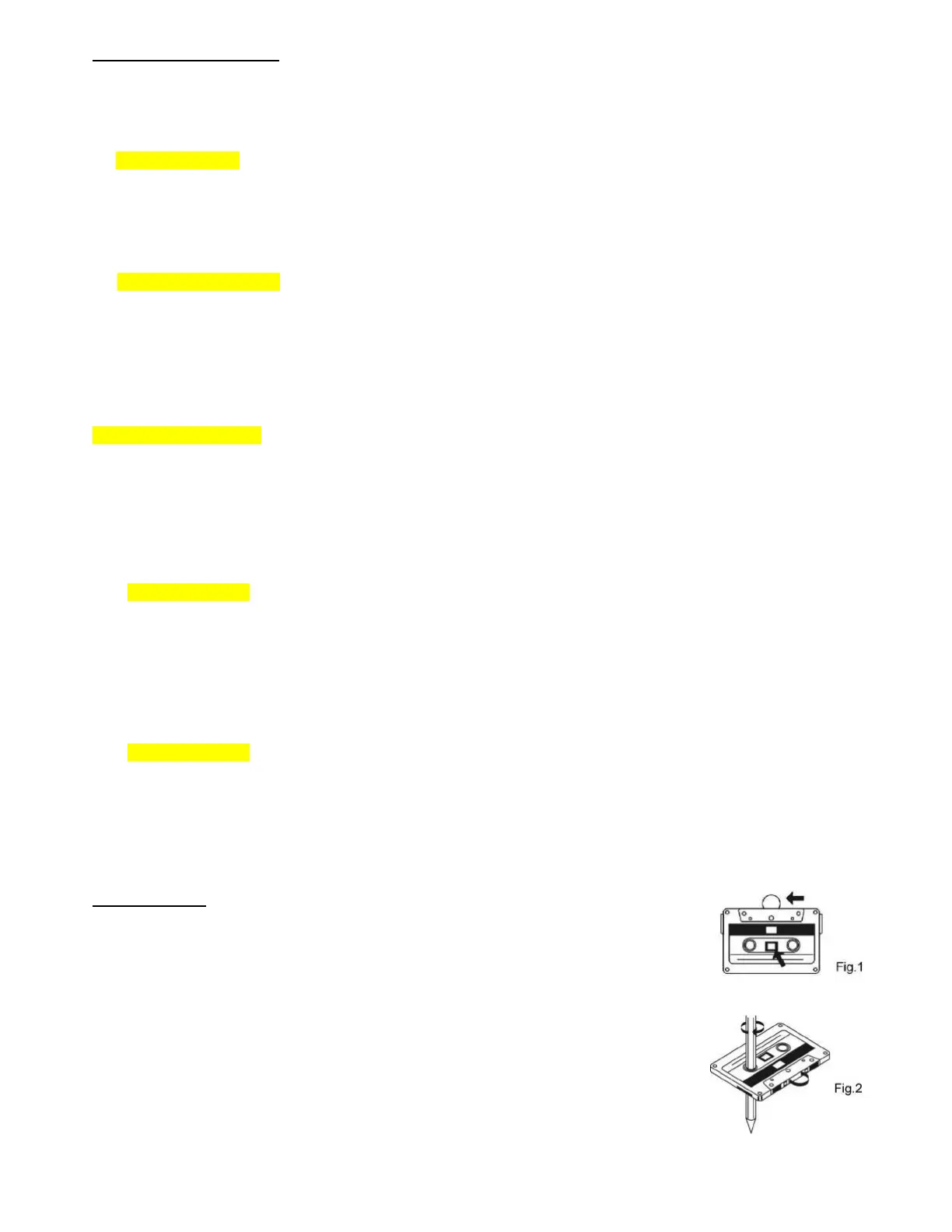
a) Checkthattherearenolooselayers of
tape visible throughthecassettecentrewindow(seefig.
1).
b) Take upanylooselayers (usinga pencil orballpointpen withhexagonalbarrell)beforeinserting
thecassette(seefig.2)intothemechanism.
Notes:If the cassette feels tight whilst performing this operation (see fig. 2), the tape may
be
jamming due to ridgesformed in the winding of the tape (visible through the centre window).In
most cases, these may be removed by fast rewinding of the cassette from one end to the other,
turningitoverandrepeatingthisactionagain.
Donotexposecassettestodirect
sunlight,dustoroil,anddonottouchthetapesurfaces.


 To Next Page