6
MEM/PRESET InCDImode:TAPtoactivateCDProgram
InTUNERmode:TAPtoPresetStationsorselectthePresetStations
TUNEdown“‐“orup“+”Button InTUNERmode: TAPtotunetheradiostationorselectthepre‐setmemoryStation
SKIPdown“‐“
orup“+”Button InCDImode:TAPtoselecttheprevious/nextTrack
ENTER/SCAN/ InTUNERmode:TAPtoconfirmanoperation,orperformautoscanfunction
BTdisconnectButton InBluetoothReceiver(BT)mode,TAPtore‐connecttheBTconnection
PLAY/PAUSE InCDImode: TAPtoStartPlaybackorPause
FM&DABRADIOFUNCTION
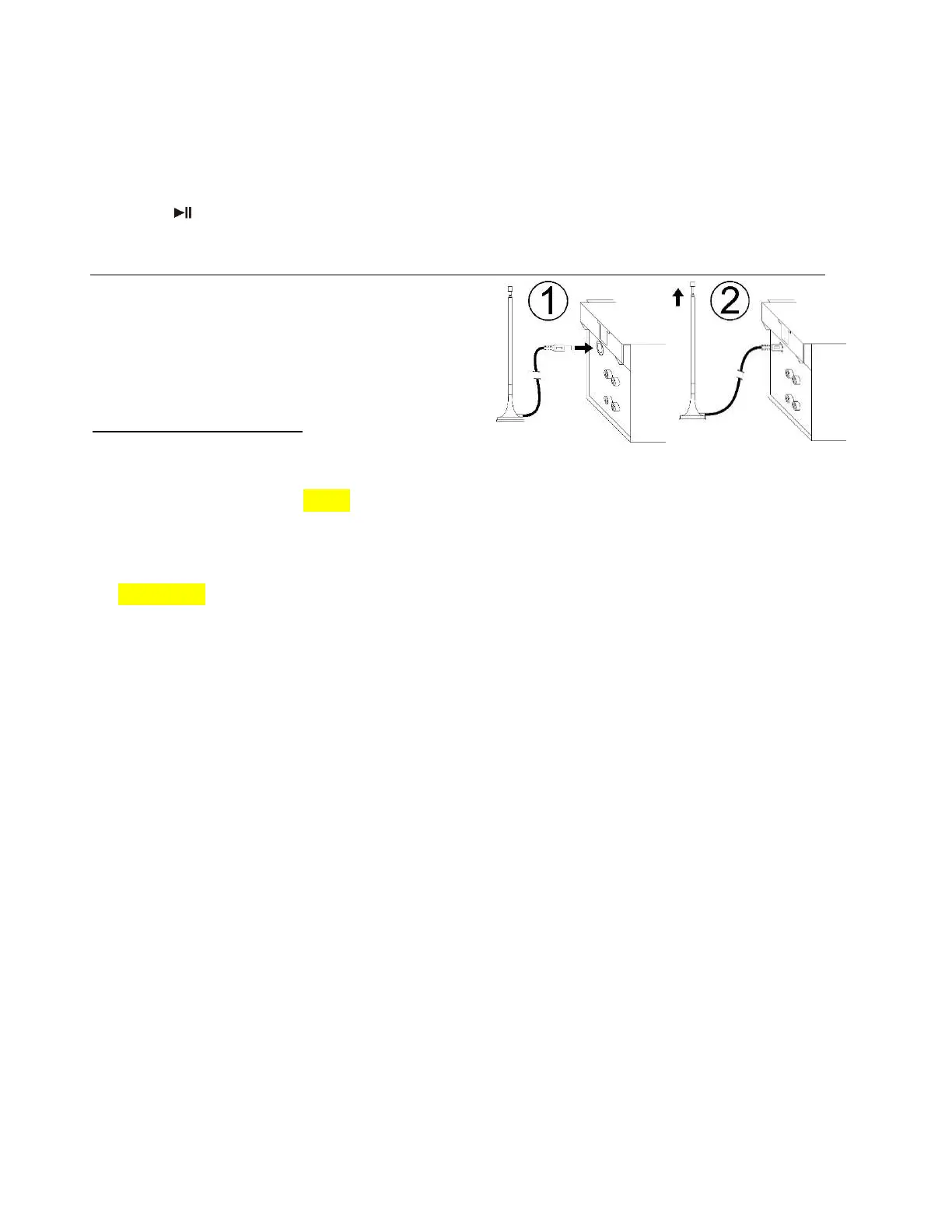
WehaveincludedadetachableFM/DABTelescopicAntenna
provided.AttachtheAntennatotheFM/DABAntenna
Socket(42),asshownintheimage(1)&(2)ontherighthandside
beforeoperation.Extendyoumayhavetotrydifferentlocations
fortheaerialuntilgoodreceptionisachieved.Shouldyou
havean
externalaerialyoucanconnectthisasanalternative
LISTENINGTOFMRADIO
ManualTuning
1. SwitchPowerswitch(50)toPowerontheunit.
2. TAPtheHOMEbutton(13)toselectFMmode.
3. TunetotherequiredstationbyTappingtheTUNEdown“‐”orup“+”button(9).
4. TurntheVOLUMEcontrol(23)forthedesiredvolumelevel.
AutoTuning
1. TAPtheHOMEbutton(13)toselectFMmodeafterswitchingontheunit(50).
2. TAPandHOLDtheTUNEdo wn“‐”orup“+”button
(9)for1‐2secondsandthenrelease.
3. Theunitwillstartsearchingautomaticallyandwillstopwhenaradiostationisreached.
4. Repeatstep2untilthedesiredradiostationhasbeenreached.
5. TurntheVOLUMEcontrol(23)forthedesiredvolumelevel.
PresettingStationsManually
Youcanmanuallystoreupto20FMradiostationsintomemory.Theprocedureisasfollows:
1. TAPtheHOMEbutton(13)toselectFMmodeafterswitchingontheunit(50).
2. Turntothedesiredradiostationwitheitherthe“manual”or“auto”tuningmethod.
3. TAPthe
MEMORYbutton(10)toenableprogramming–“1EMPTY”willappearontheLCDdispla y.
4. TAPTUNEdown“‐“orup“+”button(9)toselectthedesiredstationtostoreintomemory.
5. TAP andholdtheSCAN/ENTERbutton(6)to confirm the settingandthe
LCDdisplaywillshow“STORED”and then display
thenameofthestoredRadiostation.
6. Repeatsteps2to5tocontinuestoringotherstations.
7. ToreturntonormalTunermode,donotTAPanykeys.
SelectingthePresetStations
Youcannowselectthepresetstationsandplaytheminthedesignatedorderasperfollows:
1. SetinFMmode.TAPtheMEMORYbutton(10).
2. TUNEdown“‐“orup“+”button(9)toselectthestationnumber.
3. TAPtheSCAN/ENTERbutton(6)toconfirmdesiredstationyouwanttohear.
Presetting&SelectingStationsAutomatically
Youcanautomaticallystoreupto60FMradiostationsintomemory.Theprocedureisasfollows:
1. TAPtheHOMEbutton(13)toselectFMmodeafterswitchingontheunit(50).
2. TAPandholdtheSCAN/ENTERbutton(6)for1‐2secondsandtheunitwillstart
tostoretheFMradioststionsautomatically.
3. Toselecttheradiostation,TAPtheMEMORYbutton(10)andtheLCDdisplaywillshowthestationandthepresetnumber.
4. TAPTUNEdo wn“‐“orup“+”button(9)toselectthedesiredstation.
5. TAPtheSCAN/ENTERbutton
(6)toconfirmdesiredstationyouwanttohear.


 To Next Page