19
35.CDTRAY
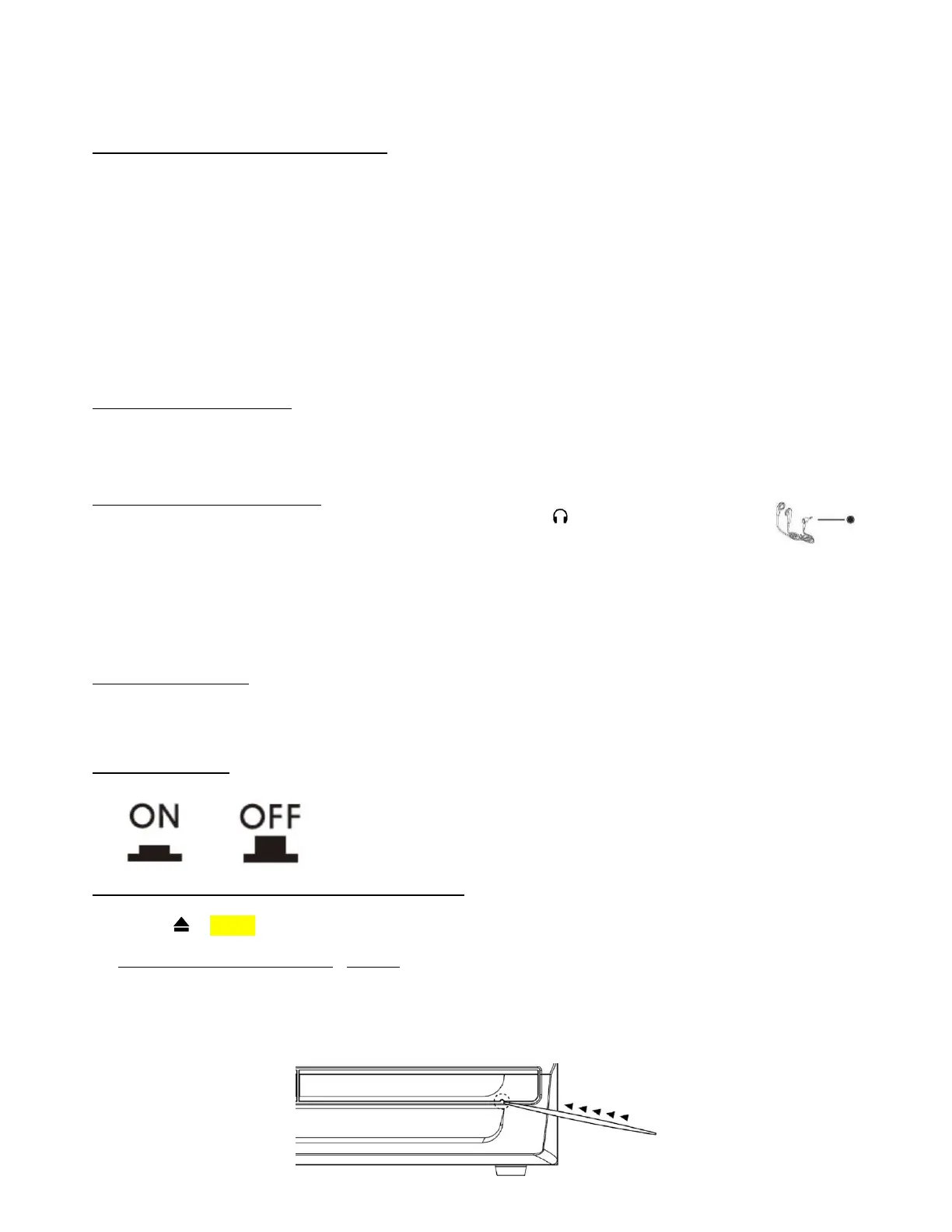
MANUALEJECTHOLE
Notes:
– Oncethetracksareerased,thiscannotbeundone.
– ItisnotpossibletoeraseonetrackatatimeonthisunitfromacopiedCD‐RWdiscthatwasrecordedonanothersystem,
butitmaybepossibletoerasealltracks.
AUX‐INCONNECTION&PLAYBACK
Connectanotheraudiodevice,e.g.a(portable)CDorCassettePlayer,orothertapeplayer,MP3playerorRadiotothissystem
via a cord with 3.5mm dia. plugs (not supplied).Connect one end of this cord to the 3.5mm dia. Headphone Jack on the
externaldeviceandtheotherend
totheAUX‐INjack(17)onthefrontpanelofthisunit.
Whenconnectedinthiswayitispossibletoeitherplaybackorrecordthemusicontheconnecteddevice:
1. TAPthePHONO/AUXfunctionbutton(24)toselectPHONOmode.
2. Plugtheexternaldevice’sconnection
lead(notsupplied)intotheAUX‐INjack(17)ofthisunit.
3. Startplayingbackthemusiconyourexternaldeviceandadjustthevolumebyturningthe
VOLUME
knob(23)orTAPtheVOL
‐/+buttonsontheRemoteControl.
Notes:
– Ifyouexperienceanysounddistortion,reducethevolumelevelonyourauxiliarydevice.
– Remembertounplugtheexternaldeviceifyouwishtoplayarecordorelsetheturntablewillnotbeable
torotate.
LINEOUTCONNECTION
YoucanconnectthissystemtoanotherHi‐FisystemandplaythemusicthroughtheAmplifierandspeakersofthatunit.
ConnectthetwoplugsofanRCAcable (notsupplied)fromtheLineOutsocketontherear(40)totheAuxiliaryInputsocketof
theotherunit.
HEADPHONECONNECTION
Connectyourheadphones(notincluded)tothe3.5mmdia.HeadphoneJack(18)forprivatelistening.
Withheadphonesconnected,thesoundfromtheunit’sspeakerswillbemuted.
CAUTIONS:
– Beforelistening,makesurethevolumeisadjustedtoasafeandcomfortablelevel.
– Avoidextendedplayataveryhighvolume
asitmayimpairyourhearing.
– Ifyouexperienceringinginyourears,reducethevolumeorshutoffyourunit.
– Keep the volume at a reasonable and safe level‐even if your headset is an open‐air type designed to allow you to hear
outsidesounds.Pleasenote
thatexcessivelyhighvolumemaystillnotblockoutsidesounds.
SUBWOOFERJACK
Connect a powered or active Subwoofer (not supplied) to the Subwoofer Jack (47) on the rear of this unit to add extra BASS
sound.ThesoundoftheSubwoofercanonlybeadjustedbyitsowncontrols.
*Contactyoursupplier,orSteepletoneUKLtd,forasuitablesubwoofersystemtouse
withthisunit.
X‐BASSBUTTON
ForenhancedBasssound,TAPtheX‐BASSbutton(51)into‘ON’–TAPitagaintoswitchthisfeatureoff.
HOWTOMANUALLYEJECTTHECDDRAWER
IfthepowerisinterruptedorifyounoticeaproblemoccursduringtheCDburningprocess,theCDtraymaynotejectwhenthe
ejectbuttonisTAPPED.Ifthathappens,youwillneedtomanuallyejecttheCDtraytoretrievetheCD,dothefollowing:
1. TurnthepowertotheunitOFFfirst–DONOTmanuallyopenthetraywhenthereispowertothedrive!
2. Locatethe
MANUALEJECTHOLE
(35)onthefrontoftheCDtrayasshownbelow.
3. Gentlyinsertastiffwire,suchasastraightenedpaperclip,intotheCDTRAY
MANUALEJECTHOLE
.
4. Whenresistanceisfelt,gentlyTAPharderuntilthedrivetrayopensslightly.
5. GentlypullthetrayouttherestofthewaybyhandtoexposetheCD.
6. Restartthesystemandrepeattheburningprocessagain.


 To Next Page