8
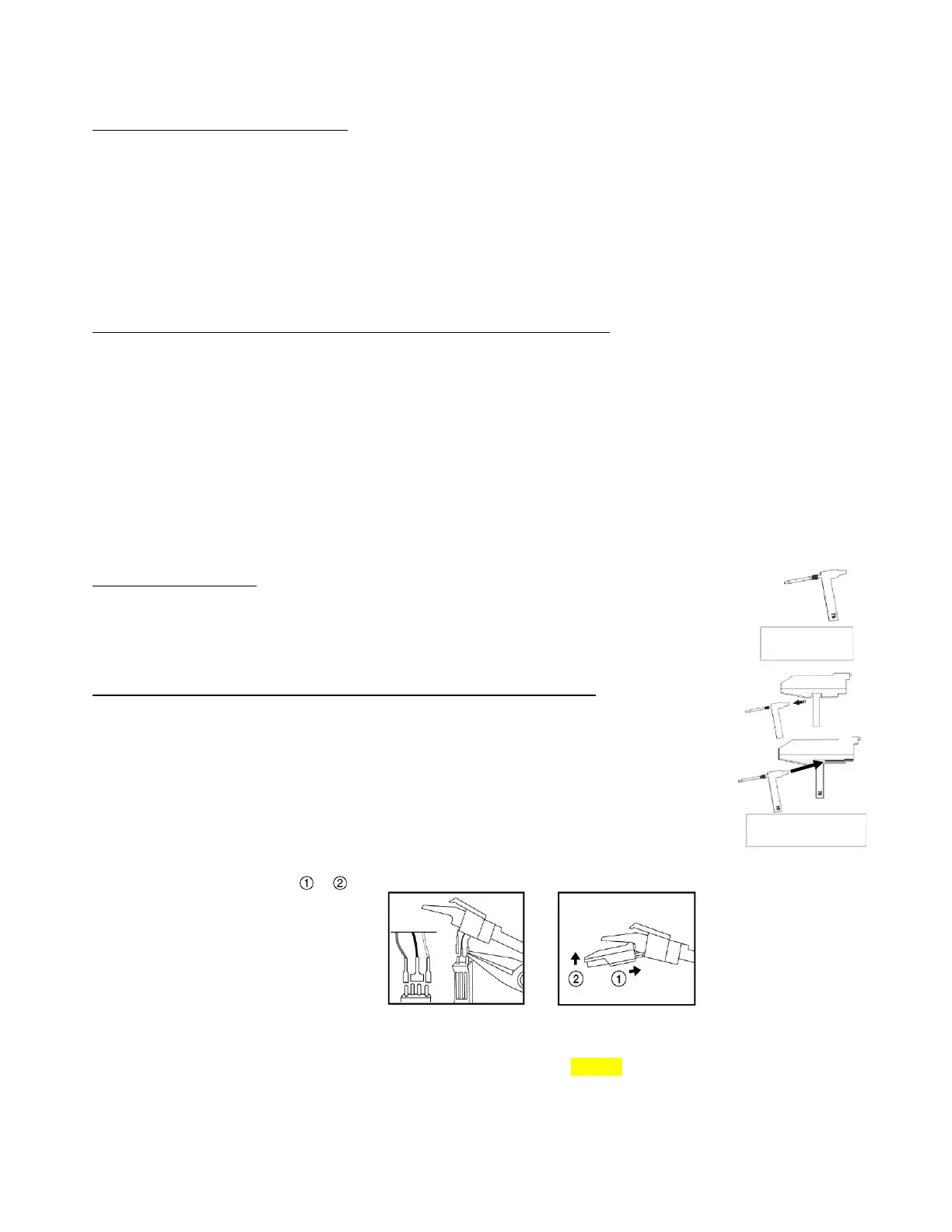
Stylus Holder &
Tone Arm Cartridge
Stylus Holder
with Stylus Tip
11. LifttheToneArmofftherecordandreturnittothearmrest.
12.
TomanuallystoptheTurntablerotatingbeforetheendoftherecord,carefullyliftthetonearmofftherecordandreturnit
tothearmrestbyhand.
TURNTABLEAUTO‐STOPFUNCTION
Some longer vinyl records will stop playing before the last track has finished, because the auto‐stop setting required is just
outsidetheunit’s pre‐set area.If thatis the case, move the AUT OSTOP Switch(38)to the “OFF“position, thiswillallowthe
tonearmtocarryon
totheendoftherecord.
Notes:
– WiththeAutoStopswitchinthe“OFF”position,the turntablewillnotstopturningattheendoftherecord,sotostopthe
turntablerotating,turntheunitofforswitchtheAUT OSTOPswitchbacktothe“ON“position,then
returntheToneArmto
theArmRest.
– WiththeSwitchleftinthe“OFF”position,theturntablewillstartrotatingassoonas‘PHONO’functionisselected.
– Important:Ifanythingispluggedintothe“AUX‐IN
“
socket,theturntablewillnotbeabletorotate!
*TURNTABLEPLATTERSPEEDALIGNMENT‐USINGTHEPITCHCONTROL
Thismodelhasa‘Pro‐Deck’styleTurntableandPitchControl.Tocheckif thespeedofarecordthatisplayingiscorrect,andifit
needstobeadjusted,dothefollowing:
o Duringplayback of for instance a 45rpm record, look at the appropriate strip of Strobe calibration
dots on the edge of the
turntableplatter,illuminatedbytheSTROBELENS(52):
o Theupperoneisfor33
1
/
3
rpm‐‐themiddleonefor45rpm‐‐thebottomonefor78rpmrecords.
o Ifthestrobedotsappeartobeflowingtotheright,itmeanstheplatt erisrevolvingslowerthantheratedspeed.
SlowlyturnthePITCHCONTROLKNOB(39)inthe“+“direction.
o Ifthe
strobedotsappeartobeflowingtotheleft,itmeanstheplatterisrevolvingfasterthantheratedspeed.
SlowlyturnthePITCHCONTROLKNOBinthe“–“direction.
o MakesmalladjustmentswiththePitchControluntilthestrobedotsappeartobestationarywithoutmoving
leftorright.
STYLUSREPLACEMENT
Whenthestyluseventuallyneedsreplacing,areplacementstylus(Code‘SSTY8’suitablefor33
1
/
3
/45/
78rpmrecords)isavailableforpurchasedirectlyfromthemanufacturer.
PleasecontactyourSupplierorSteepletoneUKLtdforinformationonhowtobuyone.
SteepletoneUKLtdLocallTelephoneno:08457585681
REMOVINGANDREFITTINGTHENEEDLEHOLDER(FLIP‐OVERSTYLUS)
1. ToremovetheFlip‐overStylusHolder,holdtheToneArmheadsteadywithonehand.
2. Turnthe‘handle’oftheStylusHolderdownslightly(showingeitherthe‘LP’or‘78’side.
3. Toremoveit,gentlypullthecompletewhiteStylusHolderoutofthe
ToneArmCartridge’s
brasscolourslotandforwards.
4. Tore‐fittheFlip‐overStylusHolder,reversetheaboveactions,makingsuretheshortwhite
plasticendisinsertedabovethesmallbrassplateinthebottomoftheToneArmCartridge.
5. Just in case it is necessary
to remove thewhole Stylus/pick‐up assembly, use small pliers to carefully
disconnectthewires,thenchangetoanotherstyluscartridgeandconnectthewirestothenewstylus
againwiththepliers.(Donotpullthepick‐upwiresdirectlyasthismaycausedamagetothewires).
6. Refit
asintheDiagramsabove/ .
Notes:AlwayshandlethestyluswithcareastheSapphireneedletipiseasilydamaged.
When transporting the turntable it is advisable to refit the protective needle cover until the unit is going to be used again.
Whenremoving orre‐fittingthe stylus,always becarefulnot toput too muchpressureon thestylusholder andthe tone arm
cartridge,toavoidcausinganypossibledamagetothem.


 To Next Page