Panel Controls and Terminals
UR242 Operation Manual 9
Channel Area
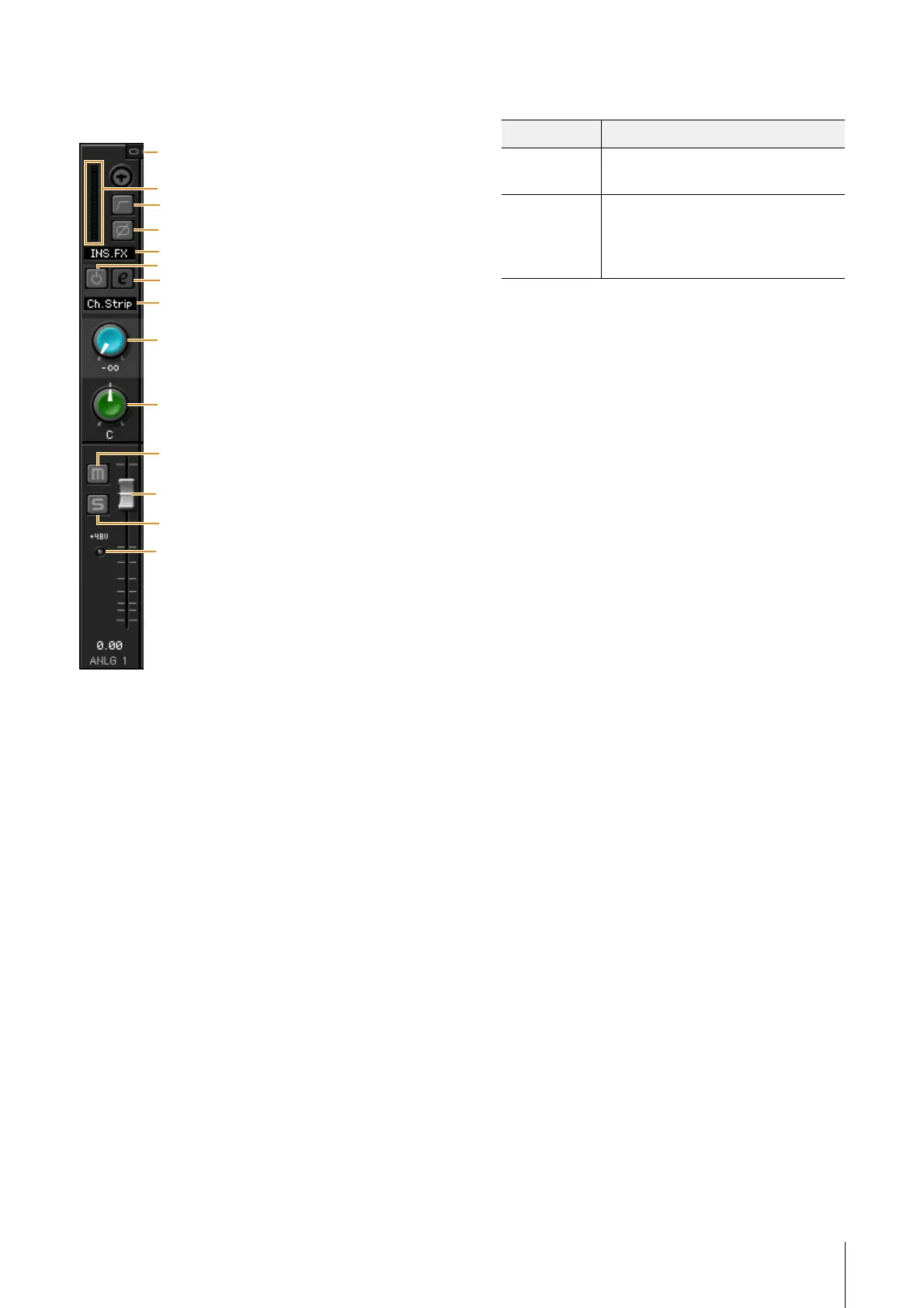
This is the area for configuring the input channel settings.
1 Channel Link
Turns on (lit) and off (dark) the channel link function of two
adjacent channels. When this is on, two mono channels will
become one stereo channel.
2 Level Meter
Indicates the signal level.
3 High Pass Filter
Turns on (lit) and off (dark) the high pass filter (not available
on [LINE INPUT 3/4] ). To select the cutoff frequency of the
high pass filter, use the “Setup Window” (page 11) in the
section “dspMixFx UR242.”
4 Phase
Turns on (lit) and off (dark) the phase inversion of the
signal.
5 Effect Insertion location
Selects the insertion location of an effect.
6 Effect On/Off
Turns the Effect on (lit) and off (dark).
7 Effect Edit
Opens (lit) and closes (dark) the selected effect setup
window.
8 Effect Type
Select the effect type.
Options: Ch.Strip, Clean, Crunch, Lead, Drive
NOTE
The maximum number of Channel Strip and Guitar Amp
Classics iterations which can be used simultaneously is
limited. Refer to the “Limitations on the use of effects”
(page 27).
9 REV-X Send
Adjusts the signal level which is sent to REV-X.
Range: - ∞ dB
– +6.00 dB
) Pan
Adjusts the pan.
Range: L16
– C – R16
! Mute
Turns the mute function on (lit) and off (dark).
@ Solo
Turns the solo function on (lit) and off (dark).
# +48V
Indicates the on/off status of the phantom power function of
the device.
$ Fader
Adjusts the signal level.
Range: - ∞ dB
– +6.00 dB
Options Description
MON.FX Applies an effect to only the monitor
signal (sent to the device).
INS.FX Applies an effect to both the monitor
signal (sent to the device) and the
recording signal (sent to the DAW
software).


 To Next Page