6947400000
22
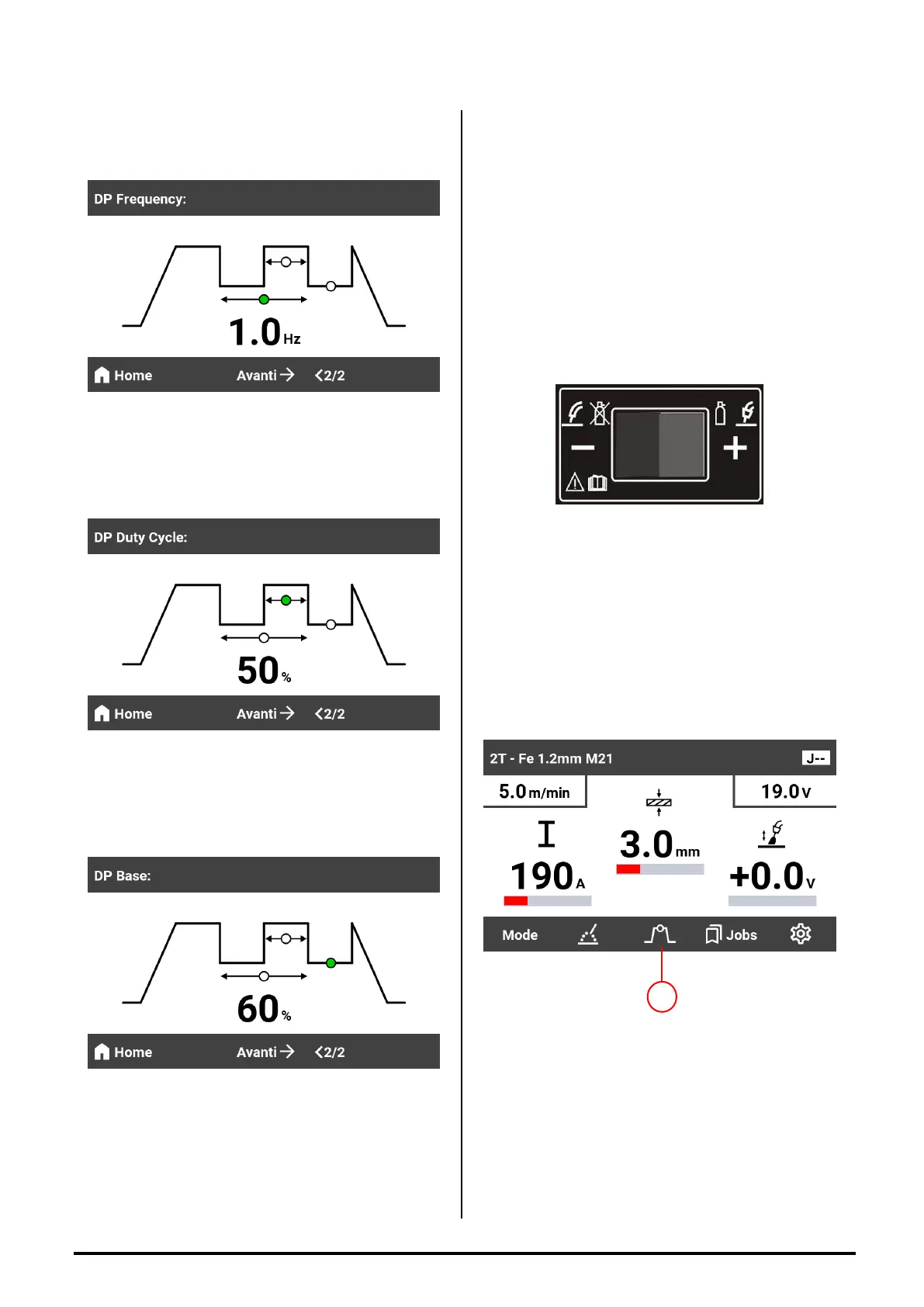
2)Press the h button to access the double pulse
parameter adjustment screen.
-DP Frequency ( Double Pulse Frequency ) is
adjustable from 0,5 to 4 Hz.
3)Pushing the button NEXT → takes you to the
Duty Cycle adjustment screen.
-DP Duty Cycle ( Duty Cycle ) is adjustable from 20
to 80%.
4)Pushing the button NEXT → takes you to the
Base Current adjustment screen.
-DP Base Current ( Duty Cycle ) is adjustable from
40 to 90%.
5)Pushing the button HOME takes you to the main
screen.
MIG WELDING WITHOUT
GAS
The procedure is the same as for welding with gas,
in this case it is not necessary to connect the gas
cylinder and furthermore the polarities must be
reversed!!! So it is necessary:
- Connect the ground cable to the positive (+)
socket of the generator;
- Connect the harness to the negative socket of the
generator ( - );
-Move the switch inside the F20 / F40 wire feeder
compartment to the “-“ position (negative polarity).
SECONDARY FUNCTION
SETTINGS
In any welding mode, by pressing the f button it is
possible to access the adjustment of secondary
functions. And then by pressing the button NEXT
→ the various functions are scrolled.
PRE GAS ( Pre-gas time) Adjustable from 0,1 to
2,5 sec.
RUN IN ( Approch Speed ) Adjustable from AUTO
to 125%.
SLOPE DOWN ( Slope Down time ) Adjustable
from 0,1 to 10 sec.
BURN BACK ( Final wire burn ) Adjustable from
AUTO to 100%.
PINCH ( Final thread cut) Adjustable from AUTO to
100%.
f


 To Next Page