EasyManua.ls Logo

stellar labs 7621 - Page 21

Default Icon
56 pages
Print Icon
To Next Page IconTo Next Page
To Previous Page IconTo Previous Page
Loading...
Stellar
®
Heavy-Duty Telescopic Crane Owner’s Manual | Page 17
Information and Diagnostics
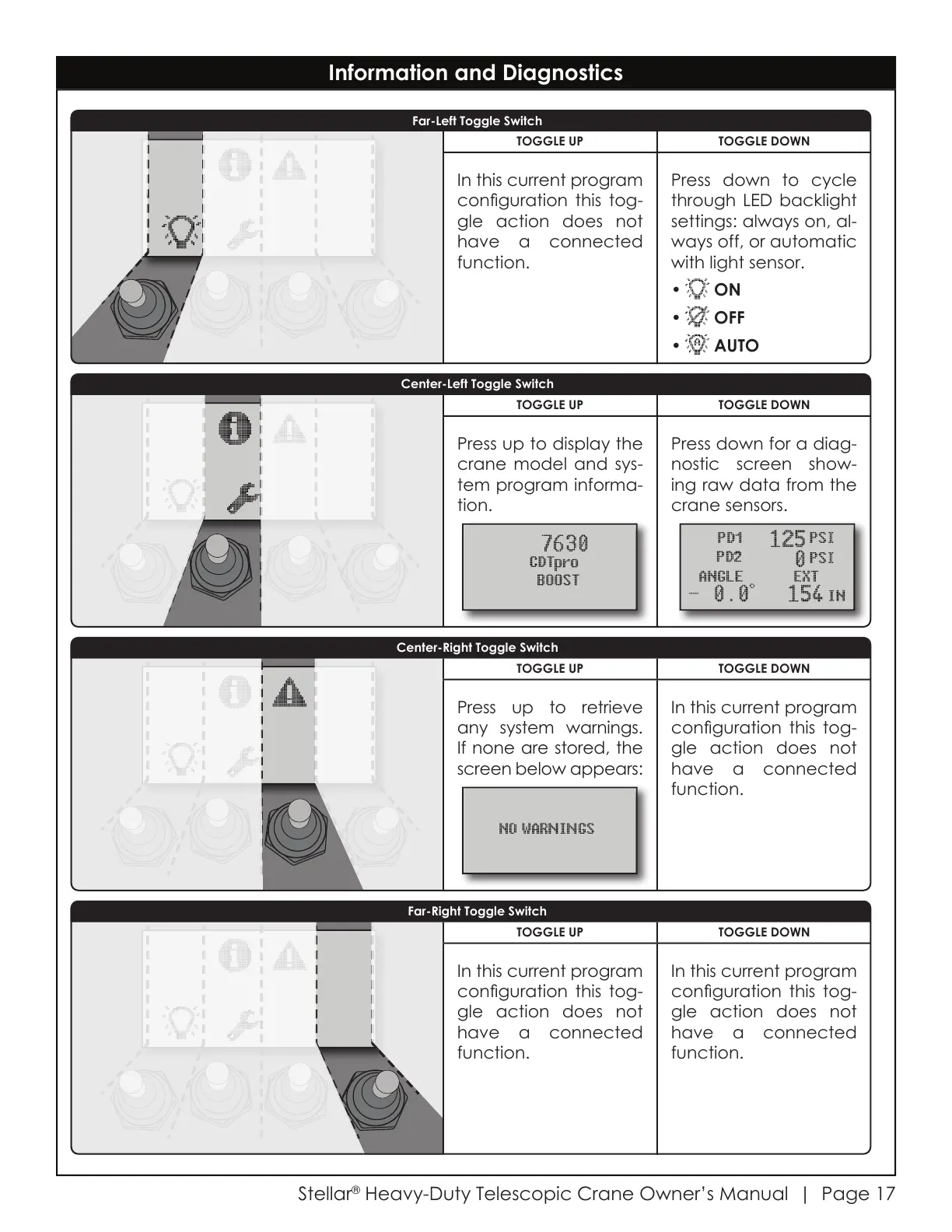
TOGGLE UP TOGGLE DOWN
Press up to retrieve
any system warnings.
If none are stored, the
screen below appears:
In this current program
conguration this tog-
gle action does not
have a connected
function.
TOGGLE UP TOGGLE DOWN
Press up to display the
crane model and sys-
tem program informa-
tion.
Press down for a diag-
nostic screen show-
ing raw data from the
crane sensors.
TOGGLE UP TOGGLE DOWN
In this current program
conguration this tog-
gle action does not
have a connected
function.
Press down to cycle
through LED backlight
settings: always on, al-
ways off, or automatic
with light sensor.
ON
OFF
AUTO
TOGGLE UP TOGGLE DOWN
In this current program
conguration this tog-
gle action does not
have a connected
function.
In this current program
conguration this tog-
gle action does not
have a connected
function.
Far-Left Toggle Switch
Far-Right Toggle Switch
Center-Left Toggle Switch
Center-Right Toggle Switch
Courtesy of CraneMarket.com

Related product manuals